
Issue in pushing values into dataLayer object | Community
Skip to main content
samsundar23
Level 4
April 2, 2021
Solved

Issue in pushing values into dataLayer object

  • April 2, 2021
  • 4 replies
  • 3786 views

I'm are working on the dataLayer for our project and I'm pushing title, url, section, subsection, subsubsection & subsubsubsection from the request URL.

Please find the below sample url and split of different sections in the URL.
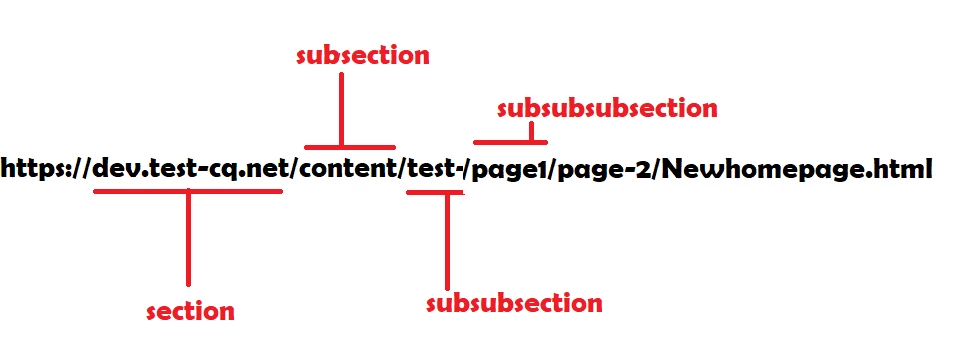


Please find the below code snippet from dataLayer.html

I want to push data only when it is available. For instance, if I don't have subsubsection in my URL, I don't wish to see even empty subsubsection(subsubsection:"") inside the dataLayer object.


<script language="JavaScript" type="text/javascript"> window.dataLayer = window.dataLayer || []; var urlWithoutExt = window.location.href.replace(location.search, '').replace(/\.[^/.]+$/, ""); console.log("urlWithoutExt::::"+urlWithoutExt); var tempsubsection = ""; var tempsubsubsection = ""; var tempsubsubsubsection = ""; if(urlWithoutExt.toString().split("/")[3] != null){ tempsubsection = urlWithoutExt.toString().split("/")[3]; } if(urlWithoutExt.toString().split("/")[4] != null){ tempsubsubsection = urlWithoutExt.toString().split("/")[4]; } if(urlWithoutExt.toString().split("/")[5] != null){ tempsubsubsubsection = urlWithoutExt.toString().split("/")[5]; } window.dataLayer.push({ event: 'content_landing', eventInfo: { title: '${currentPage.title || currentPage.name @ context="text"}', url: window.location.href.replace(location.search, ''), section: window.location.hostname, subsection: tempsubsection, subsubsection: tempsubsubsection, subsubsubsection: tempsubsubsubsection } }); </script>


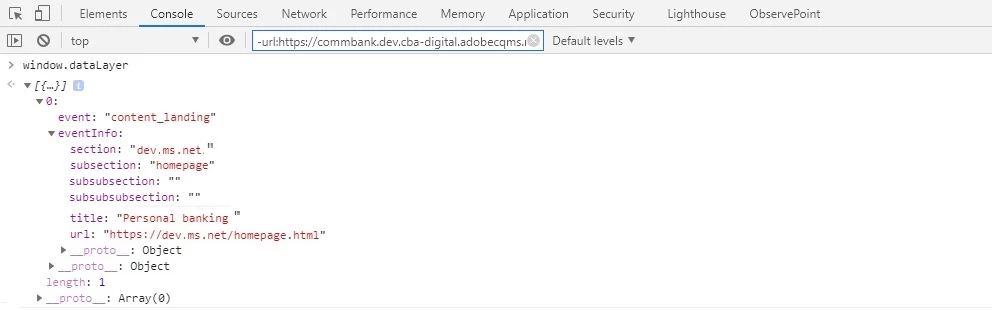
Please find the below browser console - From the dataLayer object, there is n't any subsubsection or subsubsubsection and we are seeing empty values for the both. (Actual Result)


I expect both subsubsection subsubsubsection should not available inside the dataLayer object itself. (Expected Result)
Kindly help me on this problem.

Thank you.


Regards,

SHYAMSUNDAR TK

This post is no longer active and is closed to new replies. Need help? Start a new post to ask your question.
Best answer by Asutosh_Jena_

Hi @samsundar23 

Here the key are added by you on code and it will have empty value if the variable does not contain any value. So definitely you are going to get empty value with respect to key on the dataLayer object.


If you do not want to get the key when the respective value is empty, I will suggest that you should go for a sling model and perform all the logical operation i.e. reading of title, section and subsection on the backend and send the value in a list to HTL. On the HTL, you can iterate over the list and push the value which will ensure to push only the key and value when both the items are present. Also you can keep it something like 

subsectionL1
subsectionL2
subsectionL3


To make it dynamic you can read the count and append it with the String as "subsectionL" + ${itemList.count}.


Thanks! 

4 replies

Asutosh_Jena_
Community Advisor
Asutosh_Jena_Community AdvisorAccepted solution
Community Advisor
April 2, 2021

Hi @samsundar23 

Here the key are added by you on code and it will have empty value if the variable does not contain any value. So definitely you are going to get empty value with respect to key on the dataLayer object.


If you do not want to get the key when the respective value is empty, I will suggest that you should go for a sling model and perform all the logical operation i.e. reading of title, section and subsection on the backend and send the value in a list to HTL. On the HTL, you can iterate over the list and push the value which will ensure to push only the key and value when both the items are present. Also you can keep it something like 

subsectionL1
subsectionL2
subsectionL3


To make it dynamic you can read the count and append it with the String as "subsectionL" + ${itemList.count}.


Thanks! 

Kiran_Vedantam
Community Advisor
Community Advisor
April 2, 2021

Hi @samsundar23,


For this, you can create a temp variable that stores all the data. While adding the temp to the main object, perform a null check.


Hope this helps.


Thanks,

Kiran Vedantam

samsundar23
Level 4
April 2, 2021

Hi @kiran_vedantam 


any code snippet available ?

Kiran_Vedantam
Community Advisor
Community Advisor
April 2, 2021

Hi @samsundar23,


You can create a temp variable like this in the area that you need and assign it to the main variable


Object.assign(abcd, abcdTemp);


Generally, the temp variable would get the value from the component or from the page assignment and later we use the above snippet to re-assign. Before reassigning, perform a null check as per your requirement.


Hope this helps.


Thanks,

Kiran Vedantam.

Anudeep_Garnepudi
Community Advisor
Community Advisor
April 3, 2021

@samsundar23 

In the example you shared the request url is https://dev.ms.net/homepahe.html, you don't have sub or sub-sub levels.

Do undefined check not null check and see once.

Example:

if(urlWithoutExt.toString().split("/")[4] != undefined){ tempsubsubsection = urlWithoutExt.toString().split("/")[4]; }
AG