inserting search bar in hero image | Community
Skip to main content
Level 2
June 22, 2020
Solved

inserting search bar in hero image

  • June 22, 2020
  • 4 replies
  • 4271 views

Hi friends 

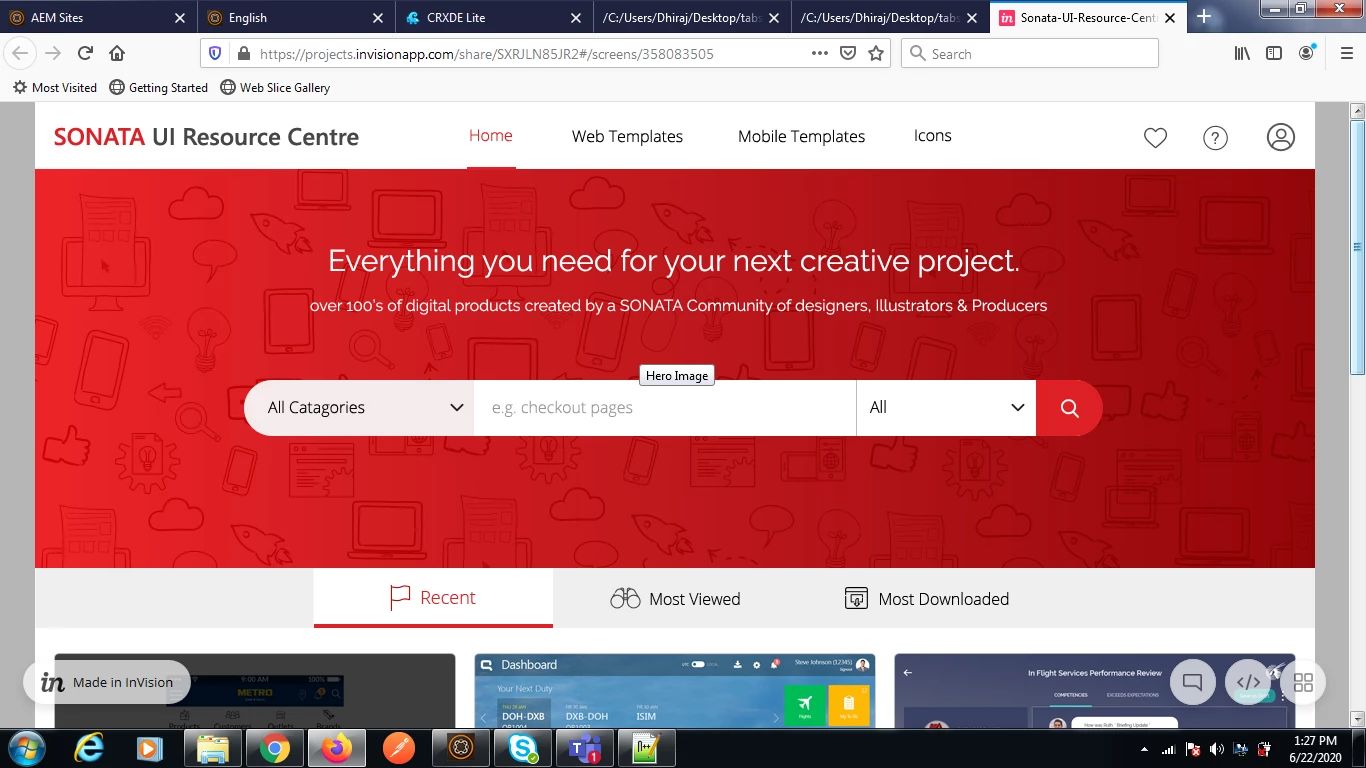
               i have a hero image and want to insert a search bar in that hero image,can u please suggest me what should i do,,,,i am new in aem,before 20 days i have started AEM, so please help me out.i want same as like fig


thanks 

This post is no longer active and is closed to new replies. Need help? Start a new post to ask your question.
Best answer by Nirmal_Jose

Is search bar an AEM functionality / component. If it is, options are

1. you can make the hero banner configuration to be part of that component itself.

2. Hero banner component and search bar component exists as two different components in author, but using CSS, in preview/publish mode it will overlap the component.


If search bar is not an AEM functionality and its a third party injected mechanism, then 

1. You can make a placeholder div in hero banner component and make the third party to inject it to that div. You can create configurations in herobanner dialog if you want to configure the position as well.
 

4 replies

vanegi
Adobe Employee
Adobe Employee
June 22, 2020

Hi Dhiraj,

You can check the implementation of /apps/weretail/components/structure/header component which is available OOTB. It's a Page header with navigation and toolbar component which you can leverage in your site page. See [0] for more details.


[0]: https://docs.adobe.com/content/help/en/experience-manager-65/communities/authoring/search.html


Thanks,

Vaishali

VeenaVikraman
Community Advisor
Community Advisor
June 22, 2020

@dhiraj85 Welcome to AEM 🙂 , Question for yo:- For the below UI , did you get your final UI ( HTML with CSS ) from your FE team ? To complete the below requirement , you need to get the UI for the header section first, and according to the UI , we can place the image and search bar. If you have the UI already, please share it and we will be happy to guide you on how to go baout developing the header. 


Veena ✌

dhiraj85Author
Level 2
June 23, 2020
Hi veena...i have hero image...i mean hero image is running i want to insert a search bar in the hero image
Nirmal_Jose
Adobe Employee
Nirmal_JoseAdobe EmployeeAccepted solution
Adobe Employee
June 23, 2020

Is search bar an AEM functionality / component. If it is, options are

1. you can make the hero banner configuration to be part of that component itself.

2. Hero banner component and search bar component exists as two different components in author, but using CSS, in preview/publish mode it will overlap the component.


If search bar is not an AEM functionality and its a third party injected mechanism, then 

1. You can make a placeholder div in hero banner component and make the third party to inject it to that div. You can create configurations in herobanner dialog if you want to configure the position as well.


VeenaVikraman
Community Advisor
Community Advisor
June 25, 2020

@dhiraj85 Do you have the UI to bring the Search bar above the Hero Banner ? something like this https://www.solodev.com/blog/web-design/how-to-add-a-search-bar-to-your-hero-section.stml . It is all work of CSS and HTML. Once you have those , you can integrate it to AEM , to make it authorable.

dhiraj85Author
Level 2
July 2, 2020
thanks..it is working now