Inheritance in metadata schema for assets? | Community
Skip to main content
tim_funk
Level 3
April 4, 2022
Solved

Inheritance in metadata schema for assets?

  • April 4, 2022
  • 2 replies
  • 3430 views

I was hoping to be able to add 2 fields in a new tab which applied to PDF's. I was looking at creating a meta data schema with the folder structure application/pdf and I'd add my 2 fields there. But when I apply it - I only get my 2 fields. I lose all other options. 


I really don't want to (needless) copy everything to my new schema. I'd prefer to inherit from the existing defaults and overlay my new tab with its properties.


I even tried creating a tab1 with properties of sling:resourceSupertype = /libs/dam/content/schemaeditors/forms/default/application/pdf/items/tabs/items/tab1 as crazy possibility (spoiler: it just NPE's on ...Tab.merge when you try that)


Here's an example of the crx structure I had in mind and was experimenting with
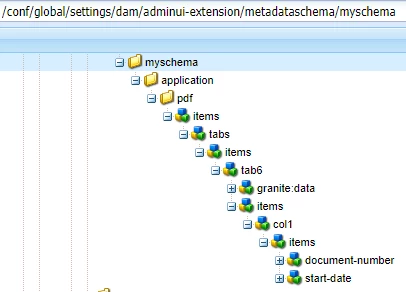


Does the functionality I'm hoping for exist? 
This post is no longer active and is closed to new replies. Need help? Start a new post to ask your question.
Best answer by Anish-Sinha

Hi @tim_funk ,
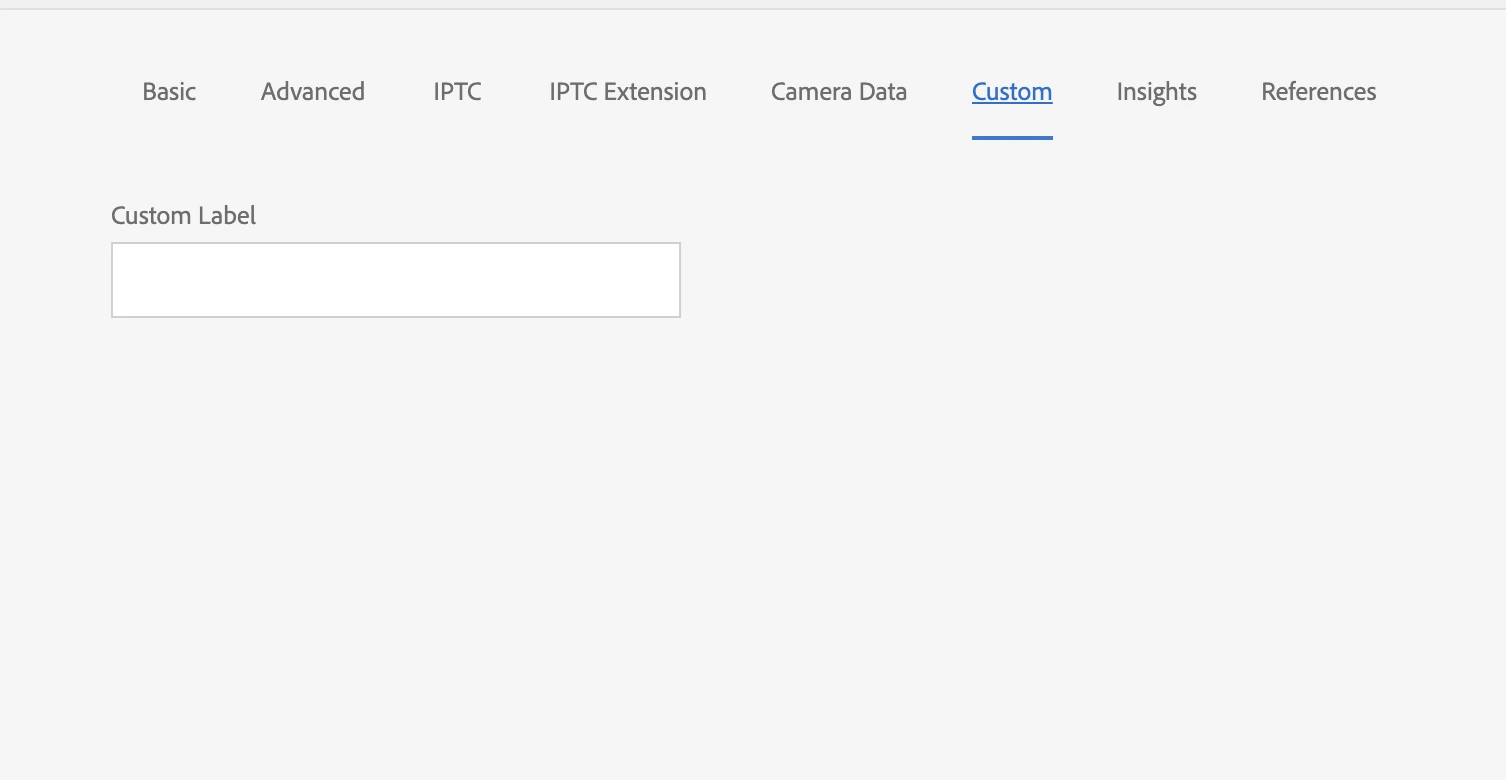
As per your requirement, you just need to create a new tab and then add custom fields, In this case you don't need to create a new metadata schema. You can simply edit the default one and add your tab and custom field. Something like below screenshot:

2 replies

Anish-Sinha
Adobe Employee
Anish-SinhaAdobe EmployeeAccepted solution
Adobe Employee
April 4, 2022

Hi @tim_funk ,
As per your requirement, you just need to create a new tab and then add custom fields, In this case you don't need to create a new metadata schema. You can simply edit the default one and add your tab and custom field. Something like below screenshot:

tim_funk
tim_funkAuthor
Level 3
April 5, 2022

Yeah - I restarted fresh with to edit the default "pdf" and in line added a new tab. Which then created the right tree in "/conf/global/settings/dam/adminui-extension/metadataschema/default/application/pdf/" and the overlap wasn't bad compared to what I was trying before. I might have been copying a higher folder such as "application" before which probably started me down the path of confusion

arunpatidar
Community Advisor
Community Advisor
April 5, 2022

Hi,

Can you try using granite include?

<items jcr:primaryType="nt:unstructured">
        <tabs jcr:primaryType="nt:unstructured"
            sling:resourceType="granite/ui/components/coral/foundation/tabs"
            size="L">
            <items jcr:primaryType="nt:unstructured">
                <tab1 granite:rel="aem-assets-metadata-form-tab"
                    jcr:primaryType="nt:unstructured"
                    jcr:title="Basic"
                    sling:resourceType="granite/ui/components/coral/foundation/container"
                    listOrder="0">
                    <granite:data jcr:primaryType="nt:unstructured"
                        tabid="dd9d71ff-4524-435d-a16c-0249020660fc" />
                    <items jcr:primaryType="nt:unstructured">
                        <col1 jcr:primaryType="nt:unstructured"
                            sling:resourceType="granite/ui/components/coral/foundation/include"
                            path="/libs/dam/content/schemaeditors/forms/default/items/tabs/items/tab1/items/col1" />
                        <col2 jcr:primaryType="nt:unstructured"
                            sling:resourceType="granite/ui/components/coral/foundation/include"
                            path="/libs/dam/content/schemaeditors/forms/default/items/tabs/items/tab1/items/col2" />
                        <col3 jcr:primaryType="nt:unstructured"
                            sling:resourceType="granite/ui/components/coral/foundation/include"
                            path="/libs/dam/content/schemaeditors/forms/default/items/tabs/items/tab1/items/col3" />
                    </items>
                </tab1>
                </items>
                </tabs>
                </items>
Arun Patidar
New Member
November 14, 2024

Hi @arunpatidar,

I am also implementing something similar and I noticed that the accepted response copies the default schema to /conf/global/settings/dam/adminui-extension/metadataschema. Now this is something I would really like to avoid. Did your suggestion with granite include work? I was hoping adding sling:resourceSuperType to /libs/dam/content/schemaeditors/forms/default would do the magic, but it doesn't seem to work.


Thanks,

Daniel

kartheekd203042
Level 3
November 21, 2024

Hi @kartheekd203042 
If you want to override OOTB field then you have to copy the entire tab nodes in your custom schema, thats the way to overirde/overlay existing metadata fields.


Could you please share your metadata schema? what did you do so far and what are you planning to achieve ? Please attached screenshots if possible.


Thanks for getting back @arunpatidar 


what we need is to create a custom schema with ALL the default tabs/fields AND additonally a custom tab with custom fields.


We need to be able to do this for few different custom schemas and not just one.


What we did was to copy the default schema and customised on top of it by adding nodes.

We are repeating that multiple times per custom schema.


Query is : Can we instead reference or link the default options and just add our custom tab/fields in our custom schemas? (we were hoping to use granite:include or some kind of reuse but based on what I see that is not possible) I am reaching out for guidance on this aspect if there is a better way. Hope it clarifies the ask?