Indexing resetting or failing | Community
Skip to main content
veerareddyc1015
Level 3
September 1, 2025
Solved

Indexing resetting or failing

  • September 1, 2025
  • 3 replies
  • 405 views

Hi Team,

About 3 years ago, I created some nodes under /oak:index/cqPageLucene/indexRules/cq:Page/properties (such as locationtags, etc.). At that time, they worked fine on some sample/test pages, and I never faced issues like queries traversing more than 100,000 nodes.

Since then, those properties were not used in real scenarios.

Now, when I try to use those already indexed properties with more pages, I’m getting the error: “query traversed more than 100,000 nodes, hence query execution stopped.”

To fix it, I tried reindexing by setting the reindex property to true, and it worked temporarily. However, after deployment, the same error reappears: “query traversed more than 100,000 nodes, hence query execution stopped.”
Also, my code does not currently reference or include those indexes.
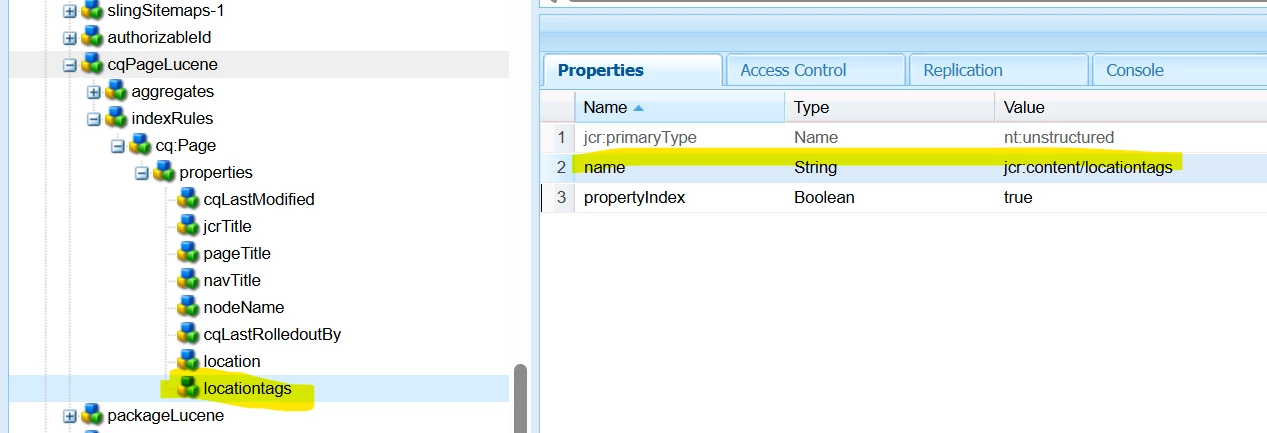
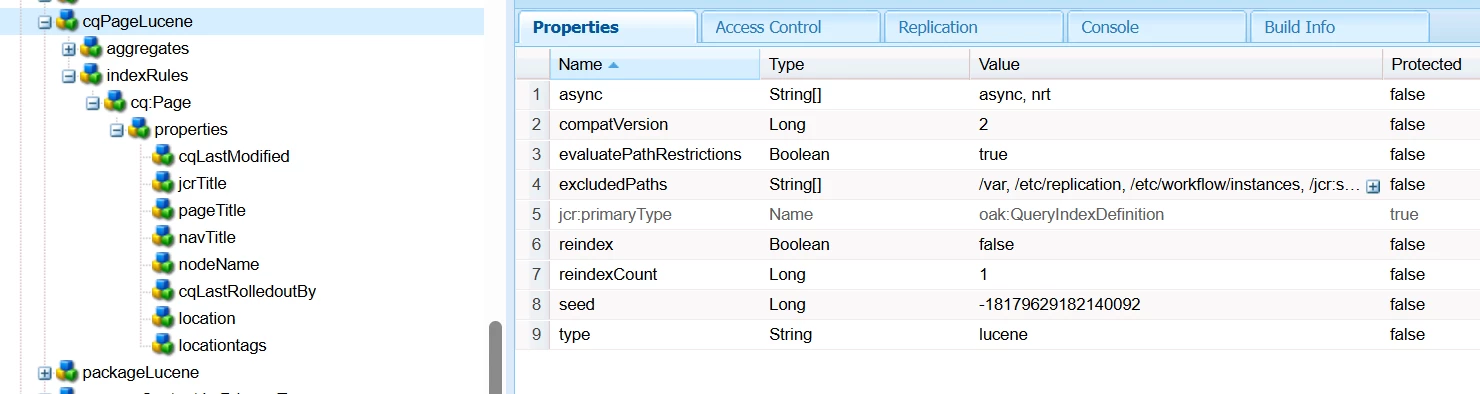


need some help on what might be causing this error

Thanks & Regards
Veera
Best answer by konstantyn_diachenko

Hi @veerareddyc1015 ,


On one of my on-prem projects the following note from the official doc helped:

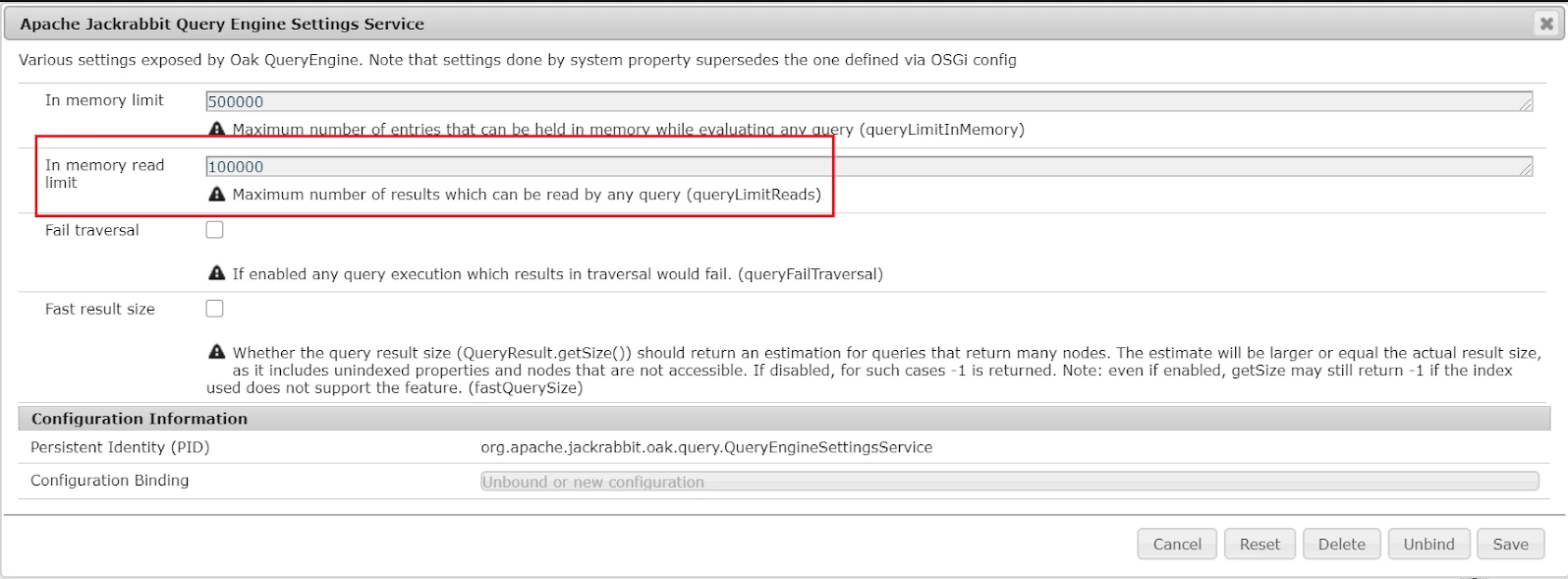
Queries that traverse many nodes, or that read many nodes in memory, can be cancelled. The limits can be set at runtime (also while a slow query is running) using JMX, domain “org.apache.jackrabbit.oak”, type “QueryEngineSettings”, attribute names “LimitInMemory” and “LimitReads”. These setting are not persisted, so in the next restart, the default values (unlimited) are used. As a workaround, these limits can be changed using the system properties “oak.queryLimitInMemory” and “oak.queryLimitReads”. Queries that exceed one of the limits are cancelled with an UnsupportedOperationException saying that “The query read more than x nodes… To avoid running out of memory, processing was stopped.”


You can override this OSGi configuration for even AEMaaCS project.


As a short term solution, you can increase oak.queryLimitReads value. For a long-term solution: revise index, create separate one for certain structure and use it for a queries explicitly.  


3 replies

Uppari_Ramesh
Level 5
September 2, 2025

Hi @veerareddyc1015 ,


Were you able to run your query in query explanation tool? When you run the query in query explanation tool then you should able to see which index is picked up for your query.


First see if it is picking up any index , if it is not picking up any index then issue with your query or yiur Query us not suitable for the index. If it is picking up index then we can debug further.


Thanks,

Ramesh.

konstantyn_diachenko
Community Advisor
konstantyn_diachenkoCommunity AdvisorAccepted solution
Community Advisor
September 8, 2025

Hi @veerareddyc1015 ,


On one of my on-prem projects the following note from the official doc helped:

Queries that traverse many nodes, or that read many nodes in memory, can be cancelled. The limits can be set at runtime (also while a slow query is running) using JMX, domain “org.apache.jackrabbit.oak”, type “QueryEngineSettings”, attribute names “LimitInMemory” and “LimitReads”. These setting are not persisted, so in the next restart, the default values (unlimited) are used. As a workaround, these limits can be changed using the system properties “oak.queryLimitInMemory” and “oak.queryLimitReads”. Queries that exceed one of the limits are cancelled with an UnsupportedOperationException saying that “The query read more than x nodes… To avoid running out of memory, processing was stopped.”


You can override this OSGi configuration for even AEMaaCS project.


As a short term solution, you can increase oak.queryLimitReads value. For a long-term solution: revise index, create separate one for certain structure and use it for a queries explicitly.  


Kostiantyn Diachenko, Community Advisor, Certified Senior AEM Developer, creator of free AEM VLT Tool, maintainer of AEM Tools plugin.
kautuk_sahni
Community Manager
Community Manager
September 12, 2025

@veerareddyc1015 Just checking in! Were you able to get this resolved? If you found your own solution, sharing the details would be a big help to others who might face the same issue later on. And if one of the replies here helped, whether it fully solved the problem or simply pointed you in the right direction, marking it as accepted makes it much easier for future readers to find. Thanks again for helping close the loop and contributing to the community!

Kautuk Sahni