Incorrect Sidekick's behaviour | Community
Skip to main content
June 22, 2020
Solved

Incorrect Sidekick's behaviour

  • June 22, 2020
  • 4 replies
  • 1817 views

Hi,

If I am trying to edit a page (which already has Content Fragment "Based on Touch UI" ) in classic UI, then drag & drop "classic UI based" components from sidekick. then sidekick's behaviour is not proper.

FYI, while drag-drop sidekick splits in two parts (not behaving properly). Please see the below screenshot.
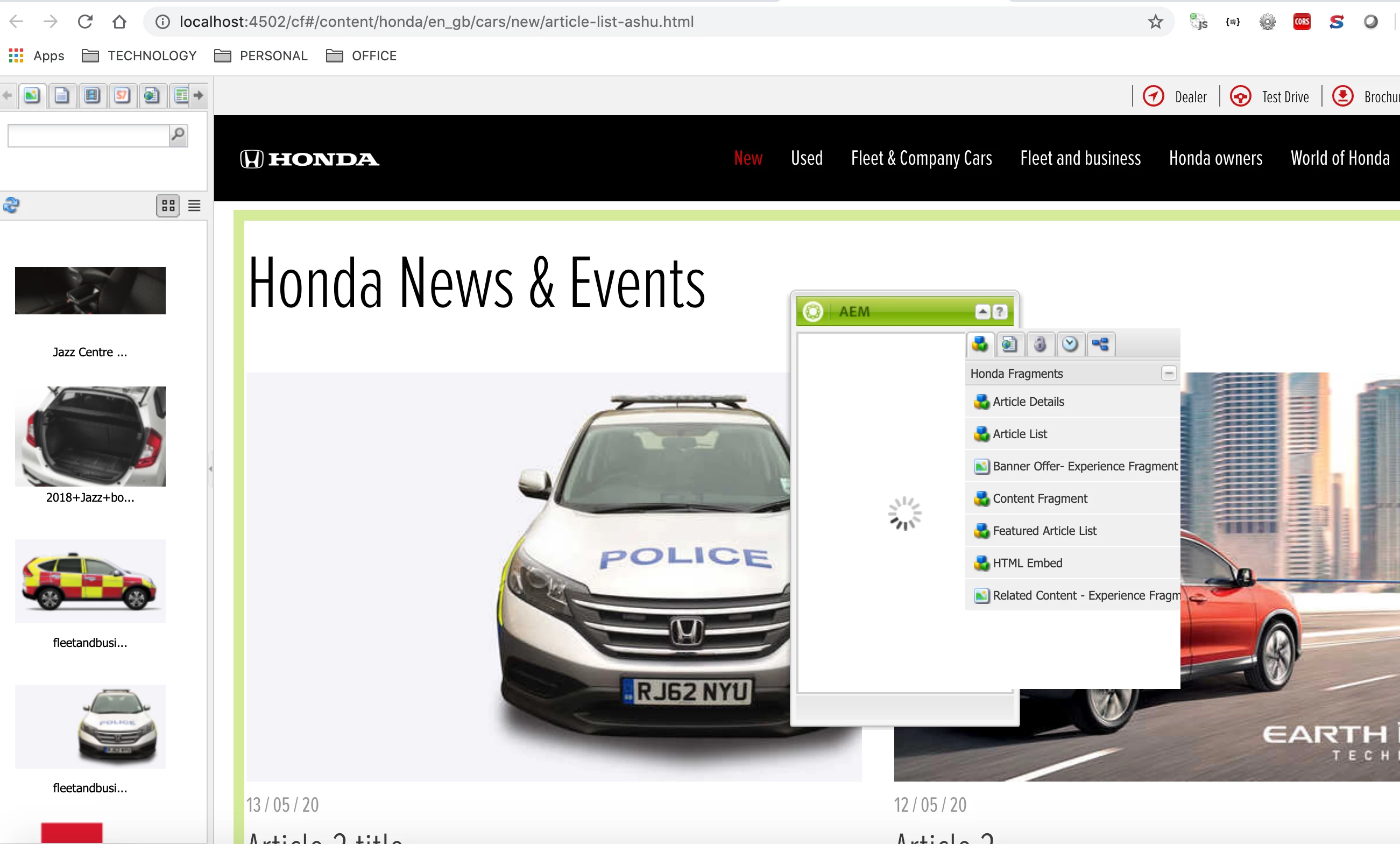

Any suggestions please ?
OR
We should not use classicUI based components on same page where touchUI based components are existing.

Any more updates on this please ??

Thanks in advance !!

This post is no longer active and is closed to new replies. Need help? Start a new post to ask your question.
Best answer by ArpitVarshney

Hi @ashutoshrastogi 

I would say you should drag/drop/edit the classic UI component in classic UI mode and touch UI component in touch UI mode.

Also, Adobe has already recommended everyone to move from classic to touch UI mode so I would suggest you move your components from classic to touch gradually but at least you can convert these dialogs from classic to touch which are pretty easy using dialog converter tool.


Regards,

Arpit

4 replies

ArpitVarshney
Community Advisor
ArpitVarshneyCommunity AdvisorAccepted solution
Community Advisor
June 22, 2020

Hi @ashutoshrastogi 

I would say you should drag/drop/edit the classic UI component in classic UI mode and touch UI component in touch UI mode.

Also, Adobe has already recommended everyone to move from classic to touch UI mode so I would suggest you move your components from classic to touch gradually but at least you can convert these dialogs from classic to touch which are pretty easy using dialog converter tool.


Regards,

Arpit

VeenaVikraman
Community Advisor
Community Advisor
June 22, 2020

I would recommend not to mix up Classic UI and Touch UI components. If you have some components which doesn't have a Touch UI dialog, just create the same and start authoring those also in Touch UI mode. It would be the best approach I would say. 

vanegi
Adobe Employee
Adobe Employee
June 22, 2020

Hi Ashutosh,

AEM provides a backward-compatible mechanism for the classic UI dialogs to co-exist with the new Touch UI interface.If we are in the new Touch UI user interface and we haven’t defined the new “cq:dialog” in the jcr, it’s possible to render the classic “dialog”.


Since Content fragments are not available in the classic UI, and so the given behavior. 


Thanks,

Vaishali

July 24, 2020
any more updates / comment on this please ??