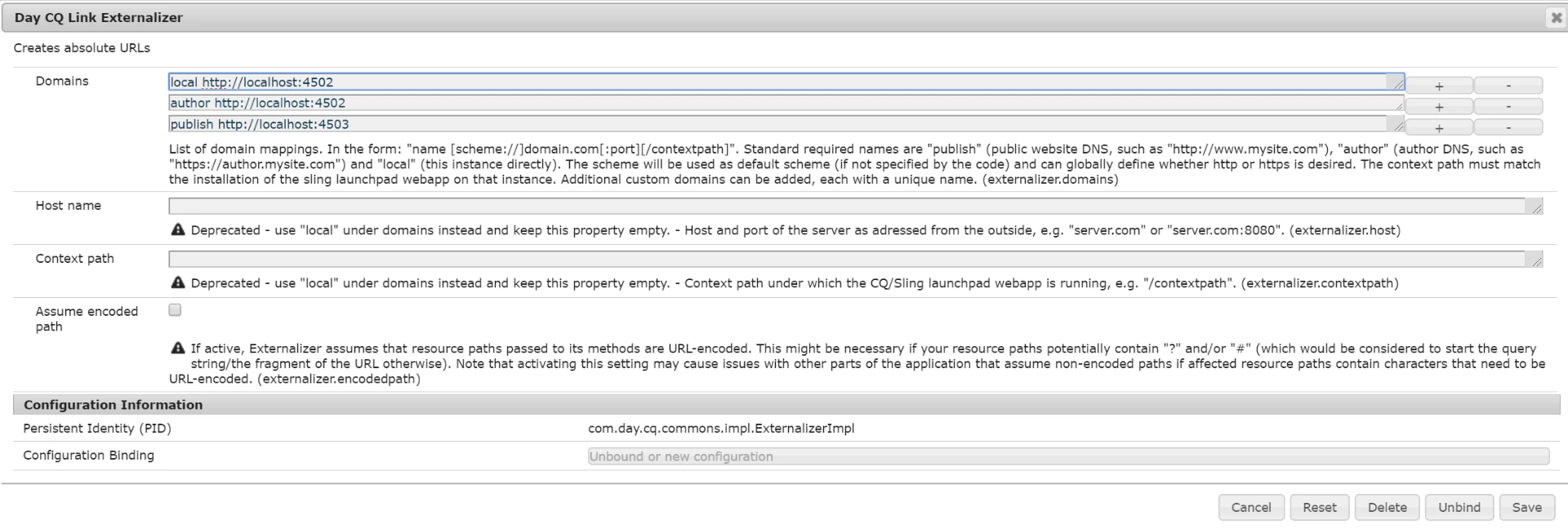
In Workflow email Part - How to display the current URL host name in email template?
In the path /etc/workflow/notification/email we have a template like
subject=Workflow notification: ${event.EventType}
header=-------------------------------------------------------------------------------------\n \
Time: ${event.TimeStamp}\n \
Step: ${item.node.title}\n \
User: ${participant.name} (${participant.id})\n \
Workflow: ${model.title}\n \
-------------------------------------------------------------------------------------\n\n
message=Content: ${host.prefix}${payload.path.open}\n
footer=\n \
-------------------------------------------------------------------------------------\n \
View the overview in your ${host.prefix}/inbox\n \
-------------------------------------------------------------------------------------\n \
This is an automatically generated message. Please do not reply.
In that template send the localhost:4502 as a host.prefix -------- I used the template in UAT as well as PRO server at that stage also it sends localhost:4502
Anyone can help me to how to get the message a respective server host name.