Import Clientlibs | Community
Skip to main content
December 7, 2022
Solved

Import Clientlibs

  • December 7, 2022
  • 1 reply
  • 895 views

I'm new working with AEM and faced a situation on WKND Tutorial that couldn't figure out how it happens.


When we want to import some clientlibs, many tutorials on onternet explains that is needed to add some code, for example, on customheaderlibs.html file of page component like:

<sly data-sly-use.clientlibs="${'com.adobe.cq.wcm.core.components.models.ClientLibraries' @ categories='wknd.site'}">
</sly>

However, on aem-guide-wknd project on Github, there is no such code anywhere, but the clientlibs are still loaded. How is it possible?


Besides that, if I create a new page from the empty-page template, no clientlibs are loaded.


What are the others forms of importing clientlibs?
This post is no longer active and is closed to new replies. Need help? Start a new post to ask your question.
Best answer by Kiran_Vedantam

Hi @mmouraam 


You can add client libs

  1. At the component level: using the below code, you include both CSS and js (all)
    1. <sly data-sly-use.clientlib="/libs/granite/sightly/templates/clientlib.html">
      <sly data-sly-call="${clientlib.all @ categories=''}"/>
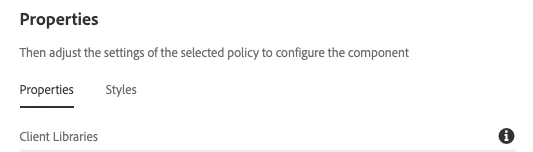
  2. At template level: Edit template > Page policy
    1.  

  3. At the page level
    1. At head.html, include css
      1. <sly data-sly-use.clientlib="/libs/granite/sightly/templates/clientlib.html">
        <sly data-sly-call="${clientlib.css @ categories=''}"/>
    2. At footer.html: Include js
      1. <sly data-sly-use.clientlib="/libs/granite/sightly/templates/clientlib.html">
        <sly data-sly-call="${clientlib.js @ categories=''}"/>

1 reply

Kiran_Vedantam
Community Advisor
Kiran_VedantamCommunity AdvisorAccepted solution
Community Advisor
December 7, 2022

Hi @mmouraam 


You can add client libs

  1. At the component level: using the below code, you include both CSS and js (all)
    1. <sly data-sly-use.clientlib="/libs/granite/sightly/templates/clientlib.html">
      <sly data-sly-call="${clientlib.all @ categories=''}"/>
  2. At template level: Edit template > Page policy
    1.  

  3. At the page level
    1. At head.html, include css
      1. <sly data-sly-use.clientlib="/libs/granite/sightly/templates/clientlib.html">
        <sly data-sly-call="${clientlib.css @ categories=''}"/>
    2. At footer.html: Include js
      1. <sly data-sly-use.clientlib="/libs/granite/sightly/templates/clientlib.html">
        <sly data-sly-call="${clientlib.js @ categories=''}"/>