Impersonate user suggestions not loading | Community
Skip to main content
vjleo94
Level 3
October 6, 2022
Solved

Impersonate user suggestions not loading

  • October 6, 2022
  • 1 reply
  • 677 views

Hi,


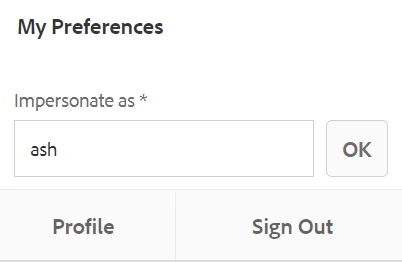
Here, We can see that nothing is loading in user suggestions. I have added my user to administrators group as well. 


/mnt/overlay/granite/ui/content/coral/foundation/authorizable/autocomplete/suggestion.0.10.html?_charset_=utf-8&selector=user&serviceUserFilter=exclude&impersonableUserFilter=includeonly&query=as&_=1665039085816


I see that above call happens in network tab, and this returns no results. Can anyone help me here with what could be the possible reason?


This post is no longer active and is closed to new replies. Need help? Start a new post to ask your question.
Best answer by SantoshSai

Hi @vjleo94,

In order for impersonating to work for non-admin users - even if member of the “administrators” group, the impersonator is required to have READ permissions in the /home/users path.

For more information on how to achieve this, see Permissions in AEM.

First, your analysis is right. The list of impersonators is a property at the target user. So the target user can grant another user (the impersonator) the right to act as himself. There is no “impersonation right”, that a specific user group is allowed to impersonate to anybody.

So the use case “Support User Group”, where a group of support users are allowed to impersonate as other business users will not work. Every individual business user must grant impersonation rights to the support user group.

To change the list of impersonators, you just need write access at the target users. Either it is the target user itself, or members of the “user administrators” group, or member of the “administrators” group, or any other user or user group that your project has granted write access on the target user.

Reference: https://stackoverflow.com/questions/48316471/who-can-addimperonators-in-useradmin-for-a-user-in-aem-6-3

Hope that helps!

Regards,

Santosh

1 reply

SantoshSai
Community Advisor
SantoshSaiCommunity AdvisorAccepted solution
Community Advisor
November 27, 2022

Hi @vjleo94,

In order for impersonating to work for non-admin users - even if member of the “administrators” group, the impersonator is required to have READ permissions in the /home/users path.

For more information on how to achieve this, see Permissions in AEM.

First, your analysis is right. The list of impersonators is a property at the target user. So the target user can grant another user (the impersonator) the right to act as himself. There is no “impersonation right”, that a specific user group is allowed to impersonate to anybody.

So the use case “Support User Group”, where a group of support users are allowed to impersonate as other business users will not work. Every individual business user must grant impersonation rights to the support user group.

To change the list of impersonators, you just need write access at the target users. Either it is the target user itself, or members of the “user administrators” group, or member of the “administrators” group, or any other user or user group that your project has granted write access on the target user.

Reference: https://stackoverflow.com/questions/48316471/who-can-addimperonators-in-useradmin-for-a-user-in-aem-6-3

Hope that helps!

Regards,

Santosh
Santosh Sai