Image disappear in AEM componetn | Adobe Higher Education
Skip to main content
Level 2
January 22, 2025
Beantwortet

Image disappear in AEM componetn

  • January 22, 2025
  • 3 Antworten
  • 1144 Ansichten

Hi 

Can you please help me take a look at this issue? I created an AEM component with image upload function, somehow the image disappeared the second time I open the configure. 


The image appears the first time when I added it. And the CRXDE node shows that path of image is added. 
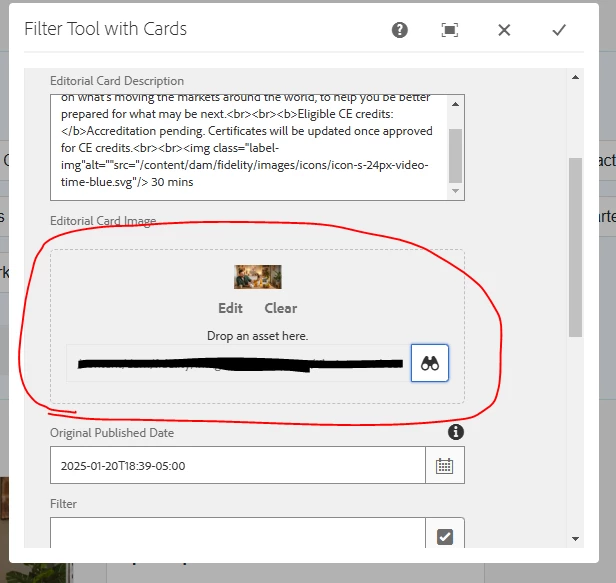

But when I open the same component the second time, that image disappeared
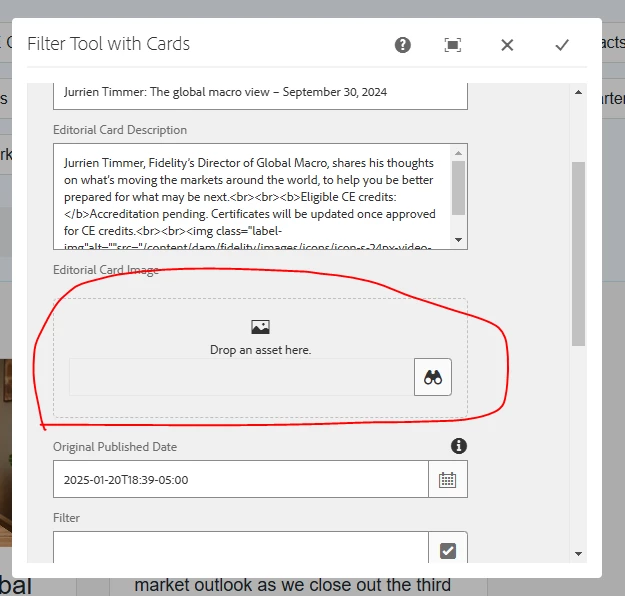
And if I click done, the image path in CRXDE node will be removed.

Here's the image set up config:

<editorialImage jcr:primaryType="nt:unstructured" sling:resourceType="cq/gui/components/authoring/dialog/fileupload" allowUpload="{Boolean}false" autoStart="{Boolean}false" class="cq-droptarget" fieldLabel="Editorial Card Image" fileNameParameter="./fileName" fileReferenceParameter="./fileReference" mimeTypes="[image]" name="./file" title="Upload Image Asset" uploadUrl="${suffix.path}" useHTML5="{Boolean}true"/>

Please let me know if you need more information. 
Thank you

Beste Antwort von PRATHYUSHA_VP

The issue is that multifield not saving file. which is very werid.


Hi @HanL ,


I did face same issue in my previous project when trying to use image drag and drop option in multi-field items.

Image will get disappear from the dialog box, it seemed like OOTB doesn't support image drag and drop in multifield. Hence i went ahead with updating pathbrowser to select image instead if drag and drop. I haven't tried since then, Please find below article if it could be of any help 


https://experienceleaguecommunities.adobe.com/t5/adobe-experience-manager/second-image-with-fileupload-doesn-t-render-in-a-multifield/td-p/383743


Thanks

3 Antworten

SreenivasBr
Level 4
January 22, 2025

After adding the image and clicking on done, did you verify in crx/de whether the image path is getting saved or not? This usually happens when the properties are not captured when you submit.

HanLAutor
Level 2
January 22, 2025

Hi @sreenivasbr 
yes, the value is saved in CRXDE 


AmitVishwakarma
Community Advisor
Community Advisor
January 22, 2025

It seems like the image path is not being saved properly when you close and reopen the AEM component dialog.
To address this, here are a few things you can check:

  1. Ensure the fileReference is correctly saved in the JCR node: After you upload the image for the first time, make sure that the fileReference (the image path) is being correctly saved in the JCR node. If it’s saved correctly the first time but disappears when you reopen the dialog, this could be due to a configuration or backend issue.
  2. Verify the dialog configuration: Double-check the fileReference and fileName parameters in your dialog setup. Ensure that these are properly configured so that when the dialog is closed and reopened, the image path is retained. If these parameters aren’t properly set up, the image path may be lost.
  3. Inspect the client-side Javascript&colon; AEM dialogs often use JavaScript to manage the UI. You can use browser developer tools to check if there are any JavaScript errors or unexpected behavior that might be causing the image path to be cleared when reopening the dialog.
  4. Check the backend logic (if applicable): If you are using Sling Models or any backend logic, make sure that the fields for fileReference and fileName are correctly bound and saved when the dialog is closed. If there’s any issue in the backend, it could be causing the image reference to disappear.

By following these steps, you should be able to pinpoint the issue and resolve the problem.

HanLAutor
Level 2
January 22, 2025

Hey @amitvishwakarma 
I found this error:

Uncaught TypeError: Cannot read properties of undefined (reading 'path')

at this function:

PRATHYUSHA_VP
Community Advisor
Community Advisor
January 23, 2025

Hi @hanl 


There is no issue with dialog.xml, it should work as expected.

If you have written any logic for image path in editor clientlibs as mentioned below, try removing that piece of code and check if it's working or not


Hope this helps 


Thanks

HanLAutor
Level 2
January 23, 2025

Hi @prathyusha_vp 

I found that the issue is with the multiple field that I am using. Here's the full code. How can I fix this?

<cardsTab jcr:primaryType="nt:unstructured" sling:resourceType="granite/ui/components/coral/foundation/container" jcr:title="Card Configuration"> <items jcr:primaryType="nt:unstructured"> <cards jcr:primaryType="nt:unstructured" sling:resourceType="granite/ui/components/coral/foundation/form/multifield" composite="{Boolean}true" fieldLabel="Cards"> <field jcr:primaryType="nt:unstructured" sling:resourceType="granite/ui/components/coral/foundation/container" name="./cards"> <items jcr:primaryType="nt:unstructured"> <cardFieldset jcr:primaryType="nt:unstructured" jcr:title="cardFieldset" sling:resourceType="granite/ui/components/foundation/layouts/collapsible" collapsed="{Boolean}false"> <items jcr:primaryType="nt:unstructured"> <cardTitle cq:showOnCreate="{Boolean}true" jcr:primaryType="nt:unstructured" sling:resourceType="granite/ui/components/coral/foundation/form/textfield" allowBulkEdit="{Boolean}true" fieldLabel="Card Title" name="./cardTitle" renderReadOnly="{Boolean}true"> <granite:data jcr:primaryType="nt:unstructured" allowBulkEdit="{Boolean}true" cq-msm-lockable="seoTitle"/> </cardTitle> <cardDescription cq:showOnCreate="{Boolean}true" jcr:primaryType="nt:unstructured" sling:resourceType="granite/ui/components/coral/foundation/form/textarea" fieldLabel="Editorial Card Description" name="./cardDescription" renderReadOnly="{Boolean}true"> <granite:data jcr:primaryType="nt:unstructured" allowBulkEdit="{Boolean}true" cq-msm-lockable="jcr:description"/> </cardDescription> <editorialImage jcr:primaryType="nt:unstructured" sling:resourceType="cq/gui/components/authoring/dialog/fileupload" allowUpload="{Boolean}false" autoStart="{Boolean}false" class="cq-droptarget" fieldLabel="Editorial Card Image" fileNameParameter="./fileName" fileReferenceParameter="./fileReference" mimeTypes="[image]" name="./file" title="Upload Image Asset" uploadUrl="${suffix.path}" useHTML5="{Boolean}true"/> <originalPublished cq:showOnCreate="{Boolean}true" jcr:primaryType="nt:unstructured" sling:resourceType="granite/ui/components/coral/foundation/form/datepicker" fieldDescription="published date of the document" fieldLabel="Original Published Date" name="./originalPublished" type="datetime"/> <filter cq:showOnCreate="{Boolean}true" jcr:primaryType="nt:unstructured" sling:resourceType="cq/gui/components/coral/common/form/tagfield" allowBulkEdit="{Boolean}true" autocreateTag="{Boolean}true" fieldLabel="Filter" multiple="{Boolean}true" name="./filter"/> <media cq:showOnCreate="{Boolean}true" jcr:primaryType="nt:unstructured" sling:resourceType="granite/ui/components/coral/foundation/form/select" emptyText="Please select an optional media type" fieldLabel="Media Type" name="./mediaType"> <items jcr:primaryType="nt:unstructured"> <video jcr:primaryType="nt:unstructured" text="Video" value="video"/> <podcast jcr:primaryType="nt:unstructured" text="Podcast" value="podcast"/> </items> </media> <redirect cq:showOnCreate="{Boolean}true" jcr:primaryType="nt:unstructured" jcr:title="Redirect Options" sling:resourceType="granite/ui/components/coral/foundation/form/fieldset"> <items jcr:primaryType="nt:unstructured"> <redirectTarget cq:showOnCreate="{Boolean}true" jcr:primaryType="nt:unstructured" sling:resourceType="granite/ui/components/coral/foundation/form/pathfield" fieldLabel="Redirect Target" name="./redirectTarget" required="{Boolean}false"/> <redirectStatus jcr:primaryType="nt:unstructured" sling:resourceType="granite/ui/components/coral/foundation/form/select" fieldDescription="The redirect status tells the user if this is a permanent change or temporary" fieldLabel="Redirect Status" name="./redirectStatus" required="{Boolean}true"> <items jcr:primaryType="nt:unstructured"> <permanent jcr:primaryType="nt:unstructured" text="Permanent" value="301"/> <temporary jcr:primaryType="nt:unstructured" text="Temporary" value="302"/> </items> </redirectStatus> </items> </redirect> </items> </cardFieldset> </items> </field> </cards> </items> </cardsTab>


HanLAutor
Level 2
January 23, 2025

The issue is that multifield not saving file. which is very werid.