
Image component is not showing save button | Community
Skip to main content
aliaksandr_hvozdzeu
December 7, 2020
Solved

Image component is not showing save button

  • December 7, 2020
  • 3 replies
  • 2574 views

Hey.


After upgrading the version from 6.3 to 6.5, buttons no longer displayed in the component dialog window.

And they have the "hidden" attribute in HTML.
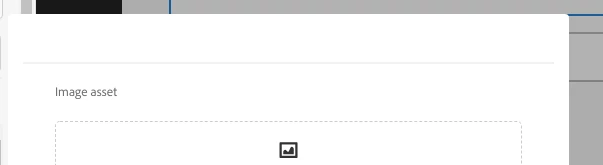


It's a customer component.


What could be the reason?
This post is no longer active and is closed to new replies. Need help? Start a new post to ask your question.
Best answer by Anudeep_Garnepudi

@aliaksandr_hvozdzeu 

Please share dialog.xml

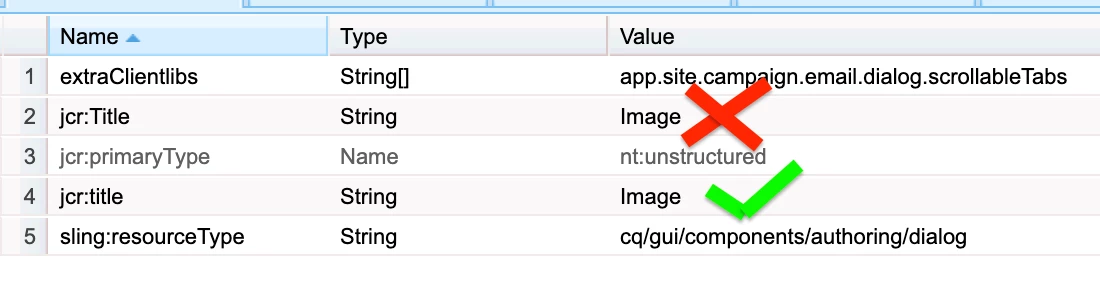
Remove jcr:Title property and add jcr:title property to dialog node(cq/gui/components/authoring/dialog) and check once.

If you still see the issue, try removing the extraClientlibs. Could be your custom override adding it.

3 replies

Anudeep_Garnepudi
Community Advisor
Anudeep_GarnepudiCommunity AdvisorAccepted solution
Community Advisor
December 7, 2020

@aliaksandr_hvozdzeu 

Please share dialog.xml

Remove jcr:Title property and add jcr:title property to dialog node(cq/gui/components/authoring/dialog) and check once.

If you still see the issue, try removing the extraClientlibs. Could be your custom override adding it.

Anudeep_Garnepudi
Community Advisor
Community Advisor
December 7, 2020
Update the jcr:Title with jcr:title to dialog(cq/gui/components/authoring/dialog) node and check once
SureshDhulipudi
Community Advisor
Community Advisor
December 7, 2020

What is the resourceType you are using for file upload?

cq/gui/components/authoring/dialog/fileupload

If you are using this - in AEM 6.5 , there is a change , the way to upload image, it will be drag and drop from side rail, instead of file select through path.

Once you drag and drop the asset, you can navigate.

aliaksandr_hvozdzeu
December 7, 2020

I remember the ability to drag and drop images. I am interested in the moment why the buttons are not displayed. Why did it become so?


cq dialog xml.

<?xml version="1.0" encoding="UTF-8"?>
<jcr:root xmlns:sling="http://sling.apache.org/jcr/sling/1.0" xmlns:jcr="http://www.jcp.org/jcr/1.0" xmlns:nt="http://www.jcp.org/jcr/nt/1.0"
jcr:primaryType="nt:unstructured"
jcr:Title="Image"
sling:resourceType="cq/gui/components/authoring/dialog"
extraClientlibs="[app.site.campaign.email.dialog.scrollableTabs]">
<content
jcr:primaryType="nt:unstructured"
sling:resourceType="granite/ui/components/coral/foundation/container">
<items jcr:primaryType="nt:unstructured">
<image
jcr:primaryType="nt:unstructured"
jcr:title="Image"
sling:resourceType="granite/ui/components/coral/foundation/fixedcolumns">
<items jcr:primaryType="nt:unstructured">
<column
jcr:primaryType="nt:unstructured"
sling:resourceType="granite/ui/components/coral/foundation/container">
<items jcr:primaryType="nt:unstructured">
<file jcr:primaryType="nt:unstructured"
sling:resourceType="granite/ui/components/foundation/form/fileupload"
allowUpload="{Boolean}true"
autoStart="{Boolean}false"
class="cq-droptarget"
fieldLabel="Image asset"
fileNameParameter="./fileName"
fileReferenceParameter="./fileReference"
mimeTypes="[image/gif,image/jpeg,image/png,image/webp,image/tiff]"
multiple="{Boolean}false"
name="./file"
title="Upload Image Asset"
uploadUrl="${suffix.path}"
useHTML5="{Boolean}true"/>
<alt jcr:primaryType="nt:unstructured"
sling:resourceType="granite/ui/components/coral/foundation/form/textfield"
fieldDescription="Textual alternative of the meaning or function of the image, for visually impaired readers."
fieldLabel="Alternative Text"
name="./alt"
wrapperClass="cmp-image--editor-alt"/>
<path
jcr:primaryType="nt:unstructured"
sling:resourceType="granite/ui/components/coral/foundation/form/pathfield"
name="./path"
required="false"
fieldLabel="Hyperlink"
rootPath="/content"/>
<pathSuffix
jcr:primaryType="nt:unstructured"
sling:resourceType="granite/ui/components/foundation/form/inputgroup"
fieldLabel="Hyperlink suffix"
renderReadOnly="{Boolean}true">
<field
jcr:primaryType="nt:unstructured"
sling:resourceType="granite/ui/components/coral/foundation/form/textfield"
fieldLabel="Hyperlink suffix"
name="./pathSuffix"/>
<rightButton
class="coral-Button--square"
icon="coral-Icon--adobeCampaign"
init="acmetadatapicker"
jcr:primaryType="nt:unstructured"
sling:resourceType="granite/ui/components/foundation/button"
targetinput="input[name='./pathSuffix']"/>
</pathSuffix>
<align
jcr:primaryType="nt:unstructured"
sling:resourceType="granite/ui/components/coral/foundation/form/select"
fieldLabel="Align"
name="./align">
<items jcr:primaryType="nt:unstructured">
<Center
jcr:primaryType="nt:unstructured"
text="Center"
value="center"/>
<Left
jcr:primaryType="nt:unstructured"
text="Left"
value="left"/>
<Right
jcr:primaryType="nt:unstructured"
text="Right"
value="right"/>
</items>
</align>
</items>
</column>
</items>
</image>
</items>
</content>
</jcr:root>
aliaksandr_hvozdzeu
December 7, 2020
This only happens with this component. There is also a component identical to this, it differs only in 1 property - component group, but version 2 works correctly.