Solved
Identifying image use on other folders
Image A is expiring and there are 20 different folders in AEM.
Before removing Image A, I will need to identify which of the 20 folders is associating with Image A.
How do I go about doing so?
Image A is expiring and there are 20 different folders in AEM.
Before removing Image A, I will need to identify which of the 20 folders is associating with Image A.
How do I go about doing so?
Hi @audrey27,
In case you have copy of the same image in multiple folders in the DAM, you can simply run query e.g from crx/de. Below is an example of query that will search for all the folders that contains image with specific name. You can easy change criteria from name to other property. The example query will look for all folders in entire DAM (/content/dam) that includes asset with name 48-hours-of-wilderness-1.jpg
SELECT * FROM [nt:folder] AS folder
INNER JOIN [dam:Asset] AS asset ON ISCHILDNODE(asset, folder)
WHERE ISDESCENDANTNODE(folder, "/content/dam")
AND name(asset) = "48-hours-of-wilderness-1.jpg"
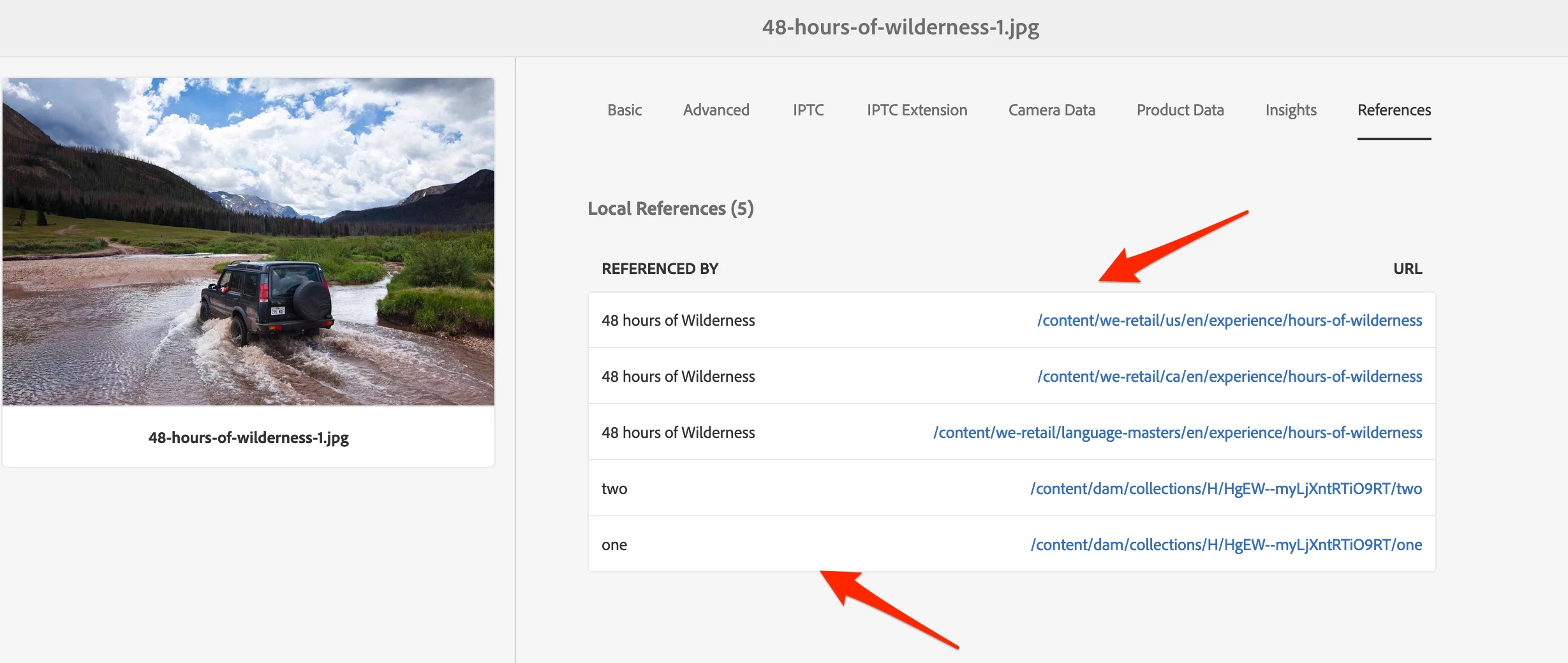
However, if by folders associated with asset you mean collections, then you can get list of the collections that include reference to given asset under asset properties. Below is sample screen, it shows list of all references so pages and collections - you can easy recognize collection by its location.
Enter your E-mail address. We'll send you an e-mail with instructions to reset your password.