Icons not loading through CSS in AEM 6.3 | Community
Skip to main content
Level 2
April 25, 2018
Solved

Icons not loading through CSS in AEM 6.3

  • April 25, 2018
  • 4 replies
  • 2786 views

Hello Everyone,

We are developing our site in AEM 6.3 and created clientLibs under apps and set proxy as true.  But not able to access icons present in css.
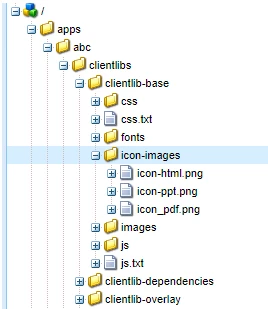
Thanks,

Megha Gowroji

This post is no longer active and is closed to new replies. Need help? Start a new post to ask your question.
Best answer by Vijayalakshmi_S

Hi,

The images need to be placed in a folder named "resources" under clientlibs folder.

In this case, rename the folder -  icon-images as resources

Reference:

Using Client-Side Libraries

4 replies

Vijayalakshmi_S
Vijayalakshmi_SAccepted solution
Level 10
May 8, 2018

Hi,

The images need to be placed in a folder named "resources" under clientlibs folder.

In this case, rename the folder -  icon-images as resources

Reference:

Using Client-Side Libraries

Level 2
May 8, 2018

Plus, it appears that the clientlib which references the static resources needs to have @allowProxy set to true (as opposed to relying on allowProxy being set by an embedding clientlib).

In other words, if clientlib_A embeds clientlib_B, and clientlib_B references static resources, clientlib_B must set allowProxy = true.

It's not enough to rely on clientlib_A setting allowProxy and having that "cascade" through the embedded clientlibs. This turned out to be my problem.

Level 2
May 9, 2018

Thank you vijis31358935​  it worked.

Level 2
June 11, 2018

Hello Everyone,

I have one more issue related with above question.

When we use the images from resource folder in <img src="PATH_IMAGE_FROM_RESOURCE"> then in dispatcher we are not able to see the icons.

If the same image is used in CSS then it works. Could you please suggest how can we achieve this?

Thanks,

Megha Gowroji
