i18n in AEM as a cloud | Community
Skip to main content
Level 3
June 10, 2025
Solved

i18n in AEM as a cloud

  • June 10, 2025
  • 1 reply
  • 1323 views

I cannot modify i18n in /apps as i am using for translation, Where can i place i18n apart from apps and please explain me the steps

I tried placing i18n in /content/cq:i18n/en/test/submit where en and test is of sling:folder, submit is of type sling:messageEntry and it has sling:message property as submit, its not recognizing the i18n , please help me out

Best answer by arunpatidar

tried same didnt worked 
en page


fr page


Can you try to restart i18n bundle or restart AEM/Felix console?

https://sourcedcode.com/blog/aem/aem-i18n-not-showing-translations 

1 reply

arunpatidar
Community Advisor
Community Advisor
June 10, 2025

Hi @shwetha1994 

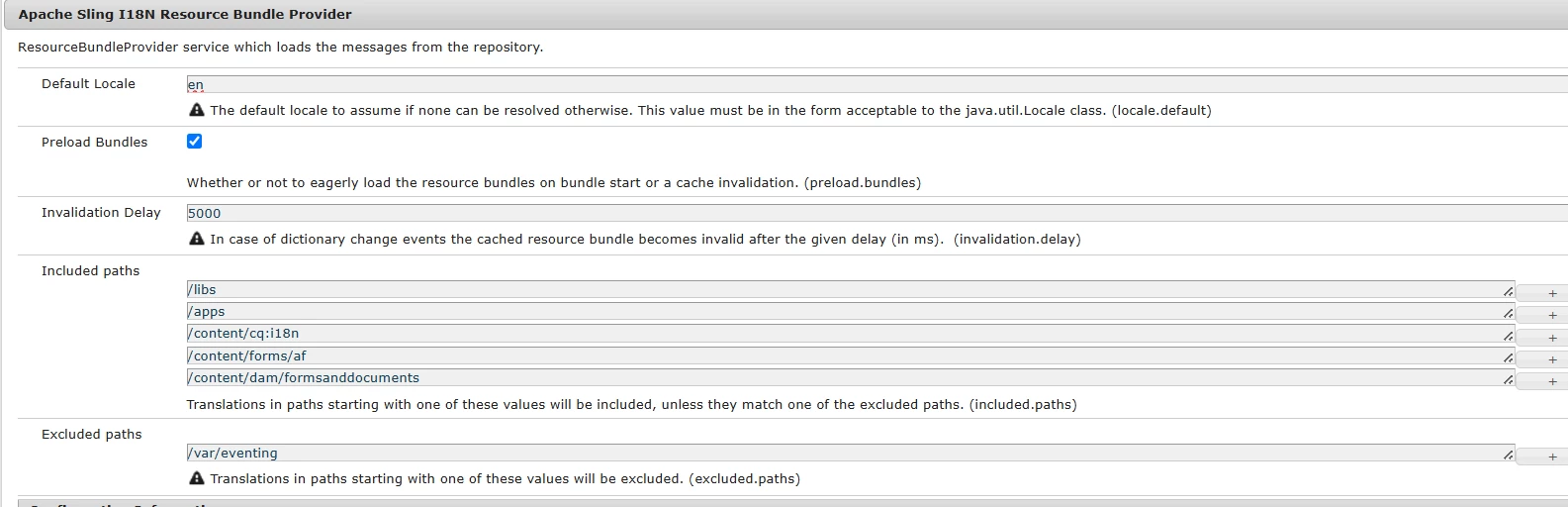
I think it should work, I can see that 'Apache Sling I18N Resource Bundle Provider' config has /content/cq:i18n in include path


Please check https://experienceleaguecommunities.adobe.com/t5/adobe-experience-manager/can-we-move-i18n-file-from-apps-lt-project-structure-gt-i18n-to/m-p/753213 


Arun Patidar
Level 3
June 10, 2025

I tried the same link /content/cq:i18n/test/en.json


en.json has
{
"hello" : "Test Hello"
}


<div>Test : ${'hello' @ i18n}</div>

Level 3
June 10, 2025

Can you try to restart i18n bundle or restart AEM/Felix console?

https://sourcedcode.com/blog/aem/aem-i18n-not-showing-translations 


After restarting instance it worked. Thanks