I have created a Accordion Component and also created clientlib but in that the JS is not getting applied for that please suggest me | Community
Skip to main content
Level 3
September 28, 2023
Solved

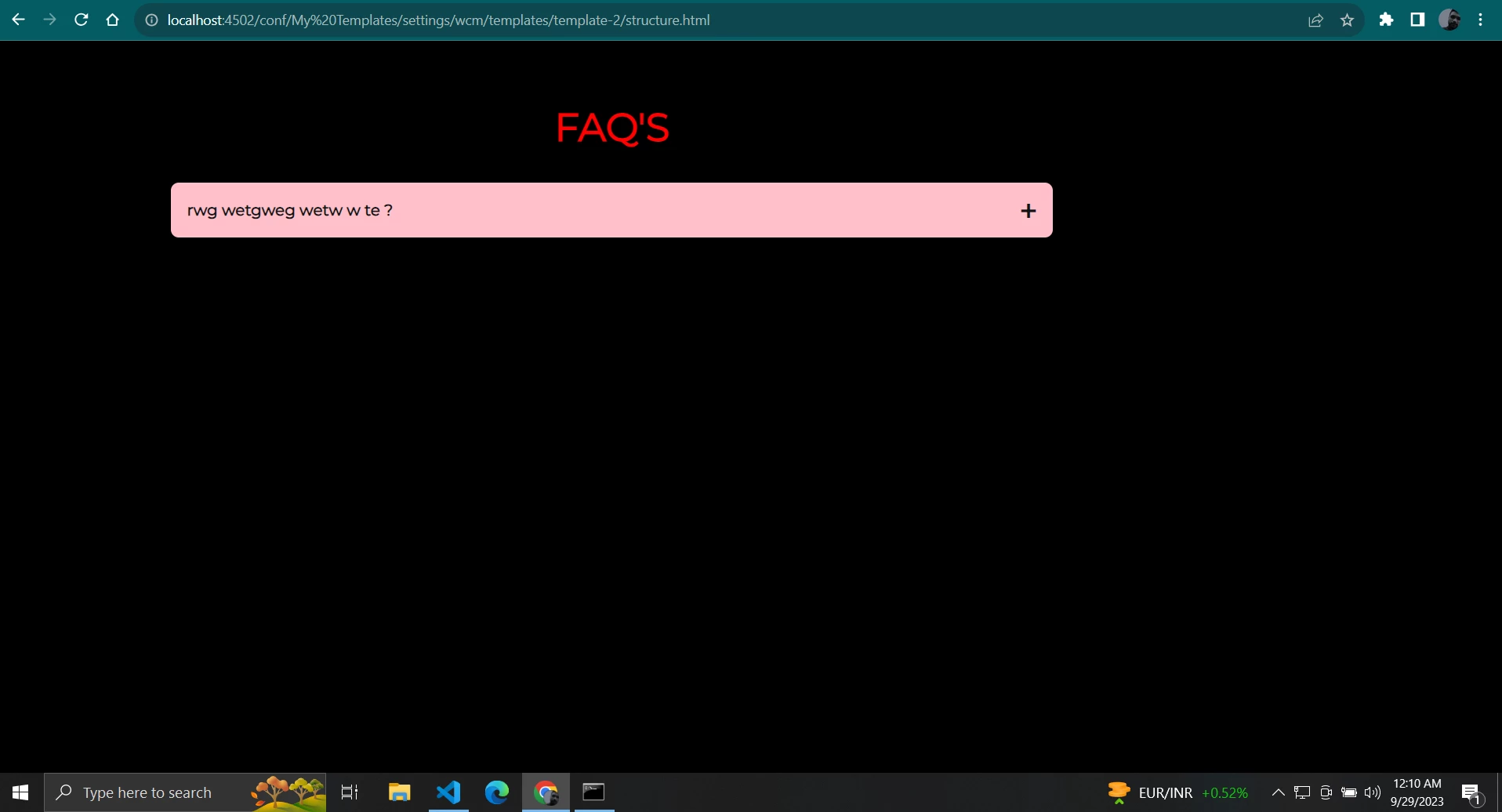
I have created a Accordion Component and also created clientlib but in that the JS is not getting applied for that please suggest me
  • September 28, 2023
  • 4 replies
  • 1742 views

After clicking on the plus icon nothing is happening ...

This post is no longer active and is closed to new replies. Need help? Start a new post to ask your question.
Best answer by Sady_Rifat

Hello @monish_gavali ,
Two things I will suggest-


1. Make sure you set the allowproxy in clientlib, (allowProxy="{Boolean}true"

<?xml version="1.0" encoding="UTF-8"?>
<jcr:root xmlns:cq="http://www.day.com/jcr/cq/1.0" xmlns:jcr="http://www.jcp.org/jcr/1.0"
jcr:primaryType="cq:ClientLibraryFolder"
allowProxy="{Boolean}true"
categories="[your.component.clientlib.name]"/>

2. Make sure you added the JS script into customfooterlibs.html. This means your script is at the bottom of your page. Also please check in the source tab your JS is loaded.



4 replies

B_Sravan
Community Advisor
Community Advisor
September 28, 2023

Hi @monish_gavali , 

If the CSS is getting applied, then I am sure that your client-lib is being called.There could be the following possibilities as to why your JS is not being loaded.

1. You could be calling only CSS, as in while you call your client lib through HTML you may writing like this, 

<sly data-sly-call="${clientlib.css @ categories='myCategory'}"/>

doing so, would load only CSS. So make sure you call js in your body or customfooterlibs like this

<sly data-sly-call="${clientlib.js @ categories='myCategory'}"/>

 
or just include everything like this 

<sly data-sly-use.clientlib="/libs/granite/sightly/templates/clientlib.html" data-sly-call="${clientlib.all @ categories=['myCategory1', 'myCategory2']}"/>

2. There could be any error in your JS that could have caused the js malfunction or stop functioning, open your browser console look for any errors, and debug it.

Here is a sample code, please give a try.

HTML:

<!DOCTYPE html> <html lang="en"> <head> <meta charset="UTF-8"> <meta name="viewport" content="width=device-width, initial-scale=1.0"> <link rel="stylesheet" href="accordion.css"> <title>Accordion Component</title> </head> <body> <div class="accordion"> <div class="accordion-item"> <div class="accordion-header">Section 1</div> <div class="accordion-content"> <p>This is the content of Section 1.</p> </div> </div> <div class="accordion-item"> <div class="accordion-header">Section 2</div> <div class="accordion-content"> <p>This is the content of Section 2.</p> </div> </div> <div class="accordion-item"> <div class="accordion-header">Section 3</div> <div class="accordion-content"> <p>This is the content of Section 3.</p> </div> </div> </div> </body> </html>

Java Script:

// Get all accordion items const accordionItems = document.querySelectorAll('.accordion-item'); // Add click event listeners to each accordion header accordionItems.forEach((item) => { const header = item.querySelector('.accordion-header'); const content = item.querySelector('.accordion-content'); header.addEventListener('click', () => { // Toggle the content visibility if (content.style.display === 'block') { content.style.display = 'none'; } else { content.style.display = 'block'; } }); });
Mahedi_Sabuj
Community Advisor
Community Advisor
September 28, 2023

You are currently checking the accordion component from template structure.html by removing the editor.html (http://localhost:4502/conf/..../structure.html). However, this is not the correct approach for checking any component. Instead I would recommend creating a new page using the template in the Sites Console (http://localhost:4502/sites.html/content) and then adding the components on the page such as Accordion.

Nevertheless, I would suggest exploring the AEM Core Accordion Component and extend it to align with your requirements. https://www.aemcomponents.dev/content/core-components-examples/library/core-content/accordion.html 

Mahedi Sabuj
Level 3
September 28, 2023

As per your suggestion I tried testing by creating a page, but still it did not work for me, so i tried adding the js script in the html file itself then it is working fine...


Sady_Rifat
Community Advisor
Sady_RifatCommunity AdvisorAccepted solution
Community Advisor
September 29, 2023

Hello @monish_gavali ,
Two things I will suggest-


1. Make sure you set the allowproxy in clientlib, (allowProxy="{Boolean}true"

<?xml version="1.0" encoding="UTF-8"?>
<jcr:root xmlns:cq="http://www.day.com/jcr/cq/1.0" xmlns:jcr="http://www.jcp.org/jcr/1.0"
jcr:primaryType="cq:ClientLibraryFolder"
allowProxy="{Boolean}true"
categories="[your.component.clientlib.name]"/>

2. Make sure you added the JS script into customfooterlibs.html. This means your script is at the bottom of your page. Also please check in the source tab your JS is loaded.


kautuk_sahni
Community Manager
Community Manager
October 4, 2023

@monish_gavali Did you find the suggestions from users helpful? Please let us know if more information is required. Otherwise, please mark the answer as correct for posterity. If you have found out solution yourself, please share it with the community.

Kautuk Sahni