HTML Loading as Plain Text on Dispatcher, only on the first page (IIS) | Community
Skip to main content
Level 2
June 10, 2024
Solved

HTML Loading as Plain Text on Dispatcher, only on the first page (IIS)

  • June 10, 2024
  • 4 replies
  • 934 views

Can anyone help figure out why I'm running into an error with my Dispatcher not loading a line of HTML code, it's instead loading it as plain text. All other pages load the tags properly, but not the first page.
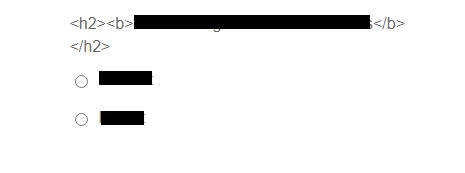


When doing an "Inspect" the tags are showing up like this:

<div class="guideFieldLabel top" style="" data-richtext="true">&lt;h2&gt;&lt;b&gt; Words Words Words as&lt;/b&gt;&lt;/h2&gt;</div>|

Where they should be showing up like this just like on the Publish instance:


<div class="guideFieldLabel top" style="" data-richtext="true"><h2><b>Words Words Words</b></h2></label></div>

This post is no longer active and is closed to new replies. Need help? Start a new post to ask your question.
Best answer by kapil_rajoria

Hi @aem_user25 did you use @ context='html' in your HTL? If not, Please try using it.
For Example:
<div class="guideFieldLabel top" style="" data-richtext="true">${modelName.richTextName @ context='html'}</div>

If this doesn't resolve the issue please check the RTE configuration in the component's dialog. Also check your model code is correct.
Since the issue is happening on the first page only, there might be some configuration mismatch. Is the first page also using the same template?

4 replies

jayv25585659
Level 8
June 11, 2024

not enough info


I believe you can encapsulate HTML code inside another tag so code renders as code.

kapil_rajoria
Community Advisor
kapil_rajoriaCommunity AdvisorAccepted solution
Community Advisor
June 11, 2024

Hi @aem_user25 did you use @ context='html' in your HTL? If not, Please try using it.
For Example:
<div class="guideFieldLabel top" style="" data-richtext="true">${modelName.richTextName @ context='html'}</div>

If this doesn't resolve the issue please check the RTE configuration in the component's dialog. Also check your model code is correct.
Since the issue is happening on the first page only, there might be some configuration mismatch. Is the first page also using the same template?

Level 2
June 12, 2024

Hi @aem_user25 ,


Better restart the instance and check if the issue still persists.

kautuk_sahni
Community Manager
Community Manager
June 19, 2024

@aem_user25 Did you find the suggestion helpful? Please let us know if you require more information. Otherwise, please mark the answer as correct for posterity. If you've discovered a solution yourself, we would appreciate it if you could share it with the community. Thank you!

Kautuk Sahni