HTL tags issue | Community
Skip to main content
November 18, 2024
Solved

HTL tags issue

  • November 18, 2024
  • 4 replies
  • 1068 views
<sly data-sly-use.product="**.**.**.**.**.models.product">


<script type="application/ld+json"> {
"@context": "http://schema.org",
"@type": "Product",
"name": "${product.name }",

<sly data-sly-test="${product.getReviewSummary != 0 && product.getReviewCount != 0}">
"aggregateRating": {

"ratingValue": "${product.getReviewSummary }",
"reviewCount": "${product.getReviewCount }"
}</sly>
}

</script>
</sly>


output:
<script type="application/ld+json"> {
"@context": "http://schema.org",
"@type": "Product",
"name": "jean",

<sly data-sly-test="">
"aggregateRating": {
"ratingValue": "4.0",
"reviewCount": "2"
}

</sly>
}
</script>

issue is in output <sly data-sly-test=""> tag is getting in json  how to avoid it.



This post is no longer active and is closed to new replies. Need help? Start a new post to ask your question.
Best answer by arunpatidar

HI @user96222 

You can construct the ld+json in the Sling Model with business logic and return as String and use 


jsonLDStr = GsonBuilder().setPrettyPrinting().excludeFieldsWithoutExposeAnnotation().create().toJson(jsonLDObj);


<script type="application/ld+json">
${myObj.jsonLD @ context='scriptComment'}
</script>


4 replies

chavad
November 18, 2024

Hi @user96222,

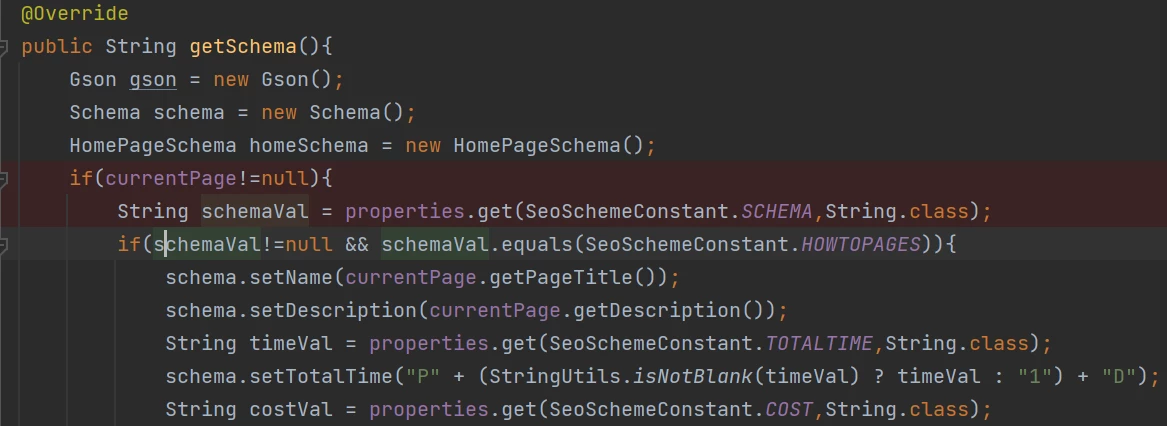
We cannot get rid of the sly tag from the script. We had similar issue so we ended up forming the json object in Sling model - 

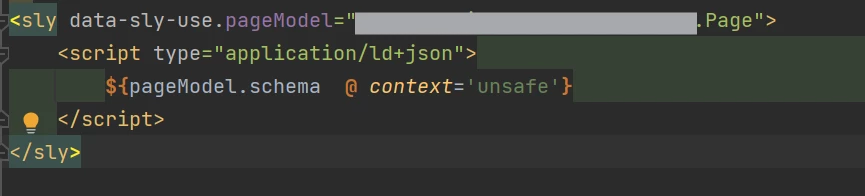
and then used the schema object in HTL -


Or you can try using javascript to form the json.

gkalyan
Community Advisor and Adobe Champion
November 18, 2024

@chavad @user96222 Be careful setting "unsafe" context as this disables XSS protection completely.

Tethich
Community Advisor
Community Advisor
November 18, 2024

Hi @user96222 

I believe you already received answers to this in your previous thread: https://experienceleaguecommunities.adobe.com/t5/adobe-experience-manager/htl-issue/m-p/719017#M177234


user96222Author
November 18, 2024

This is different 

Tethich
Community Advisor
Community Advisor
November 19, 2024

You are right. This is a different issue. I misreas. Apologies.


Unless you want to wrap the entire script in a data-sly-test twice for both true and false cases, I advice you prepare your json on sling model and provides it in one go to the component ( same as @arunpatidar indicated ).

PRATHYUSHA_VP
Community Advisor
Community Advisor
November 19, 2024

Hi @user96222 ,


Can you try updating data-sly-test condition on line 2 and try to execute. Check if the issue still persists


Hope this helps


Thanks

arunpatidar
Community Advisor
arunpatidarCommunity AdvisorAccepted solution
Community Advisor
November 19, 2024

HI @user96222 

You can construct the ld+json in the Sling Model with business logic and return as String and use 


jsonLDStr = GsonBuilder().setPrettyPrinting().excludeFieldsWithoutExposeAnnotation().create().toJson(jsonLDObj);


<script type="application/ld+json">
${myObj.jsonLD @ context='scriptComment'}
</script>


Arun Patidar
gkalyan
Community Advisor and Adobe Champion
November 21, 2024

I second this, moving the business logic to back-end(sling models).

HTL is mainly presentation.