How to upload JSON asset using Asset API | Community
Skip to main content
July 16, 2020
Solved

How to upload JSON asset using Asset API

  • July 16, 2020
  • 3 replies
  • 4348 views

Hi. I am using AEM Assent API and trying to upload a binary file using HTTP request.


Here you can find the docs: https://docs.adobe.com/content/help/en/experience-manager-65/assets/extending/mac-api-assets.html#create-an-asset


It's working for images but for every json files i am uploading, it's creating new directory with name of the file instead of uploading this file. Any suggestions? How the request should looks like?


This post is no longer active and is closed to new replies. Need help? Start a new post to ask your question.
Best answer by VeenaVikraman

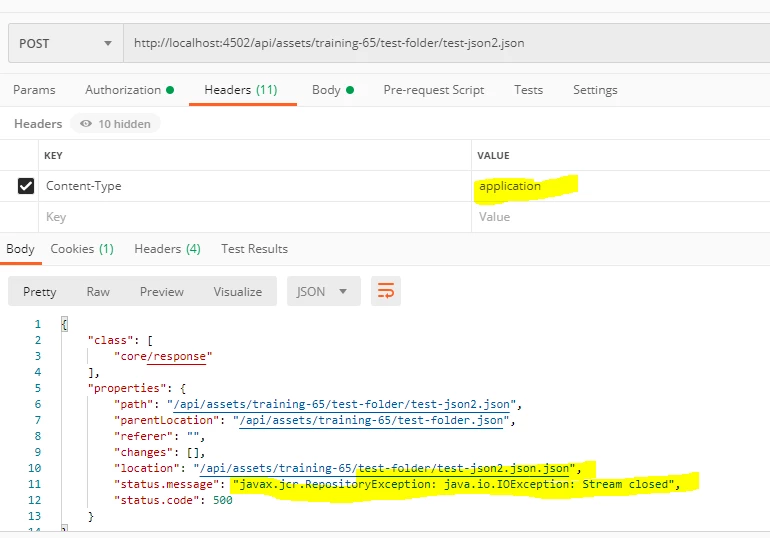
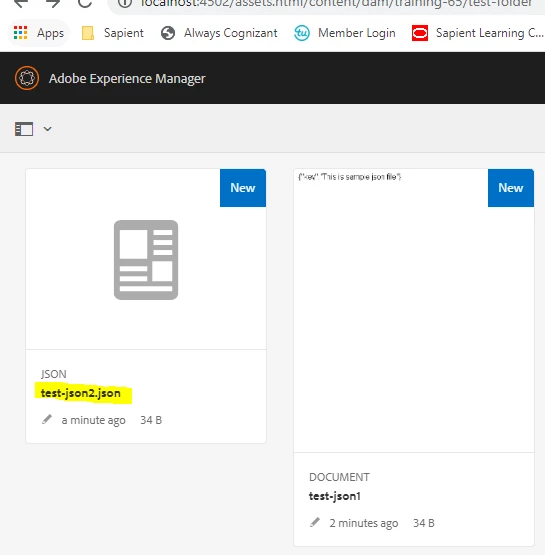
@matstyler Thanks for following up. I tried this out.  When we give Content-Type : "application/json" , it is creating a folder , So I tried with a generic type as Content-Type:"application" and it worked ✌😉

Even though it throws me error , file actually got uploaded 


Hope this works for you ✌

Thanks

Veena


3 replies

VeenaVikraman
Community Advisor
Community Advisor
July 16, 2020

Hi @matstyler 


   Recently I tried out Asset API myself and tried to put it in a video for others if it helps. Please check it how to upload asset here https://youtu.be/NL-2WqitHUE?t=835 


Hope this helps

Veena ✌

MatStylerAuthor
July 16, 2020
That's the problem.
Adobe Employee
July 16, 2020


If I understand you correctly are you are trying to create an asset outside any folder , and  are seeing that the curl command is creating a folder instead of a node name?

MatStylerAuthor
July 16, 2020
It's working with images (uploading an image) but not for jsons.
VeenaVikraman
Community Advisor
VeenaVikramanCommunity AdvisorAccepted solution
Community Advisor
July 29, 2020

@matstyler Thanks for following up. I tried this out.  When we give Content-Type : "application/json" , it is creating a folder , So I tried with a generic type as Content-Type:"application" and it worked ✌😉

Even though it throws me error , file actually got uploaded 


Hope this works for you ✌

Thanks

Veena


MatStylerAuthor
July 30, 2020
Yeah, it's working but returning the error so it's not a good solution but a hack.
