How to update asset programatically in AEM Assets? | Community
Skip to main content
July 1, 2020
Solved

How to update asset programatically in AEM Assets?

  • July 1, 2020
  • 5 replies
  • 11342 views

Hi All,


I am using createAsset Api to create asset in asset server.If I want to  update asset content (I am uplaoding pdfs) file is not updating. How to achieve file update with assetmanager API.


Any help much appreaciated.


AssetManager manager = resourceResolver.adaptTo(AssetManager.class);
Asset createAsset(String path,
                InputStream is,
                String mimeType,
                boolean doSave)


Thanks!
 

This post is no longer active and is closed to new replies. Need help? Start a new post to ask your question.
Best answer by AlbinIs1

You can also use the ASSETS HTTP API directly to update the asset meta data

e.g 

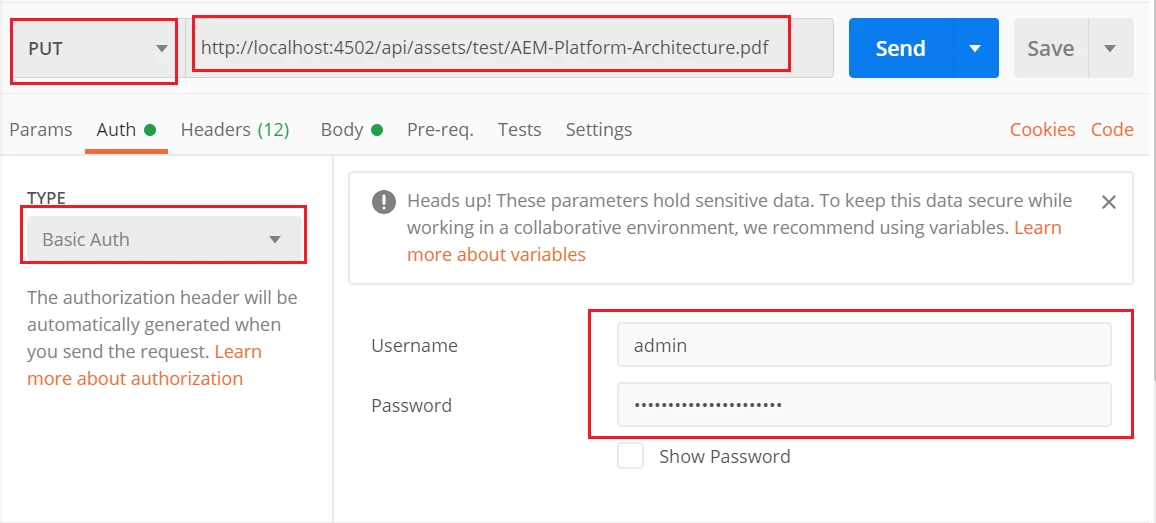
URL - http://localhost:4502/api/assets/test/test-api.pdf   (test is the parent folder under /content/dam)

Method - PUT

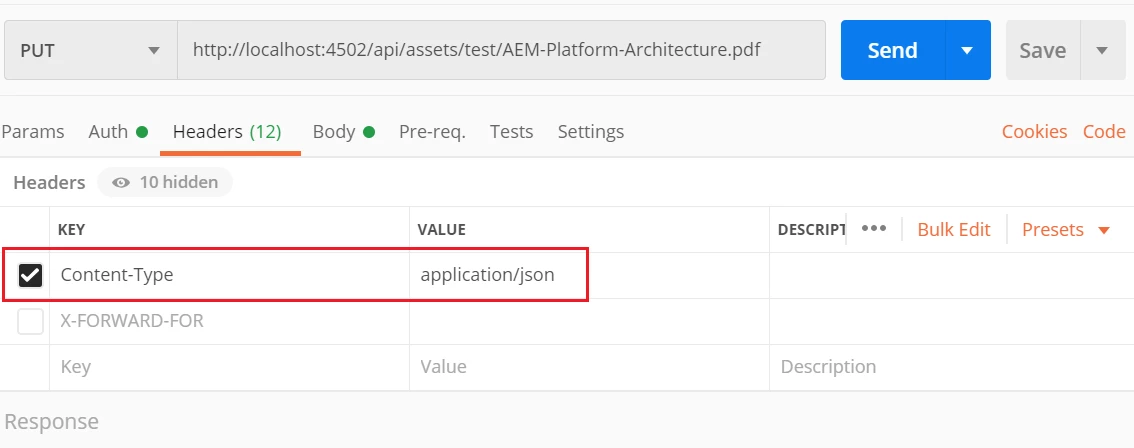
Content-Type - application/json

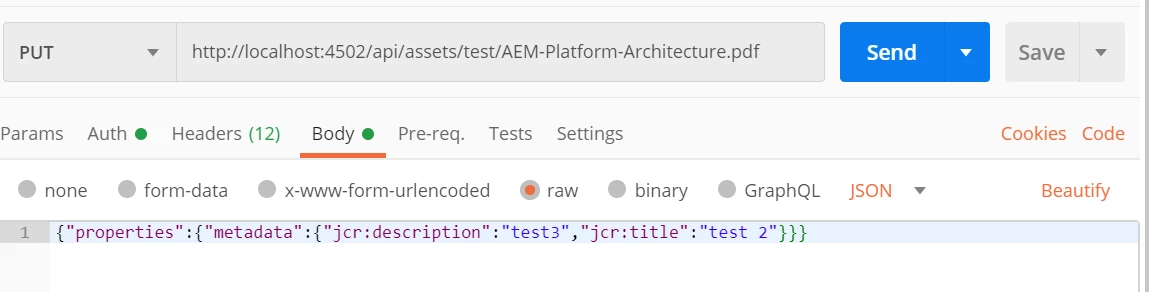
Sample Payload - {"properties":{"metadata":{"jcr:description":"test3","jcr:title":"test 2"}}}

Add the Basic authentication details 

Reference - https://docs.adobe.com/content/help/en/experience-manager-65/assets/extending/mac-api-assets.html


Sample request through postman


Regards

Albin I

www.albinsblog.com

5 replies

raj_mandalapu
July 2, 2020

The below article gives you clear information on how to create Asset and updating the Asset.

https://github.com/Adobe-Consulting-Services/acs-aem-commons/blob/master/bundle/src/main/java/com/adobe/acs/commons/mcp/impl/processes/asset/AssetIngestor.java#L320

In the above github codebase, check "saveMigrationInfo" method to update asset


December 24, 2021

Can I use the Asset HTTP API to link "Related" assets?


More details on Related Asset:
https://experienceleague.adobe.com/docs/experience-manager-65/assets/managing/related-assets.html?lang=en


Technically, 

Related assets Admin UI, creates node "related" next to "metadata" when you link using asset admin UI. 

I tried sending following JSON with Update Asset Metadata API Call, I'm getting 403 status code.

{"class":"asset","properties":{"metadata":{"cq:tags":["keywords:Cambridge"]},"related":{"others":{"sling:members":["/content/dam/test/files/test.pdf"]}}}}


How to update the "related asset?".


Thank you!

AlbinIs1Community AdvisorAccepted solution
Community Advisor
July 2, 2020

You can also use the ASSETS HTTP API directly to update the asset meta data

e.g 

URL - http://localhost:4502/api/assets/test/test-api.pdf   (test is the parent folder under /content/dam)

Method - PUT

Content-Type - application/json

Sample Payload - {"properties":{"metadata":{"jcr:description":"test3","jcr:title":"test 2"}}}

Add the Basic authentication details 

Reference - https://docs.adobe.com/content/help/en/experience-manager-65/assets/extending/mac-api-assets.html


Sample request through postman


Regards

Albin I

www.albinsblog.com

November 1, 2022

Hi,

Can Asset API be used with more secured method like Outh2.0?  

Nupur_Jain
Adobe Employee
Adobe Employee
July 2, 2020

Hi @17288292 


If I am able to understand correctly, you want to replace the existing PDF file with new PDF file OR you want to update metadata like tags, title etc?


Thanks,

Nupur

July 6, 2020
Yes Nupur I want to update the asset after I upload using assetManager.createassset method. as per the documentation it was told that we can user createassset method but it is not helping. I have trouble in getting the binary.
VeenaVikraman
Community Advisor
Community Advisor
July 2, 2020

@17288292 There is no separate method for updating an asset, it is basically the same createAsset Method which you use to update the existing asset. If you read the java docs more clearly you can read the below


createAsset

Asset createAsset(String path,
                InputStream is,
                String mimeType,
                boolean doSave)
Creates a new Asset at the given path. If an asset already exists at the given path, its original rendition is updated instead of creating a new asset. If inputStream is null new Asset is created without original rendition. If an asset already exists at given path and inputstream is null, original rendition is not updated.
 
 
Said that, for a sample code, please take a look at the codebase @raj_mandalapu  mentioned, but check line 346 , you can clearly see that line actually updates an existing asset.


//if skip then we only create asset if it doesn't exist if (r.getResource(assetPath) == null) { createAsset(source, assetPath, r, false); }


Hope this helps

Veena ✌

sunjot16
Adobe Employee
Adobe Employee
July 3, 2020

You can use the Asset Interface to achieve the same.

     // to create an asset
     AssetManager assetManager = resolver.adaptTo(AssetManager.class);
     Asset newAsset = assetManager.createAsset("/path/to/asset/document.pdf");

The following docs may be helpful:

https://helpx.adobe.com/experience-manager/6-4/sites/developing/using/reference-materials/javadoc/com/adobe/granite/asset/api/Asset.html

https://helpx.adobe.com/experience-manager/6-4/sites/developing/using/reference-materials/javadoc/com/day/cq/dam/api/AssetManager.html#createAsset-java.lang.String-java.io.InputStream-java.lang.String-boolean-


The latter one states: 

Creates a new Asset at the given path. If an asset already exists at the given path, its original rendition is updated instead of creating a new asset. If inputStream is null new Asset is created without original rendition. If an asset already exists at given path and inputstream is null, original rendition is not updated.


I think that your Input Stream is null, due to which the original rendition is not getting updated.

Input Stream is the input stream of the new asset's original binary.


You can also achieve the same using Assets HTTP API, as follows:

https://docs.adobe.com/content/help/en/experience-manager-65/assets/extending/mac-api-assets.html#create-an-asset

https://docs.adobe.com/content/help/en/experience-manager-65/assets/extending/mac-api-assets.html#update-asset-binary


Hope these help !!

July 5, 2020
@sunjot16, thank you for your reply. my input stream is not null. how to get the asset binary can you please suggest some methods. I am reading like this fileInputStream = new FileInputStream(file.getPath());