How to store multifield data in JCR properties not in JCR node | Community
Skip to main content
Level 3
November 10, 2023
Solved

How to store multifield data in JCR properties not in JCR node

  • November 10, 2023
  • 2 replies
  • 1180 views

Below is the structure of my multifield dialog in template page component. once I author this mutlified in page properties, I want data to be stored in page jcr:content properties rather than in JCR node.

Usually it is being stored like this in node type
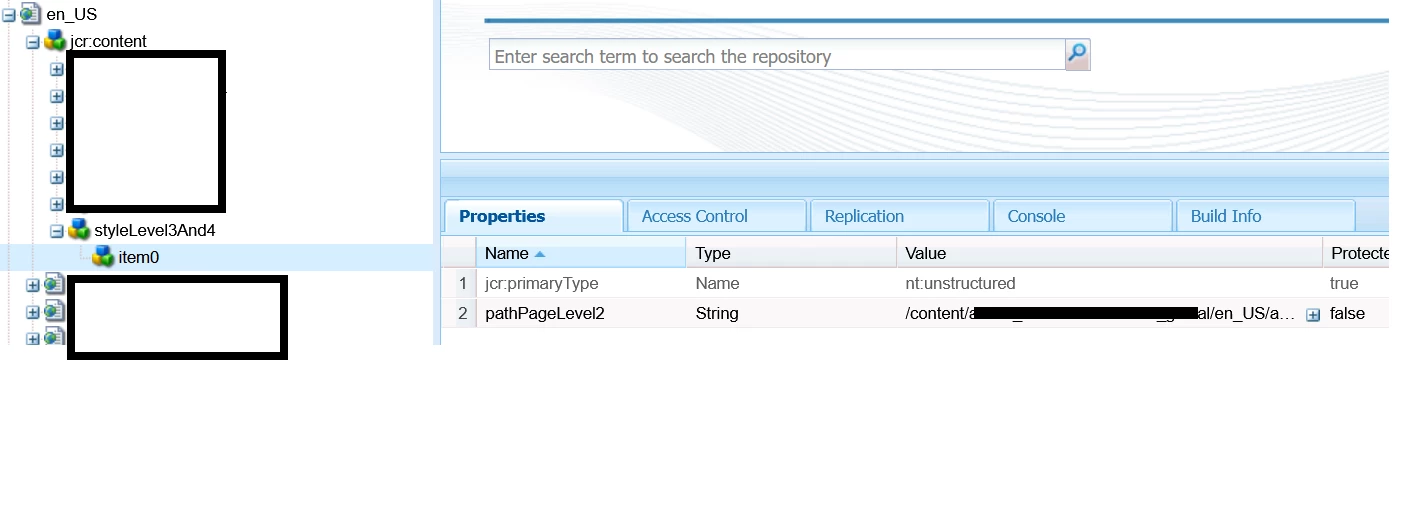
Instead above I wanted to store styleLevel3And4 inside jcr:content as a property value like below.
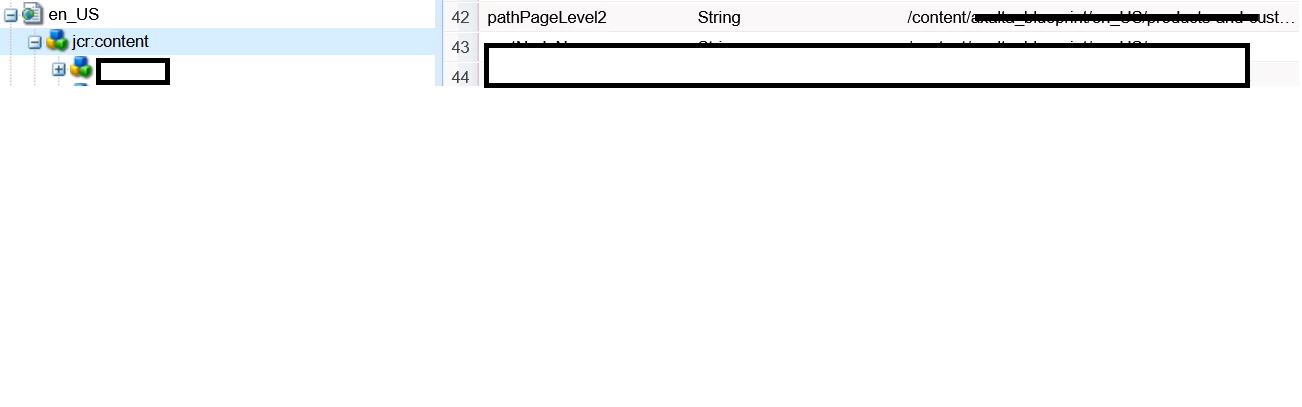
 How I can achieve that, thank you.

               <style_3and4
jcr:primaryType="nt:unstructured"
jcr:title="Style for levels 3 &amp; 4"
sling:resourceType="granite/ui/components/coral/foundation/form/fieldset"
title="Style for levels 3 &amp; 4">
<items jcr:primaryType="nt:unstructured">
<style_few_items
jcr:primaryType="nt:unstructured"
sling:resourceType="granite/ui/components/foundation/form/multifield"
cq-msm-lockable="styleLevel3And4"
fieldLabel="Style configuration(⚠ Editing is only possible in Blueprint and Standalone)">
<field
jcr:primaryType="nt:unstructured"
sling:resourceType="granite/ui/components/coral/foundation/container"
name="./styleLevel3And4">
<items jcr:primaryType="nt:unstructured">
<column
jcr:primaryType="nt:unstructured"
sling:resourceType="granite/ui/components/coral/foundation/container">
<items jcr:primaryType="nt:unstructured">
<path_page_level_2
jcr:primaryType="nt:unstructured"
sling:resourceType="granite/ui/components/coral/foundation/form/pathbrowser"
fieldLabel="Path to page on level 2"
name="./pathPageLevel2"
rootPath="/content"/>
</items>
</column>
</items>
</field>
</style_few_items>
</items>
</style_3and4>


This post is no longer active and is closed to new replies. Need help? Start a new post to ask your question.
Best answer by Mahedi_Sabuj

Here is an example you can check

<listItems jcr:primaryType="nt:unstructured" sling:resourceType="granite/ui/components/coral/foundation/form/multifield" composite="{Boolean}false" fieldDescription="Click 'Add Field' to add more domain link in list." fieldLabel="Domain Link List" required="{Boolean}true"> <field jcr:primaryType="nt:unstructured" sling:resourceType="granite/ui/components/coral/foundation/form/textfield" name="./domainLinks"/> </listItems>

2 replies

Mahedi_Sabuj
Community Advisor
Mahedi_SabujCommunity AdvisorAccepted solution
Community Advisor
November 10, 2023

Here is an example you can check

<listItems jcr:primaryType="nt:unstructured" sling:resourceType="granite/ui/components/coral/foundation/form/multifield" composite="{Boolean}false" fieldDescription="Click 'Add Field' to add more domain link in list." fieldLabel="Domain Link List" required="{Boolean}true"> <field jcr:primaryType="nt:unstructured" sling:resourceType="granite/ui/components/coral/foundation/form/textfield" name="./domainLinks"/> </listItems>
Mahedi Sabuj
arunpatidar
Community Advisor
Community Advisor
November 13, 2023
VedhaSriAuthor
Level 3
November 15, 2023


<?xml version="1.0" encoding="UTF-8"?> <jcr:root xmlns:sling="http://sling.apache.org/jcr/sling/1.0" xmlns:cq="http://www.day.com/jcr/cq/1.0" xmlns:jcr="http://www.jcp.org/jcr/1.0" xmlns:nt="http://www.jcp.org/jcr/nt/1.0" jcr:primaryType="nt:unstructured" jcr:title="Navigation" sling:resourceType="cq/gui/components/authoring/dialog"> <content jcr:primaryType="nt:unstructured" sling:resourceType="granite/ui/components/foundation/container"> <items jcr:primaryType="nt:unstructured"> <tabs jcr:primaryType="nt:unstructured" sling:resourceType="granite/ui/components/foundation/container"> <layout jcr:primaryType="nt:unstructured" sling:resourceType="granite/ui/components/foundation/layouts/tabs" type="nav" /> <items jcr:primaryType="nt:unstructured"> <navigationitems jcr:primaryType="nt:unstructured" jcr:title="Navigation Items" sling:resourceType="granite/ui/components/foundation/section"> <layout jcr:primaryType="nt:unstructured" sling:resourceType="granite/ui/components/foundation/layouts/fixedcolumns" margin="{Boolean}false" /> <items jcr:primaryType="nt:unstructured"> <column jcr:primaryType="nt:unstructured" sling:resourceType="granite/ui/components/foundation/container"> <items jcr:primaryType="nt:unstructured"> <navigationitems jcr:primaryType="nt:unstructured" sling:resourceType="granite/ui/components/foundation/form/multifield" class="full-width" fieldDescription="Click 'Add field' to add a new item" fieldLabel="Navigation Items"> <field jcr:primaryType="nt:unstructured" sling:resourceType="granite/ui/components/foundation/form/fieldset" acs-commons-nested="JSON_STORE" name="./navigationItems"> <layout jcr:primaryType="nt:unstructured" sling:resourceType="granite/ui/components/foundation/layouts/fixedcolumns" method="absolute" /> <items jcr:primaryType="nt:unstructured"> <column jcr:primaryType="nt:unstructured" sling:resourceType="granite/ui/components/foundation/container"> <items jcr:primaryType="nt:unstructured"> <link jcr:primaryType="nt:unstructured" sling:resourceType="granite/ui/components/foundation/form/pathbrowser" fieldLabel="Link" name="./linkURL" rootPath="/content" /> </items> </column> </items> </field> </navigationitems> </items> </column> </items> </navigationitems> </items> </tabs> </items> </content> </jcr:root>


Followed same dialog structure, but data is being stored in node format not in jcr property inside jcr:content


VedhaSriAuthor
Level 3
November 15, 2023

navigationItems String {"linkURL":"/content/corporate/en_US/products-and-customers/customers"} like this I want to store inside jcr:content page properties not node type.