How to stop Gulp from watching for changes when used with maven build in AEM? | Community
Skip to main content
avinasht6348431
Level 2
March 1, 2019
Solved

How to stop Gulp from watching for changes when used with maven build in AEM?

  • March 1, 2019
  • 5 replies
  • 4826 views

Hi Team,

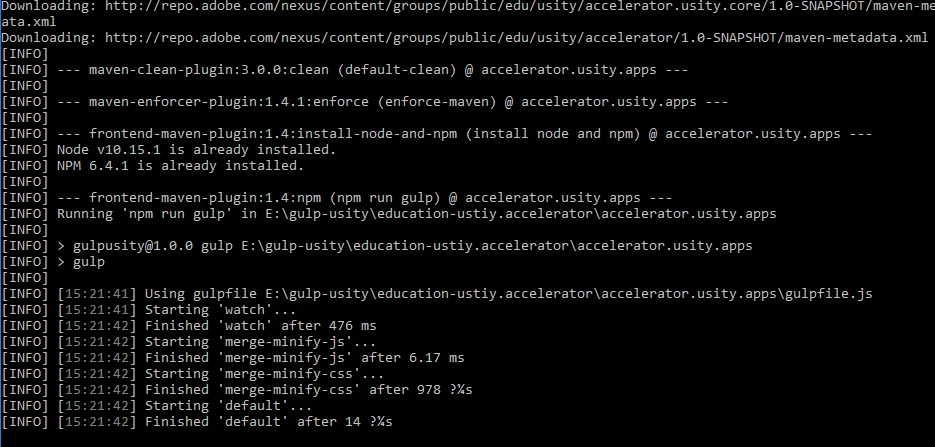
I am using gulp with frontend-maven-plugin. All my tasks defined in gulp are working fine. There is just one BIG issue. After gulp task executes the cmd waits in an infinite loop.
Below is the gulpfile.js:

var gulp = require('gulp');

var concat = require('gulp-concat');

var minifyCSS = require('gulp-minify-css');

var autoprefixer = require('gulp-autoprefixer');

var cleanCSS = require('gulp-clean-css');

var gulp = require('gulp'),

    uglify = require('gulp-uglify');

var pump = require('pump');

var paths = {

    scripts: "src/main/content/jcr_root/etc/designs/usity/clientlib-all/js/*.js",

    styles: "src/main/content/jcr_root/etc/designs/usity/clientlib-all/css/*.css"

}

gulp.task("merge-minify-js", function(){

      gulp.src(paths.scripts)

     .pipe(concat("all.js"))

     .pipe(uglify())

     .pipe(gulp.dest("src/main/content/jcr_root/etc/designs/usity/clientlib-all-min-js"));


});

gulp.task("merge-minify-css", function(){

      gulp.src(paths.styles)

     .pipe(concat("all.css"))

     .pipe(cleanCSS())

     .pipe(gulp.dest("src/main/content/jcr_root/etc/designs/usity/clientlib-all-min-css"));

});

// watch tasks for automation

gulp.task('watch', function() {


  gulp.watch(paths.scripts, ['merge-minify-js']);

  gulp.watch(paths.styles, ['merge-minify-css']);

});

gulp.task("default", ["watch","merge-minify-js", "merge-minify-css"]);

pom.xml i have added maven plugin:

<!--gulp-->

<plugin>

        <groupId>com.github.eirslett</groupId>

        <artifactId>frontend-maven-plugin</artifactId>

        <version>1.4</version>

             <!--<groupId>org.codehaus.mojo</groupId>

    <artifactId>exec-maven-plugin</artifactId>

    <version>1.5.0</version>  -->

        <executions>

           <execution>

                <id>install node and npm</id>

                <goals>

                    <goal>install-node-and-npm</goal>

                </goals>

                <configuration>

                    <nodeVersion>v10.15.1</nodeVersion>

                    <npmVersion>6.4.1</npmVersion>

                </configuration>

            </execution>

           <execution>

<id>npm run gulp</id>

<goals>

<goal>npm</goal>

</goals>

<configuration>

<arguments>run gulp</arguments>    

</configuration>

<phase>generate-resources</phase>

</execution>

            <execution>

                <id>bower install</id>

                <goals>

                     <goal>bower</goal>

                </goals>

                     <configuration>

                        <arguments>install</arguments>

                     </configuration>

                </execution>

                <execution>

                     <id>gulp build</id>

                     <goals>

                         <goal>gulp</goal>

                     </goals>

                     <phase>generate-resources</phase>

                </execution> 

        </executions>

    </plugin>

Kindly let me know the resolution for the same to make build successful.

Thanks in advance.

This post is no longer active and is closed to new replies. Need help? Start a new post to ask your question.
Best answer by Gaurav-Behl

change

gulp.task("default", ["watch","merge-minify-js", "merge-minify-css"]);

to

gulp.task("default", ["merge-minify-js", "merge-minify-css"]);

5 replies

smacdonald2008
Level 10
March 1, 2019

WHy are you not using the Maven Archetype as discussed here:

Getting Started with AEM Sites Chapter 1 - Project Setup

This is what Adobe recommends. 

Gaurav-Behl
Gaurav-BehlAccepted solution
Level 10
March 1, 2019

change

gulp.task("default", ["watch","merge-minify-js", "merge-minify-css"]);

to

gulp.task("default", ["merge-minify-js", "merge-minify-css"]);

avinasht6348431
Level 2
March 5, 2019

Thanks Gaurav.It worked for me.

But is it possible to "watch" the tasks for js and css file(add/delete) and parallelly make the maven build also success?!

Gaurav-Behl
Level 10
March 5, 2019

Not in the same thread/terminal/cmd but you can create another task like -   gulp.task("<mytask>", ["watch","merge-minify-js", "merge-minify-css"]);

and when you want to watch use "gulp <mytask>" in terminal otherwise for normal maven build when you wouldn't want build to keep waiting, use "default" (gulp would run "default"  task if you don't specify one in goal)

avinasht6348431
Level 2
March 6, 2019

Thanks Gaurav!