How to specify package dependencies in Maven project | Community
Skip to main content
Level 4
July 7, 2020
Solved

How to specify package dependencies in Maven project

  • July 7, 2020
  • 2 replies
  • 1100 views

Hi All,

According to https://docs.adobe.com/content/help/en/experience-manager-cloud-manager/using/how-to-use/deploying-code.html#deployment-process , package dependencies determine the deployment order when deploying using Cloud Manager.

How do I specify the package dependencies so that I can control the order in which Cloud Manager deploys packages?

I tried adding the code below to the <dependencies> section in the pom.xml and it has not affected Cloud Manager package deployment order?

<dependency>
<groupId>com.myproject.ecomm.aem</groupId>
<artifactId>myproject.ui.thirdpartypackages</artifactId>
<version>${project.version}</version>
<type>zip</type>
</dependency>

Thanks and best regards,

Robert
This post is no longer active and is closed to new replies. Need help? Start a new post to ask your question.
Best answer by arunpatidar

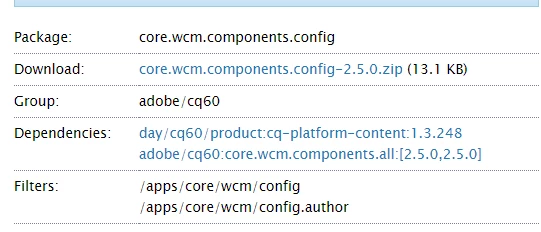
You can define package dependencies using maven like dependencies tab in AEM packages

https://docs.adobe.com/content/help/en/experience-manager-64/administering/contentmanagement/package-manager.html#package-settings


like core components


<plugin> <groupId>org.apache.jackrabbit</groupId> <artifactId>filevault-package-maven-plugin</artifactId> <extensions>true</extensions> <configuration> <showImportPackageReport>false</showImportPackageReport> <embeddedTarget>/apps/core/wcm/install</embeddedTarget> <embeddeds> <embedded> <groupId>${project.groupId}</groupId> <artifactId>core.wcm.components.core</artifactId> <target>/apps/core/wcm/install</target> </embedded> </embeddeds> <subPackages> <subPackage> <groupId>${project.groupId}</groupId> <artifactId>core.wcm.components.content</artifactId> <filter>true</filter> </subPackage> <subPackage> <groupId>${project.groupId}</groupId> <artifactId>core.wcm.components.config</artifactId> <filter>true</filter> </subPackage> </subPackages> <packageType>container</packageType> </configuration> </plugin>


2 replies

VeenaVikraman
Community Advisor
Community Advisor
July 8, 2020

@arunpatidar @kautuk_sahni  @theo_pendle Any help here ? 

arunpatidar
Community Advisor
arunpatidarCommunity AdvisorAccepted solution
Community Advisor
July 8, 2020

You can define package dependencies using maven like dependencies tab in AEM packages

https://docs.adobe.com/content/help/en/experience-manager-64/administering/contentmanagement/package-manager.html#package-settings


like core components


<plugin> <groupId>org.apache.jackrabbit</groupId> <artifactId>filevault-package-maven-plugin</artifactId> <extensions>true</extensions> <configuration> <showImportPackageReport>false</showImportPackageReport> <embeddedTarget>/apps/core/wcm/install</embeddedTarget> <embeddeds> <embedded> <groupId>${project.groupId}</groupId> <artifactId>core.wcm.components.core</artifactId> <target>/apps/core/wcm/install</target> </embedded> </embeddeds> <subPackages> <subPackage> <groupId>${project.groupId}</groupId> <artifactId>core.wcm.components.content</artifactId> <filter>true</filter> </subPackage> <subPackage> <groupId>${project.groupId}</groupId> <artifactId>core.wcm.components.config</artifactId> <filter>true</filter> </subPackage> </subPackages> <packageType>container</packageType> </configuration> </plugin>


Arun Patidar