How to setup local publish instance for cloud SDK? | Community
Skip to main content
Level 8
March 29, 2021
Solved

How to setup local publish instance for cloud SDK?

  • March 29, 2021
  • 1 reply
  • 2253 views

We have to get grapqhl working. Graphql cant be used form author instance because it requires authentication, and the method is not documented and there is no way to "unprotect" the graphql endpoint on author to not require authenticaiton.


We understand that the publish instance doesnt have this restriction, i.e. we can call the graphql endpoint without authentication.


However, we cant find how to setup a publish instance which takes its content from the author instance.


This is on an M1 Mac.


We installed author by renaming our aem_cloud_SDK jar to aem-author-p4502.jar, unpacking it, then running crx-quickstart/bin/start.  This works, and we have installed the wknd site which has content fragments and setsup the graphql endpoint correctly.   We kept the default admin/admin user/pass


We installed publish by copying the aem cloud sdk jar file to aem-publish-p4503.jar in a separate dir and uplacking/running it.  The process is running, but when we try to hit any publish url e.g. http://localhost:4503/content/wknd/us/en/magazine/ski-touring we get 404.


With the NON cloud SDK, this works out of the box (i.e. replication happens automatically), but what do we need to do for cloud SDK to get this to work?


We only need the publish instance to try to find a way to access graphql endpoint in our local dev envs without authentication.
This post is no longer active and is closed to new replies. Need help? Start a new post to ask your question.
Best answer by Asutosh_Jena_

Hi @tb3dock 

This setup completely works for me for both Author and Publish instance. Please make sure to run the instance by running the below command:

Author: java -jar aem-author-p4502.jar
Publish: java -jar aem-publish-p4503.jar

and for both the instance use the below username and password:

admin/admin


Here all the wknd pages are working fine in both author and publish instance.


In Cloud Service environment content is distributed from the Author Service to the Publish Service using Sling Content Distribution and the Adobe Pipeline whereas during development, to simulate the distribution of content using the local Author and Publish service the legacy Replication agents can be used.


  1. Login to the Author service and navigate to http://localhost:4502/etc/replication/agents.author.html
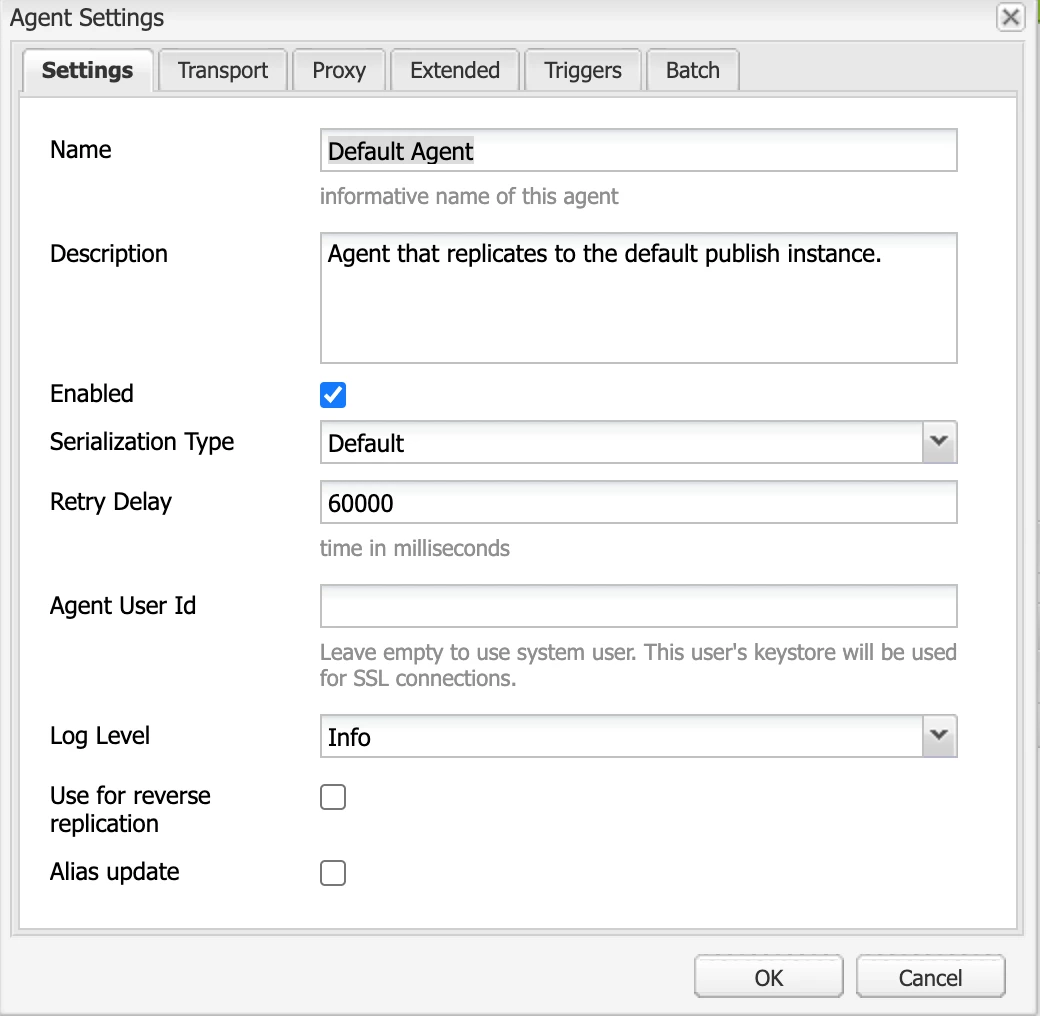
  2. Select the Default Agent and configure it.
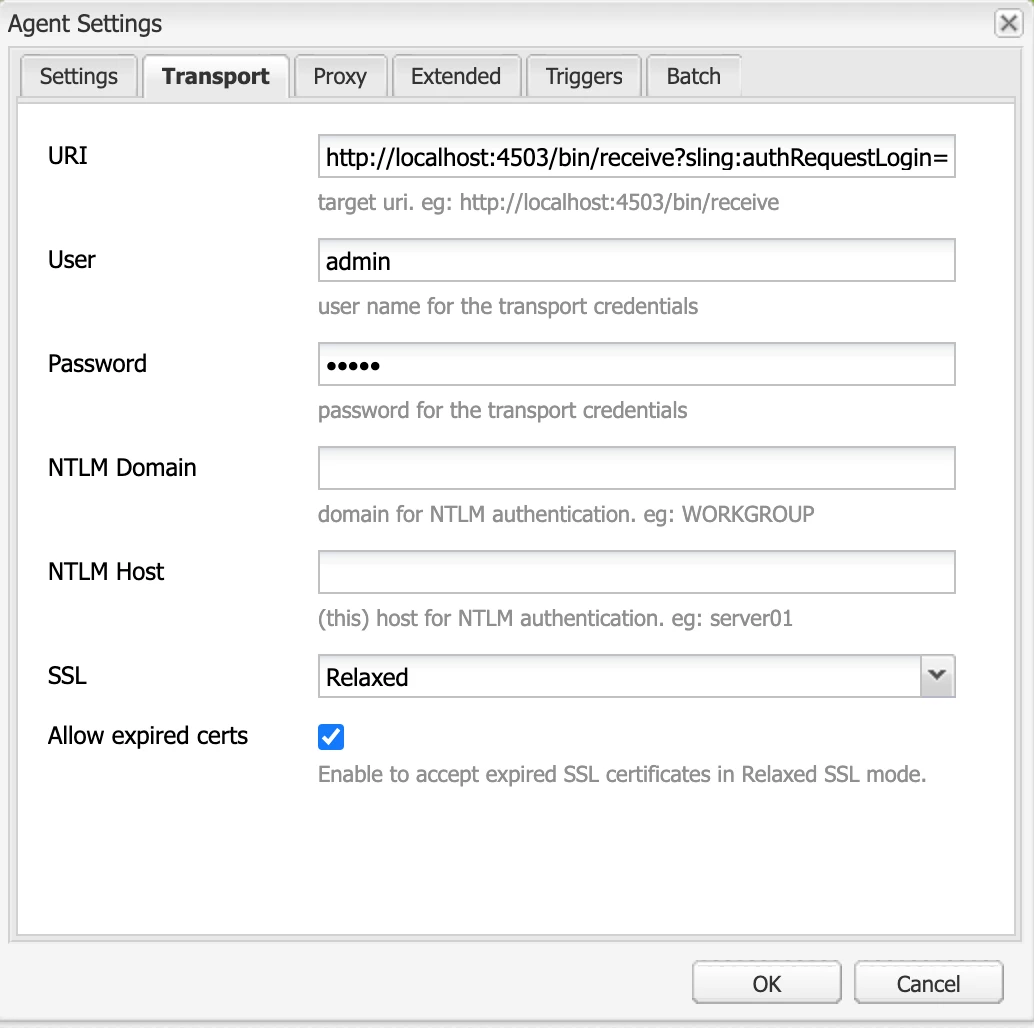
  3. Transport tab please use this config: http://localhost:4503/bin/receive?sling:authRequestLogin=1 with admin/admin
  4. Save and test the connection.


It will allow you to replicate the page.


Please refer the below link:

https://experienceleague.adobe.com/docs/experience-manager-learn/cloud-service/local-development-environment-set-up/aem-runtime.html?lang=en#content-distribution


Hope this helps!

Thanks!


1 reply

Asutosh_Jena_
Community Advisor
Asutosh_Jena_Community AdvisorAccepted solution
Community Advisor
March 29, 2021

Hi @tb3dock 

This setup completely works for me for both Author and Publish instance. Please make sure to run the instance by running the below command:

Author: java -jar aem-author-p4502.jar
Publish: java -jar aem-publish-p4503.jar

and for both the instance use the below username and password:

admin/admin


Here all the wknd pages are working fine in both author and publish instance.


In Cloud Service environment content is distributed from the Author Service to the Publish Service using Sling Content Distribution and the Adobe Pipeline whereas during development, to simulate the distribution of content using the local Author and Publish service the legacy Replication agents can be used.


  1. Login to the Author service and navigate to http://localhost:4502/etc/replication/agents.author.html
  2. Select the Default Agent and configure it.
  3. Transport tab please use this config: http://localhost:4503/bin/receive?sling:authRequestLogin=1 with admin/admin
  4. Save and test the connection.


It will allow you to replicate the page.


Please refer the below link:

https://experienceleague.adobe.com/docs/experience-manager-learn/cloud-service/local-development-environment-set-up/aem-runtime.html?lang=en#content-distribution


Hope this helps!

Thanks!


TB3dockAuthor
Level 8
March 29, 2021
Hi, If I start the author instance using equivalent of java -jar aem-author-p4502.jar it works as expected. If I start the aem-publish-p4503.jar in a new dir in the same way, whatever URL I hit on http://localhost:4503 I get 404 not found. There is no login option. I am using the local cloud SDK. It works if I use the old non-cloud jar file for author or publish (e.g. on my old windows computer), but on the mac I am using the cloud SDK as thats what most of the tutorials use, and cloud is what we are using in production.