How to set permissions on workflow models to a specific user group? | Adobe Higher Education
Skip to main content
jezwn
Level 5
May 28, 2020
Respondido

How to set permissions on workflow models to a specific user group?

  • May 28, 2020
  • 3 respostas
  • 5057 Visualizações

Let's say I have a user group x with minimal permissions which needs to trigger a workflow y. Currently the group permissions are,
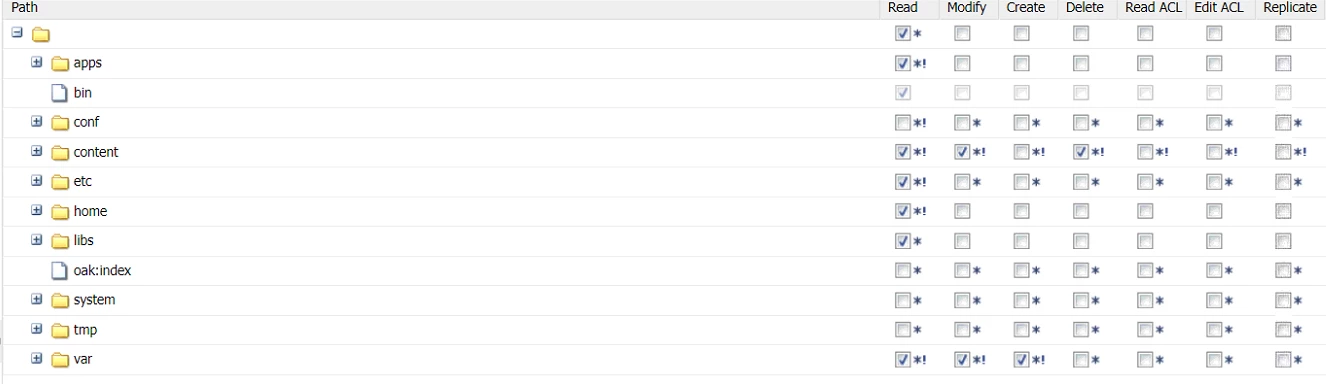
 

So if I try to start the workflow from the sites, selecting the page --> Create --> Workflow, in select the workflow models dropdown OOTB models are also being listed. I want the dropdown list to be restricted to only the workflow y, which I created. So how can I set the required permissions!

Este tópico foi fechado para respostas.
Melhor resposta por vanegi

You can also achieve the given use case by implementing Workflow: System tag on the model. This will allow you to hide default workflows and display custom workflows in the Start Workflow list in the AEM Sites and Assets UI. See [0] for more details.


Steps:

Workflow models are hidden by setting Workflow: System tag on the model.

  1. Go to the Workflow Models console: http://host:port/libs/cq/workflow/admin/console/content/models.html/etc/workflow/models
  2. Click Page Properties on the AEM Sidekick.
  3. Add Workflow: System tag into Tags/Keywords.
  4. Remove Workflow: WCM tag (and other tags) from Tags/Keyword if any.
  5. Click the OK button.
  6. Click the Save button in the top left of the editor page.

[0]: https://helpx.adobe.com/in/experience-manager/kb/hide-workflow-models-start-workflow-list.html

3 Respostas

Adobe Employee
May 28, 2020
jezwn
jezwnAutor
Level 5
May 29, 2020
For the models folder the permission was set to deny for jcr:read and for inside one folder set the permission as allow. But it ain't showing up. The rule is to deny all and allow specific right!
Adobe Employee
May 30, 2020

Answer by @hamid1350 already covers the link you can try and it works.


In case you need to deny certain workflows from appearing in the drop down and it is true for all the users then a suggested approach can be to tag such workflows as system workflows. You can open the workflow properties and tag it with workflow/system and it won't appear in any drop down where user can select it.


December 31, 2020
I am also facing same issue. Using AEM 6.5
vanegi
Adobe Employee
vanegiAdobe EmployeeResposta
Adobe Employee
June 14, 2020

You can also achieve the given use case by implementing Workflow: System tag on the model. This will allow you to hide default workflows and display custom workflows in the Start Workflow list in the AEM Sites and Assets UI. See [0] for more details.


Steps:

Workflow models are hidden by setting Workflow: System tag on the model.

  1. Go to the Workflow Models console: http://host:port/libs/cq/workflow/admin/console/content/models.html/etc/workflow/models
  2. Click Page Properties on the AEM Sidekick.
  3. Add Workflow: System tag into Tags/Keywords.
  4. Remove Workflow: WCM tag (and other tags) from Tags/Keyword if any.
  5. Click the OK button.
  6. Click the Save button in the top left of the editor page.

[0]: https://helpx.adobe.com/in/experience-manager/kb/hide-workflow-models-start-workflow-list.html