How to set Default value in Dropdown in fragment model ? | Community
Skip to main content
Level 2
April 29, 2022
Solved

How to set Default value in Dropdown in fragment model ?

  • April 29, 2022
  • 2 replies
  • 1083 views

Hi,

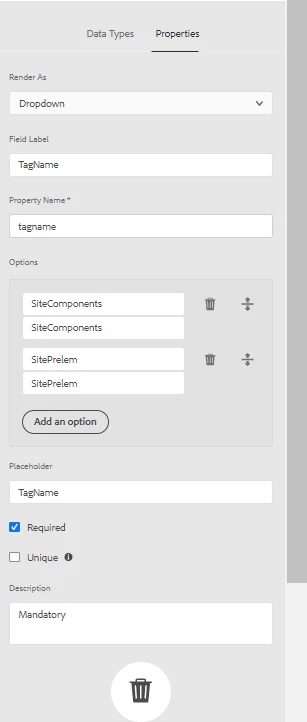
I need to set Default value in Dropdown of fragment model as there is no property of "default value" in Dropdown datatype. Please suggest what need to do to get it.
 

This post is no longer active and is closed to new replies. Need help? Start a new post to ask your question.
Best answer by Bhuwan_B

@rohit4 OOTB Default option is not available as of now, Please refer below URL to look for custom solution by extending current behavior. Also please log a ticket with Adobe.

https://blogs.perficient.com/2021/05/27/how-to-extend-content-fragment-model-data-types/

2 replies

Bhuwan_B
Community Advisor
Bhuwan_BCommunity AdvisorAccepted solution
Community Advisor
April 29, 2022

@rohit4 OOTB Default option is not available as of now, Please refer below URL to look for custom solution by extending current behavior. Also please log a ticket with Adobe.

https://blogs.perficient.com/2021/05/27/how-to-extend-content-fragment-model-data-types/

Anmol_Bhardwaj
Community Advisor
Community Advisor
April 29, 2022

Try adding the jcr:property

selected = {Boolean}true

Rohit4Author
Level 2
May 3, 2022

Hi @anmol_bhardwaj 

Where i need to add jcr:property , [ selected = {Boolean}true ] in below properties. Please let me know exact location where i need to add in below properties or other CRX window.