how to set a Default value inside an Reference component provided using data-sly-resource | Community
Skip to main content
samikshaa223429
Level 3
June 30, 2020
Solved

how to set a Default value inside an Reference component provided using data-sly-resource

  • June 30, 2020
  • 2 replies
  • 5253 views

hi ,


I have a component which uses an reference component embedded inside the main component. I am using AEM 6.5 . 

<sly data-sly-resource="${'experiencefragment' @ resourceType='cq/experience-fragments/editor/components/experiencefragment'}"></sly>

I need to define default values to the fragmentPath inside the experience fragment. I tried using the approach provided under 

https://experienceleaguecommunities.adobe.com/t5/adobe-experience-manager/default-value-in-reference-component/qaq-p/315467 , i.e using cq:template and cq:templatePath approach and it fails . 


STEPS : 

1. Created a node inside the component of type nt:unstructured called cq:template. Added a property called fragmentPath of type String to it with default value for XF path. 

2. Created a sling:folder outside the component called templateConfigs, created node of type nt:unstructured inside it called experienceFragment . Added a property to it called fragmentPath of type String. Then added a property to component called cq:templateType (String) and added path of the new config as its value.


Both above approaches did not work. Please help.


Thanks,

Samiksha,
 

This post is no longer active and is closed to new replies. Need help? Start a new post to ask your question.
Best answer by Theo_Pendle

Hi @samikshaa223429,

@arunpatidar beat me to the punch 😉 But his answer is correct! One thing to know is that the value is cq:template are set when a component is created. That means if you placed your component on the page, then modified the cq:template values, you would have to remove and add the component again to see the changes, maybe that is your problem? 🙂

Other things to look out for:

  • The cq:template child must have the same name as the name of the resource in your data-sly-resource attribute (ie: experiencefragment)
  • The property you want to set a default for must match the name of that property in the target resourceType (ie: fragmentPath)

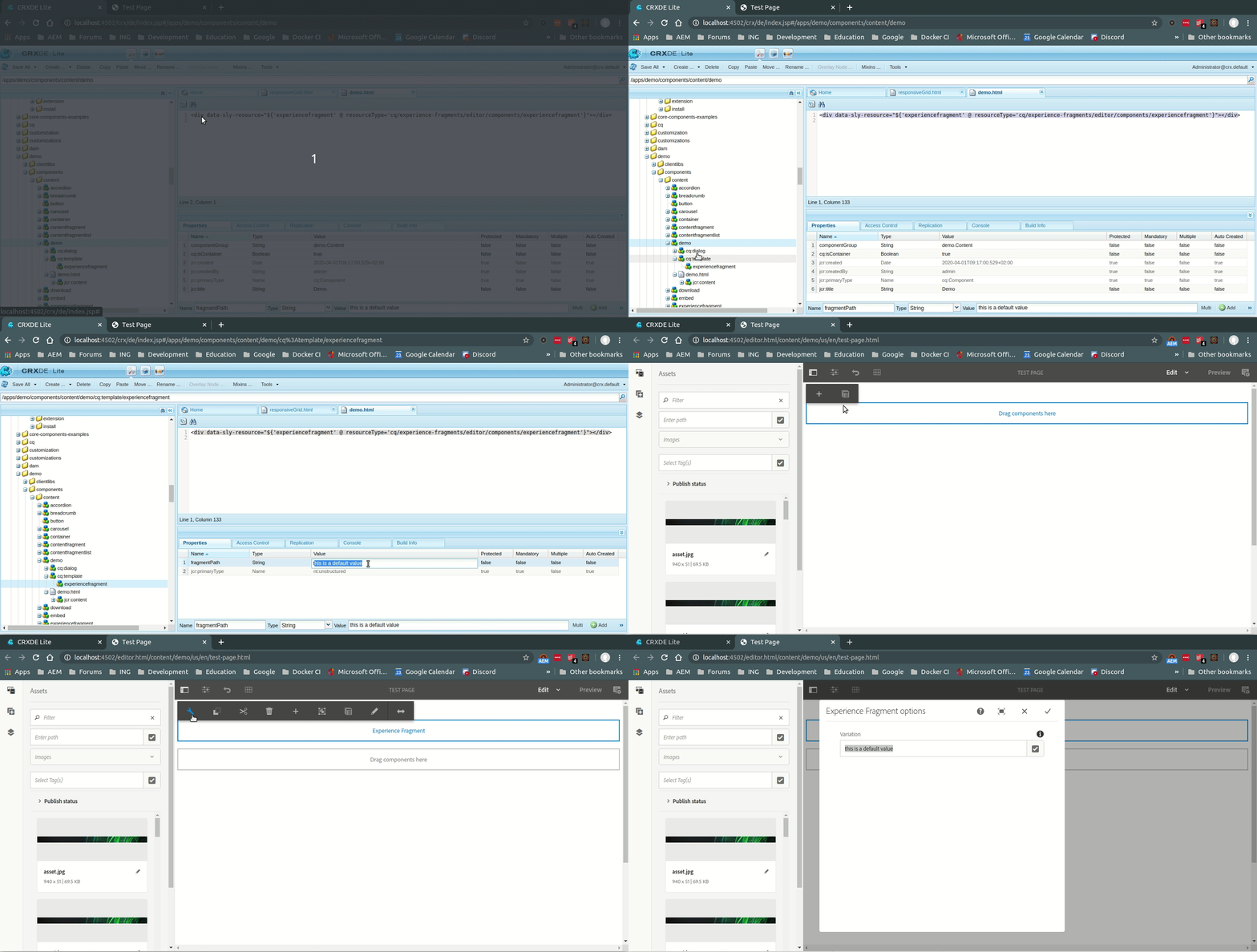
Here's a quick GIF to prove it works:


2 replies

arunpatidar
Community Advisor
Community Advisor
June 30, 2020

Create a node inside the component of type nt:unstructured called cq:template. Add a child node experiencefragment type of nt:unstructured and add a property called fragmentPath of type String to it with the default value for XF path. 

Arun Patidar
samikshaa223429
Level 3
June 30, 2020

hi Arun ,


The solution shared by you didnt work . XF is still not picking up the default value. 

Theo_Pendle
Theo_PendleAccepted solution
Level 8
July 1, 2020

Hi @samikshaa223429,

@arunpatidar beat me to the punch 😉 But his answer is correct! One thing to know is that the value is cq:template are set when a component is created. That means if you placed your component on the page, then modified the cq:template values, you would have to remove and add the component again to see the changes, maybe that is your problem? 🙂

Other things to look out for:

  • The cq:template child must have the same name as the name of the resource in your data-sly-resource attribute (ie: experiencefragment)
  • The property you want to set a default for must match the name of that property in the target resourceType (ie: fragmentPath)

Here's a quick GIF to prove it works:


arunpatidar
Community Advisor
Community Advisor
July 1, 2020
Yes you are correct @theo_pendle , the cq:template's properties are added to the node as soon as component added to the page. The idea to have properties in cq:template to initialize component with default values similar to value property of Granite field type. Once the component is modified or already added, cq:template will not have any effect.
Arun Patidar