How to save field values from a coral checkbox in a dialog in page properties | Community
Skip to main content
Level 3
December 20, 2018

How to save field values from a coral checkbox in a dialog in page properties

  • December 20, 2018
  • 1 reply
  • 2847 views

Hello,

In AEM 6.3, Touch UI, I have created a custom section in page properties with checkboxes on both the page and in a Coral dialog (popup).
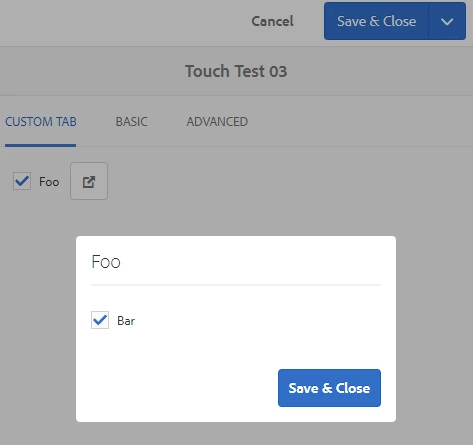
The values are to be saved in a custom node location within the content (jcr:content/custom/place/storage). The checkbox on the page saves. The checkbox within the dialog does not.

Example code:

<%@include file="/libs/foundation/global.jsp"%><%@page import="
java.util.*,
org.apache.sling.api.resource.Resource"%><%
ValueMap componentProps = null;
String pagePath = (request.getAttribute("javax.servlet.include.query_string") != null) ? request.getAttribute("javax.servlet.include.query_string").toString().replace("item=","") : "";
Resource pageResource = resourceResolver.getResource(pagePath);
Page thisPage = pageResource.adaptTo(Page.class);
Resource placeResource = thisPage.getContentResource("custom/place");
String fooCheck = "";
String barCheck = "";
String[] storageSettings = null;
if(placeResource != null){
     componentProps = placeResource.adaptTo(ValueMap.class);
     if(componentProps != null && componentProps.get("storage", String[].class) != null){
          storageSettings = componentProps.get("storage", String[].class);
          for(String s: storageSettings){
               if(s.equals("Foo=foo$true"))
                    fooCheck = "checked";
               if(s.equals("Foo=bar$true"))
                    barCheck = "checked";
          }
     }
}
%>
<coral-checkbox name="./custom/place/storage" id="top-foo" class="foo" name="foo" value="Foo=foo$true" <%=fooCheck%>>Foo</coral-checkbox><input class="foundation-field-related" type="hidden" name="./custom/place/storage@Delete">
<a is="coral-anchorbutton" icon="popOut" iconsize="XS" variant="secondary" onclick="showDialog('foo-dialog')"></a>
<coral-dialog id="foo-dialog">
     <coral-dialog-header>Foo</coral-dialog-header>
     <coral-dialog-content>
          <coral-checkbox name="./custom/place/storage" data="Foo" id="bar" class="foo" name="foobar" value="Foo=bar$true" <%=barCheck%>>Bar</coral-checkbox><input class="foundation-field-related" type="hidden" name="./custom/place/storage@Delete">
     </coral-dialog-content>
     <coral-dialog-footer><button is="coral-button" variant="primary" coral-close="" class="coral-Button coral-Button--primary" size="M"><coral-button-label>Save &amp; Close</coral-button-label></button></coral-dialog-footer>
</coral-dialog>
<script type="text/javascript">
     function showDialog(identifier) {
          var dialog = document.querySelector('#' + identifier);
          dialog.show();
     }
</script>

The Foo=foo$true value gets saved in jcr:content/custom/place/storage, like it should, but the Foo=bar@true value from dialog does not.

Why is the dialog's checkbox not saving, and what needs to happen to make it do so?

This post is no longer active and is closed to new replies. Need help? Start a new post to ask your question.

1 reply

Matt-H-Author
Level 3
December 20, 2018

I can see what is happening. Looking at what Coral UI does, when the coral dialog opens up, it moves the dialog div containing the checkbox outside of the form that gets submitted. And when the dialog closes, it doesn't move the checkboxes back, so the values aren't included in the save post.

Knowing ​why​ it's happening, however, doesn't tell me the best way to make it work...

Matt-H-Author
Level 3
January 29, 2019

In the end, what I ended up doing is grouping the <coral-checkbox>, the coral-anchorbutton link the show dialog, and the <coral-dialog> in a div with an id. Then I put a .on('coral-overlay:close') listener on the <coral-dialog> element to move the dialog box back into the group so it is back within the form when it the dialog closed.

Here is the revised code:

<%@include file="/libs/foundation/global.jsp"%><%@page import="
java.util.*,
org.apache.sling.api.resource.Resource"%><%
ValueMap componentProps = null;
String pagePath = (request.getAttribute("javax.servlet.include.query_string") != null) ? request.getAttribute("javax.servlet.include.query_string").toString().replace("item=","") : "";
Resource pageResource = resourceResolver.getResource(pagePath);
Page thisPage = pageResource.adaptTo(Page.class);
Resource placeResource = thisPage.getContentResource("custom/place");
String fooCheck = "";
String barCheck = "";
String[] storageSettings = null;
if(placeResource != null){
     componentProps = placeResource.adaptTo(ValueMap.class);
     if(componentProps != null && componentProps.get("storage", String[].class) != null){
          storageSettings = componentProps.get("storage", String[].class);
          for(String s: storageSettings){
               if(s.equals("Foo=foo$true"))
                    fooCheck = "checked";
               if(s.equals("Foo=bar$true"))
                    barCheck = "checked";
          }
     }
}
%>
<div id="foo-group">
    <coral-checkbox name="./custom/place/storage" id="top-foo" class="foo" name="foo" value="Foo=foo$true" <%=fooCheck%>>Foo</coral-checkbox><input class="foundation-field-related" type="hidden" name="./custom/place/storage@Delete">
    <a is="coral-anchorbutton" icon="popOut" iconsize="XS" variant="secondary" onclick="showDialog('foo-dialog')"></a>
    <coral-dialog id="foo-dialog">
        <coral-dialog-header>Foo</coral-dialog-header>
        <coral-dialog-content>
            <coral-checkbox name="./custom/place/storage" data="Foo" id="bar" class="foo" name="foobar" value="Foo=bar$true" <%=barCheck%>>Bar</coral-checkbox><input class="foundation-field-related" type="hidden" name="./custom/place/storage@Delete">
        </coral-dialog-content>
        <coral-dialog-footer><button is="coral-button" variant="primary" coral-close="" class="coral-Button coral-Button--primary" size="M"><coral-button-label>Save &amp; Close</coral-button-label></button></coral-dialog-footer>
    </coral-dialog>
</div>
<script type="text/javascript">
     function showDialog(identifier) {
          var dialog = document.querySelector('#' + identifier);
          dialog.show();
     }
     //Move Coral Dialog box back upon close
     $("coral-dialog").on('coral-overlay:close', function(event) {
          var dialogid = $(this).attr("id");
          var parentid = dialogid.replace("-dialog","-group");
          if (parentid != dialogid && ($("#" + dialogid).length > 0) && ($("#" + parentid).length > 0))
              $("#" + dialogid).appendTo("#" + parentid);
     });
</script>
Level 2
January 12, 2023

Hi @matt-h- ,


I have similar requirement with huge data and checking the posibilities how we can accomadate.

Could you please share the zip file or steps..


Thanks in advance.