How to resolve these issues ? | Community
Skip to main content
This post is no longer active and is closed to new replies. Need help? Start a new post to ask your question.
Best answer by Hemendra

Hi @monish_gavali ,
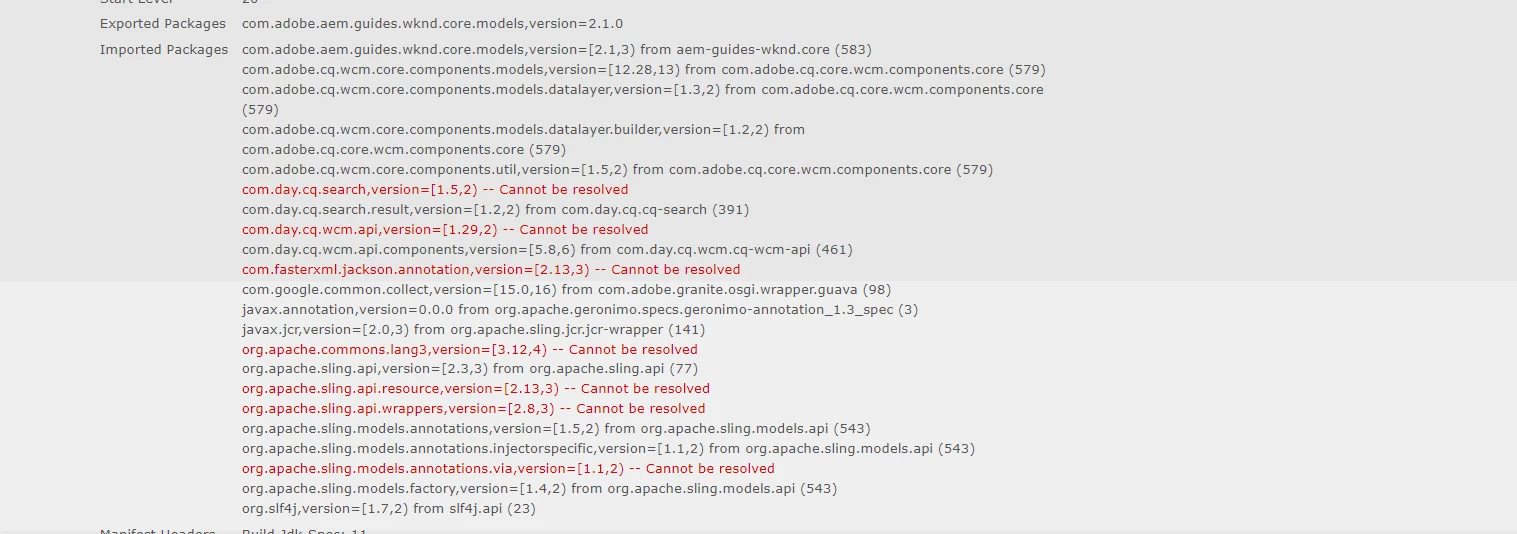
It's a problem of your local AEM setup. I would suggest you to reinstall it from scratch and follow the instructions carefully.
https://experienceleague.adobe.com/docs/experience-manager-learn/getting-started-wknd-tutorial-develop/project-archetype/project-setup.html 
I have faced some similar issue long back and for me i have revisited everthing carefully and it got resolved for me. I usually follow the following steps for any new project setup.Give it a try and see if it works for you.
1. Install all prerequisite software, java, maven, node.js etc. mentioned here

2. Setup AEM 6.5+ Instance and make sure it is up and running

3. Create a new Project structure using the "maven-archetype" command


mvn -B org.apache.maven.plugins:maven-archetype-plugin:3.2.1:generate \ -D archetypeGroupId=com.adobe.aem \ -D archetypeArtifactId=aem-project-archetype \ -D archetypeVersion=39 \ -D appTitle="WKND Sites Project" \ -D appId="wknd" \ -D groupId="com.adobe.aem.guides" \ -D artifactId="aem-guides-wknd" \ -D package="com.adobe.aem.guides.wknd" \ -D version="0.0.1-SNAPSHOT" \ -D aemVersion="cloud or 6.5.+"


5. Once Project structure got created successfully.

6. Run the command(mvn clean install) to build the project.


mvn clean install


7. Import it with Intellij or any IDE that you want to use.
8. Finally Run mvn clean install -PautoInstallSinglePackage


mvn clean install -PautoInstallSinglePackage


2 replies

aanchal-sikka
Community Advisor
Community Advisor
December 27, 2023

Hello @monish_gavali 


Please assure that the WKND package is compatible with your AEM version

https://github.com/adobe/aem-guides-wknd/releases 

Aanchal Sikka
Hemendra
HemendraAccepted solution
Level 2
December 28, 2023

Hi @monish_gavali ,
It's a problem of your local AEM setup. I would suggest you to reinstall it from scratch and follow the instructions carefully.
https://experienceleague.adobe.com/docs/experience-manager-learn/getting-started-wknd-tutorial-develop/project-archetype/project-setup.html 
I have faced some similar issue long back and for me i have revisited everthing carefully and it got resolved for me. I usually follow the following steps for any new project setup.Give it a try and see if it works for you.
1. Install all prerequisite software, java, maven, node.js etc. mentioned here

2. Setup AEM 6.5+ Instance and make sure it is up and running

3. Create a new Project structure using the "maven-archetype" command


mvn -B org.apache.maven.plugins:maven-archetype-plugin:3.2.1:generate \ -D archetypeGroupId=com.adobe.aem \ -D archetypeArtifactId=aem-project-archetype \ -D archetypeVersion=39 \ -D appTitle="WKND Sites Project" \ -D appId="wknd" \ -D groupId="com.adobe.aem.guides" \ -D artifactId="aem-guides-wknd" \ -D package="com.adobe.aem.guides.wknd" \ -D version="0.0.1-SNAPSHOT" \ -D aemVersion="cloud or 6.5.+"


5. Once Project structure got created successfully.

6. Run the command(mvn clean install) to build the project.


mvn clean install


7. Import it with Intellij or any IDE that you want to use.
8. Finally Run mvn clean install -PautoInstallSinglePackage


mvn clean install -PautoInstallSinglePackage