How to rename a page with many references? | Community
Skip to main content
This post is no longer active and is closed to new replies. Need help? Start a new post to ask your question.

3 replies

Mahedi_Sabuj
Community Advisor
Community Advisor
October 18, 2023

I would recommend to use Sling Alias (Advanced Tab) property in the page properties instead of rename the page.

The property sling:alias set on any pages to indicate an alias name for the page. For example, /content/visitors may have the sling:alias property set to besucher allowing the page to be addressed in an URL as /content/besucher as well as the original path /content/visitors.

Mahedi Sabuj
October 19, 2023

Thanks for your suggestion. In this case, I created a new page (using the new template ) to replace the old template page, using the same path, so I need to rename the old page to another url, failed actually. Is there any way to achieve it?Thanks.

iamnjain
Community Advisor
Community Advisor
October 18, 2023

Hi @dorothy007 


It will automatically adjust name in references.You can try on one dummy page in local instance.


alternative, can try @mahedi_sabuj solution as well.


Hope it helps.

October 19, 2023

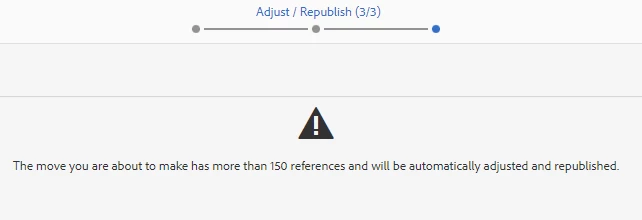
Tried. After the warning, I can't proceed the next step.

kautuk_sahni
Community Manager
Community Manager
October 19, 2023

@dorothy007 Did you find the suggestions from users helpful? Please let us know if more information is required. Otherwise, please mark the answer as correct for posterity. If you have found out solution yourself, please share it with the community.

Kautuk Sahni
October 19, 2023

Thanks. I haven't found a solution yet. I tried both ways below and failed.

1. Rename the page: Warning the page has more than 150 references and cannot move to next step.

2. Delete the page: The page is deleted and disappeared from the content tree, but the page URL is still live. I cannot create or rename the new page with the URL name which I have deleted.


Do you have any recommend?Thanks in advance.

Unnikrishnankv
Level 3
November 16, 2023

We can use a Groovy script to rename a page and find its references. Recently we did for some other purpose like DM migration