How to re-order AEM sites pages in AEM 6.3 Touch UI | Community
Skip to main content
Level 2
September 15, 2017
Solved

How to re-order AEM sites pages in AEM 6.3 Touch UI

  • September 15, 2017
  • 4 replies
  • 13191 views

Hello Community,

I have AEM 6.3 (without any service packs) installed. I have a list of AEM pages created and would now like to re-order the pages as shown in AEM author instance.

For example, as per the sreenshot attached, I would like to move Germany page and place it after Spain page. This task can very easily be done in Classic UI but is there a way for Authrs to arrange the page in Touch UI? Adobe documentations and several other blogs do not highlight this point.
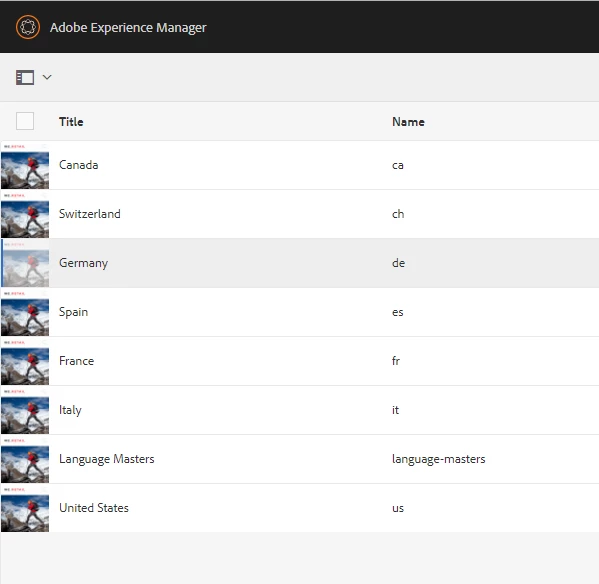
Looking forward to your replies!

This post is no longer active and is closed to new replies. Need help? Start a new post to ask your question.
Best answer by ravindrareddydr

HI Varun,

I hope this we can do in " List View".

Navigation -> Sites -> Top RIght select -> List View.

Thanks

Ravindra

4 replies

ravindrareddydr
ravindrareddydrAccepted solution
Level 2
September 15, 2017

HI Varun,

I hope this we can do in " List View".

Navigation -> Sites -> Top RIght select -> List View.

Thanks

Ravindra

May 22, 2023

Is this true also for AEM 6.5.14?

I'm not able to reorder pages in list view (Touch UI - as admin). I tried to do this with drag and drop.

The same is possible in Classic UI and in CRX/DE.


My client needs the functionality in touch UI. How can I achieve this. I guess this is a typical an essential requirement for a CMS.

Can you help?


May 22, 2023

In the meantime I found the solution myself.

In list view there's a little handle at the right, that can be used to drag pages up or down in the list.


This is what I was looking for. Unfortunately I did not find something in the documentation.


Henry

rajeevy89244319
Level 3
January 9, 2018

What user permissions are needed to allow user to re order pages. I added user to author group but re-ordering fails.

Thanks,

Rajeev

GaneshM
Level 3
April 24, 2018

Hi Rajeev,

I'm also facing the same issue, for admin users it works but not for content authors.

Would you please tell me how did you address the issue? it would be great help for me.

Thanks!

Adobe Employee
April 25, 2018