How to purge Asset Versions in AEMaaCS? | Community
Skip to main content
Adobe Employee
July 30, 2025
Solved

How to purge Asset Versions in AEMaaCS?

  • July 30, 2025
  • 4 replies
  • 999 views

Hi,

How to purge the asset version in aem programmatically?
Configured OOTB Day CQ WCM Version Manager configuration to purge the versions but in this case not all the versions getting purged atleast 1 version will be there in the asset. 
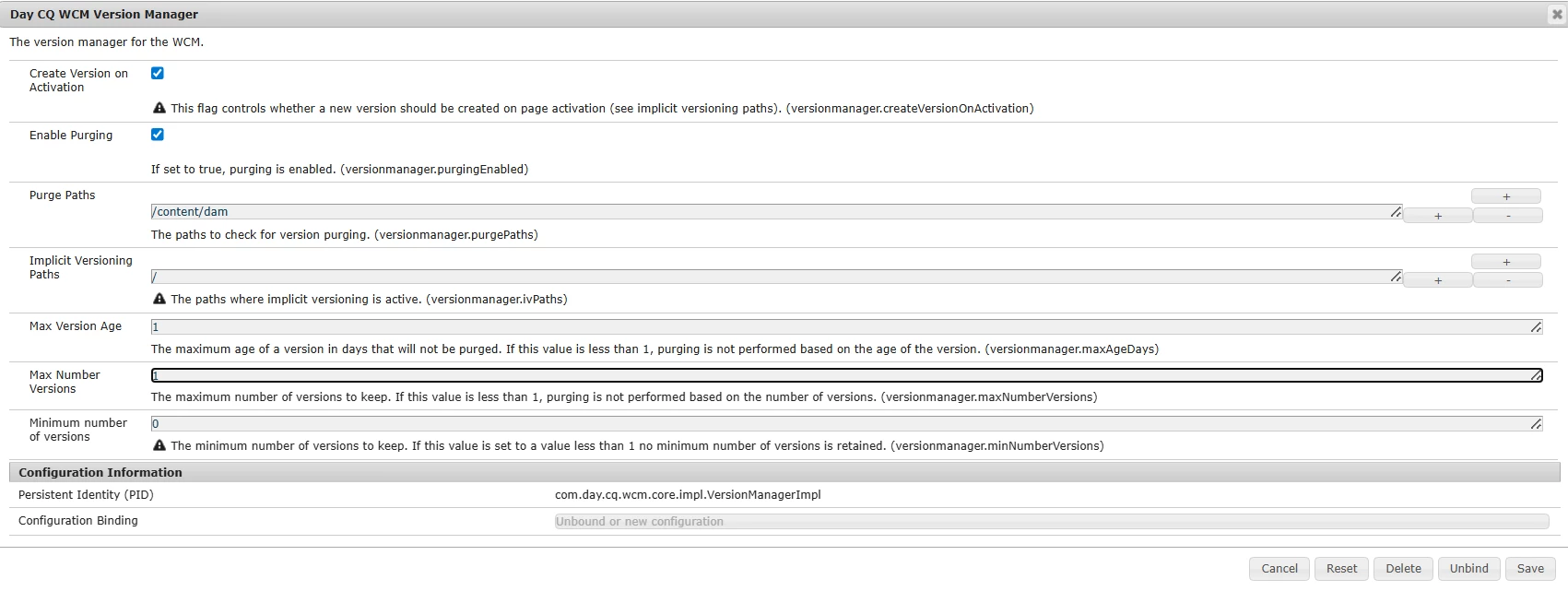
Tried to get version programmatically and delete the versions but same issue here as well purge will work only if the versions are more than 1.

VersionManager versionManager = session.getWorkspace().getVersionManager();
VersionHistory versionHistory = versionManager.getVersionHistory(assetPath);

Iterator<Version> versions = versionHistory.getAllVersions();
while (versions.hasNext()) {
Version version = versions.next();
String versionName = version.getName();
String versionPath = version.getPath();
if (!"jcr:rootVersion".equals(versionName)) {
versionHistory.removeVersion(versionName);
}
}

I want a code which deletes all the versions of asset. Just keep the original version.

I tried deleting the property "mix:versionable" from the asset which is working and deleting all the versions. But when I upload newer version again all the older versions are getting added. Not sure whether the version is getting deleted or the version is getting unlinked when I run this code.

Node assetNode = session.getNode(assetPath);
if (assetNode.isNodeType("mix:versionable")) {
assetNode.removeMixin("mix:versionable");
session.save();
}

Please let me know if this is the right way. If not please share the appropriate way to delete all the asset versions.

Thanks.

Best answer by Keerthana_H_N

I was expecting the ACS commons public code would be useful 🙂


Hi @briankasingli ,

After removing the ref of version from asset then able to delete. I'm removing property "mix:versionable" and then deleted the versions. Can we do it this way?

session = resolver.adaptTo(Session.class);
VersionManager versionManager = session.getWorkspace().getVersionManager();
VersionHistory versionHistory = versionManager.getVersionHistory(assetPath);

List<String> names = new ArrayList<>();
VersionIterator versionIterator = versionHistory.getAllVersions();
while (versionIterator.hasNext()) {
Version v = versionIterator.nextVersion();
String name = v.getName();
if (!name.equals("jcr:rootVersion")) {
names.add(v.getName());
}
}
Node assetNode = session.getNode(assetPath);
if (assetNode.isNodeType("mix:versionable")) {
assetNode.removeMixin("mix:versionable");
session.save();
}
for (String name : names) {
versionHistory.removeVersion(name);
}


4 replies

Ekhlaque
Adobe Employee
Adobe Employee
July 30, 2025

Hi @keerthana_h_n , as i understand ,you cannot purge every version of a versionable node programmatically using the JCR API ,there will always be at least one version (the root version) in the version history. This is by design, and is specified by the JCR and Oak implementation.I would recommend to stick with the “remove all but root version” logic and don’t try to delete jcr:rootVersion.

Adobe Employee
July 30, 2025

Hi @ekhlaque ,
I tried deleting all the versions but jcr:rootVersion using versionHistory. But I'm getting error while deleting the base version using this code.

VersionManager versionManager = session.getWorkspace().getVersionManager();
VersionHistory versionHistory = versionManager.getVersionHistory(assetPath);

Iterator<Version> versions = versionHistory.getAllVersions();
while (versions.hasNext()) {
Version version = versions.next();
String versionName = version.getName();
String versionPath = version.getPath();
if (!"jcr:rootVersion".equals(versionName)) {
versionHistory.removeVersion(versionName);
}
}


javax.jcr.ReferentialIntegrityException: OakIntegrity0001: Unable to delete referenced node: ${asset_version_node}
 

arunpatidar
Community Advisor
Community Advisor
July 30, 2025
Arun Patidar
Adobe Employee
July 30, 2025

Hi @arunpatidar ,

I'm doing same approach 

VersionManager versionManager = session.getWorkspace().getVersionManager();
VersionHistory versionHistory = versionManager.getVersionHistory(assetPath);

Iterator<Version> versions = versionHistory.getAllVersions();
while (versions.hasNext()) {
Version version = versions.next();
String versionName = version.getName();
String versionPath = version.getPath();
if (!"jcr:rootVersion".equals(versionName)) {
versionHistory.removeVersion(versionName);
}
}

 It'll delete all the versions except rootVersion and last version. And getting this exception while deleting javax.jcr.ReferentialIntegrityException: OakIntegrity0001: Unable to delete referenced node: ${asset_version_node}

arunpatidar
Community Advisor
Community Advisor
July 31, 2025

Hi @keerthana_h_n 

I agree with @ekhlaque , keep the base version, if you can't delete it maybe rename the version to something else which would be easy to track.

Arun Patidar
BrianKasingli
Community Advisor and Adobe Champion
July 30, 2025

Hey @keerthana_h_n ,

Take a look at the ACS Commons open-sourced Project. They have a servlet called DeletedContentVersionPurgerServlet https://github.com/Adobe-Consulting-Services/acs-aem-tools/blob/master/bundle/src/main/java/com/adobe/acs/tools/versions/impl/DeletedContentVersionPurgerServlet.java that removes version histories of content that has already been deleted.

Adobe Employee
July 30, 2025

Hi @briankasingli ,

I have written the similar code and this will not delete all the versions. Error occurs while deleting baseVersion.

BrianKasingli
Community Advisor and Adobe Champion
July 31, 2025

I was expecting the ACS commons public code would be useful 🙂

kautuk_sahni
Community Manager
Community Manager
August 4, 2025

@keerthana_h_n Just checking in — were you able to resolve your issue? We’d love to hear how things worked out. If the suggestions above helped, marking a response as correct can guide others with similar questions. And if you found another solution, feel free to share it — your insights could really benefit the community. Thanks again for being part of the conversation!

Kautuk Sahni
Adobe Employee
August 4, 2025

Hi @kautuk_sahni ,

Thanks for checking. I was able to resolve and I have marked the right answer.