How to prevent page locking (through user rights or other means)? | Community
Skip to main content
Level 2
May 31, 2018
Solved

How to prevent page locking (through user rights or other means)?

  • May 31, 2018
  • 5 replies
  • 2193 views

The question is really simple but I can't seem to find an easy answer to it.

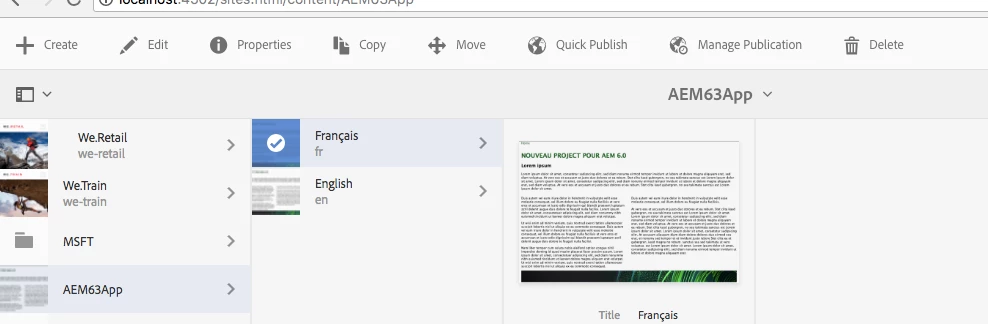
How can I prevent a user from locking a page. Is there a simple way through which the option is removed from the different menu's? Can this be achieved through user rights? Other (simple) means? I know I can customise each menu - but I'd rather only do this as a last resort
This post is no longer active and is closed to new replies. Need help? Start a new post to ask your question.
Best answer by arunpatidar

This is easy, you need to

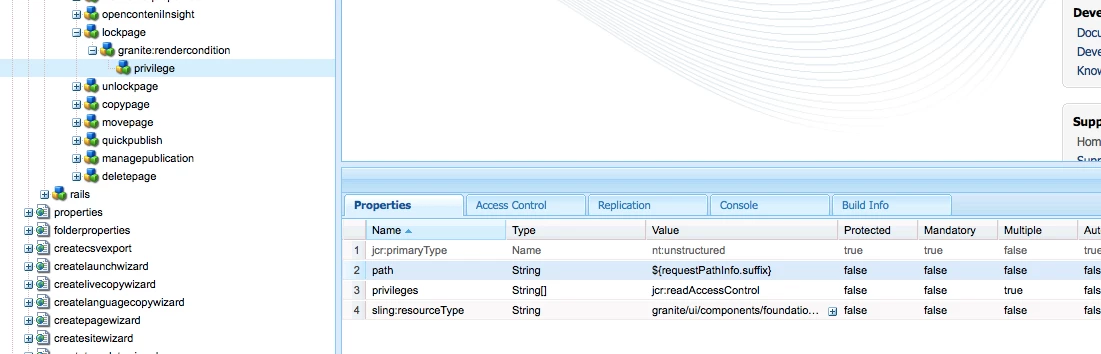
1. overlay /libs/wcm/core/content/sites/jcr:content/actions/selection/lockpage

2. create granite:rendercondition child node of /apps/wcm/core/content/sites/jcr:content/actions/selection/lockpage/ 

3. create privilege(granite/ui/components/foundation/renderconditions/privilege) node under granite:rendercondition

4. add properties to this node  refer Privilege — Granite UI 1.0 documentation

5. create a group which has readAccessControl or modifyAccessControl access or other access which you like for that lock button should display

JCR 2.0: 16 Access Control Management (Content Repository for Java Technology API v2.0)

you can do same for unlock node as well.

5 replies

Adobe Employee
May 31, 2018

A locked page is unlocked only by the user who locked it , or an admin account. So yes the best way would be through user management.

Editing Page Content

3xil3Author
Level 2
May 31, 2018

Hi Ankush, I'm aware of what you're saying, but I'm asking exactly HOW I can prevent it from happening in the first place. You say it can be done through user management. Can you specify exactly how I can prevent a user from locking a page? What roles/rights should the user have to prevent this? This is the core question.

arunpatidar
Community Advisor
arunpatidarCommunity AdvisorAccepted solution
Community Advisor
May 31, 2018

This is easy, you need to

1. overlay /libs/wcm/core/content/sites/jcr:content/actions/selection/lockpage

2. create granite:rendercondition child node of /apps/wcm/core/content/sites/jcr:content/actions/selection/lockpage/ 

3. create privilege(granite/ui/components/foundation/renderconditions/privilege) node under granite:rendercondition

4. add properties to this node  refer Privilege — Granite UI 1.0 documentation

5. create a group which has readAccessControl or modifyAccessControl access or other access which you like for that lock button should display

JCR 2.0: 16 Access Control Management (Content Repository for Java Technology API v2.0)

you can do same for unlock node as well.

Arun Patidar
3xil3Author
Level 2
May 31, 2018

I was hoping not to have to overlay anything, but it's the best practical answer! Thank you for your effort!

joerghoh
Adobe Employee
Adobe Employee
June 3, 2018

Techically it's an overlay, but you are actually using a documented way to do it. It's much more stable than overlaying Javascript functions.