How to optimize the query to get a matching node name and create a custom index? | Community
Skip to main content
Adobe Champion
February 10, 2022

How to optimize the query to get a matching node name and create a custom index?

  • February 10, 2022
  • 2 replies
  • 1621 views

Hi,

I am using the below query in one of my workflows to search for a node name(article id) in AEM. This is to locate the folder with a particular article id where an asset needs to be moved. Please find the sample query used below


path=/content/dam/testfolder/test-assets
1_group.1_type = sling:Folder
1_group.2_type= sling:OrderedFolder
1_group.3_type=nt:folder
1_group.p.or=true
nodename=12345678_ea


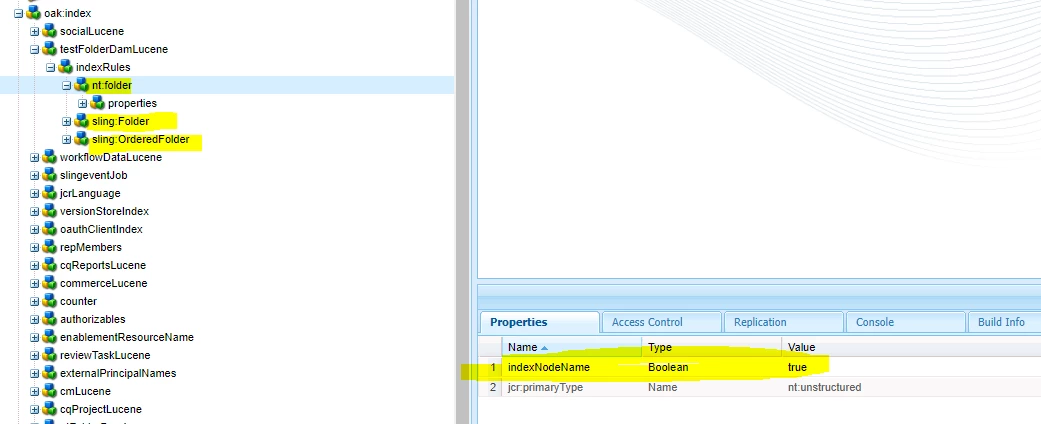
This query is giving me node traversal errors and hence empty results. I tried creating a custom index for this query as per the below suggestion from oak index generator
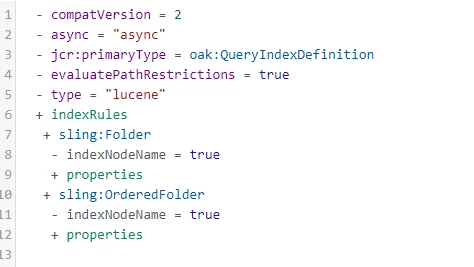
Please find the screenshot of my custom index below
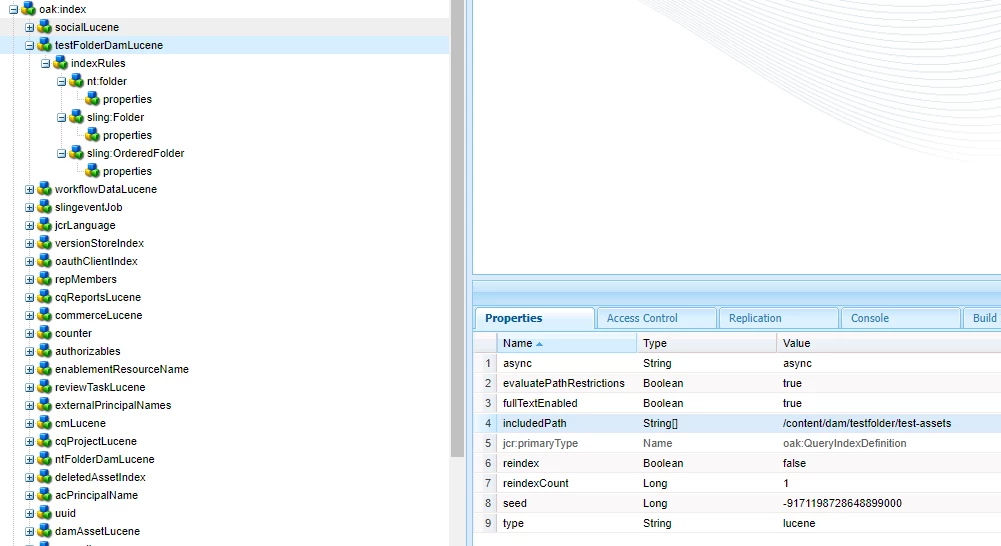
After this step, the query is still giving node traversal error and it is not even picking my custom index since the cost of OOB index is better than the custom index.


cost for [/oak:index/ntFolderDamLucene] of type (lucene-property) with plan [lucene:ntFolderDamLucene(/oak:index/ntFolderDamLucene) :ancestors:/content/dam/testfolder/test-assets] is 4303257.00


cost for [/oak:index/testFolderDamLucene] of type (lucene-property) with plan [lucene:testFolderDamLucene(/oak:index/testFolderDamLucene) +:ancestors:/content/dam/testfolder/test-assets +:nodeName:21022781_ea] is 6980484.00


How can I fix this issue? How can I optimize my query used to locate a particular matching node name? If not, how I can i improve the cost of my custom index so that it is picked to search just my specific folder? Appreciate if someone can help here.

This post is no longer active and is closed to new replies. Need help? Start a new post to ask your question.

2 replies

Nitin_laad
Community Advisor
Community Advisor
February 10, 2022

@p_v_nair Since you are looking for assets, did you try to add query param as type=dam:Asset and set uniq flag as true in property index. 

Oak Queries and Indexing | Adobe Experience Manager

P_V_NairAdobe ChampionAuthor
Adobe Champion
February 10, 2022

@nitin_laad If you see my query, here I am trying to search for a node name and not an asset. path=/content/dam/testfolder/test-assets
1_group.1_type = sling:Folder
1_group.2_type= sling:OrderedFolder
1_group.3_type=nt:folder
1_group.p.or=true
nodename=12345678_ea

joerghoh
Adobe Employee
Adobe Employee
February 10, 2022

The JCR Query Cheat Sheet [1] says that the index definition must have the property "indexNodeName" set to true.


[1] https://experienceleague.adobe.com/docs/experience-manager-65/assets/JCR_query_cheatsheet-v1.0.pdf?lang=en

P_V_NairAdobe ChampionAuthor
Adobe Champion
February 10, 2022

@joerghoh I have added that property to the nodes inside index rules already. As in the initial screenshot that was as per the index generated in the oak index generator. But still no luck


joerghoh
Adobe Employee
Adobe Employee
February 14, 2022

@joerghoh Yes. As in my initial post. It is always picking OOB index lucene:testFolderDamLucene(/oak:index/testFolderDamLucene , since cost is better for this one


Can you just search for the node name and remove the constraint for folder types?