How to modify a CRXDE file from the IDE code? | Community
Skip to main content
September 15, 2023
Solved

How to modify a CRXDE file from the IDE code?

  • September 15, 2023
  • 3 replies
  • 1770 views

Hello, what happens is that I want to change the logic of a file called fileupload.js that this file is used in the AEM DAM when the user uploads an asset to the platform.

The problem is that I don't know how to modify or add that code in the repository where I have my project, I have investigated and they tell me that the path in CRXDE is in:

/libs/dam/gui/coral/components/commons/fileupload/clientlibs/fileupload/js/fileupload.js

And it is there, but in my code in the IDE doesn't come, where should I add the fileupload.js code in my repository to be able to modify that method without using CRXDE?

I try to create a libs folder in the root with the same path but doesn't work.

Here is the file in CRXDE but I want to modify in my repository code that don't have it:


Here are my folders of the repository code:


Best answer by lukasz-m

Hi @aaron_dempwolff,

You should use overlay mechanism, you can check the official Adobe documentation:

Essentially for this path from AEM 

  • /libs/dam/gui/coral/components/commons/fileupload/clientlibs/fileupload/js/fileupload.js

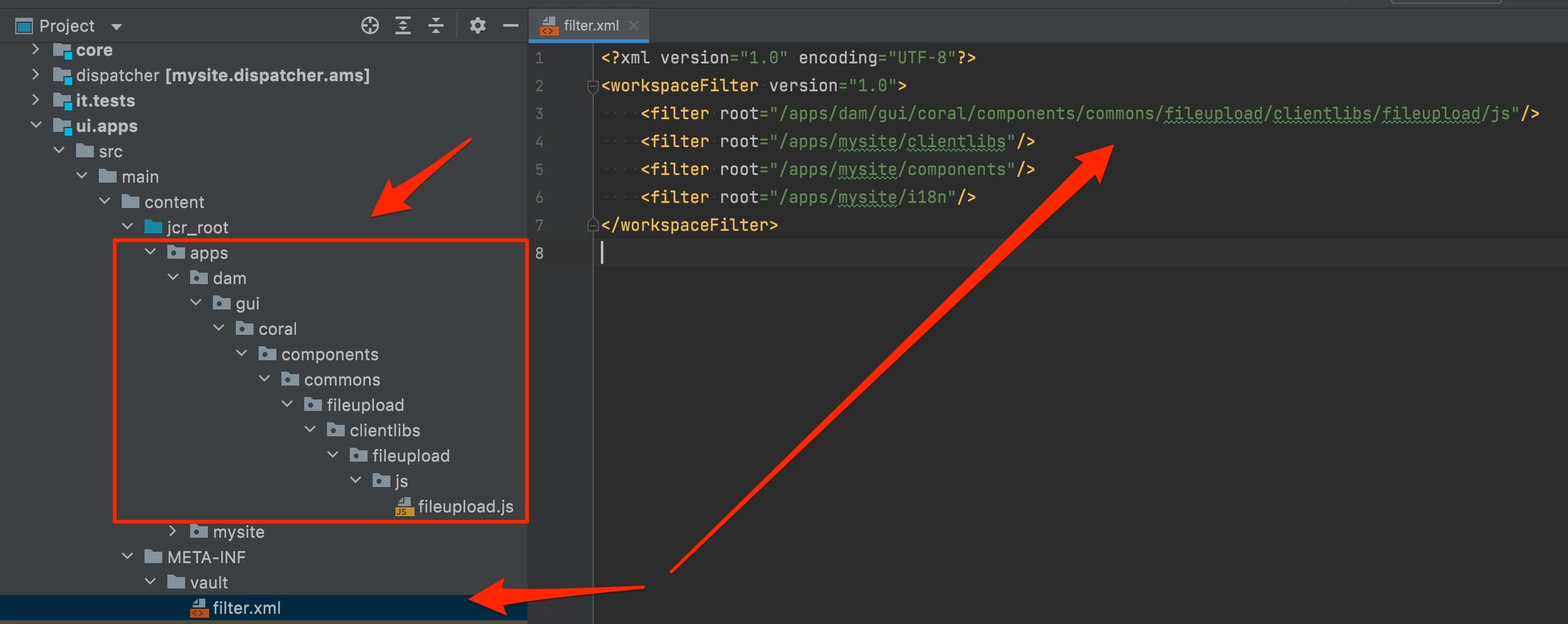
you will need below path in your ui.apps module

  • /apps/dam/gui/coral/components/commons/fileupload/clientlibs/fileupload/js/fileupload.js

and don't forget to update you filter.xml file for ui.apps module, it has to include /apps/dam/gui/coral/components/commons/fileupload/clientlibs/fileupload/js path as well, like on the screen.

3 replies

Sudheer_Sundalam
Community Advisor
Community Advisor
September 15, 2023

@aaron_dempwolff ,

You need to overlay fileupload.js from /libs to /apps in your project. Please see the below blog for more explanation of overlaying in AEM.

https://experienceleaguecommunities.adobe.com/t5/adobe-experience-manager/concept-of-override-and-overlay-in-aem-aem-community-blog/m-p/453403

lukasz-m
Community Advisor
lukasz-mCommunity AdvisorAccepted solution
Community Advisor
September 15, 2023

Hi @aaron_dempwolff,

You should use overlay mechanism, you can check the official Adobe documentation:

Essentially for this path from AEM 

  • /libs/dam/gui/coral/components/commons/fileupload/clientlibs/fileupload/js/fileupload.js

you will need below path in your ui.apps module

  • /apps/dam/gui/coral/components/commons/fileupload/clientlibs/fileupload/js/fileupload.js

and don't forget to update you filter.xml file for ui.apps module, it has to include /apps/dam/gui/coral/components/commons/fileupload/clientlibs/fileupload/js path as well, like on the screen.

September 19, 2023

Hey, I tried to add the same path as you but when I build it I have the next error:

is not covered by any of the specified dependencies nor a valid root

Do you know what can cause this issue?

DPrakashRaj
Community Advisor
Community Advisor
September 17, 2023

Apart from what has been explained by @lukasz-m you can also setup the vault plugin for your project yo sync the file from aem crx/de to local file system once you overlayed the file from /libs folder to /apps folder so that you can work on the file for any modification and can commit it to your code base

July 9, 2025