How to identify if the user is admin user or have admin privileges? | Community
Skip to main content
This post is no longer active and is closed to new replies. Need help? Start a new post to ask your question.
Best answer by BrianKasingli

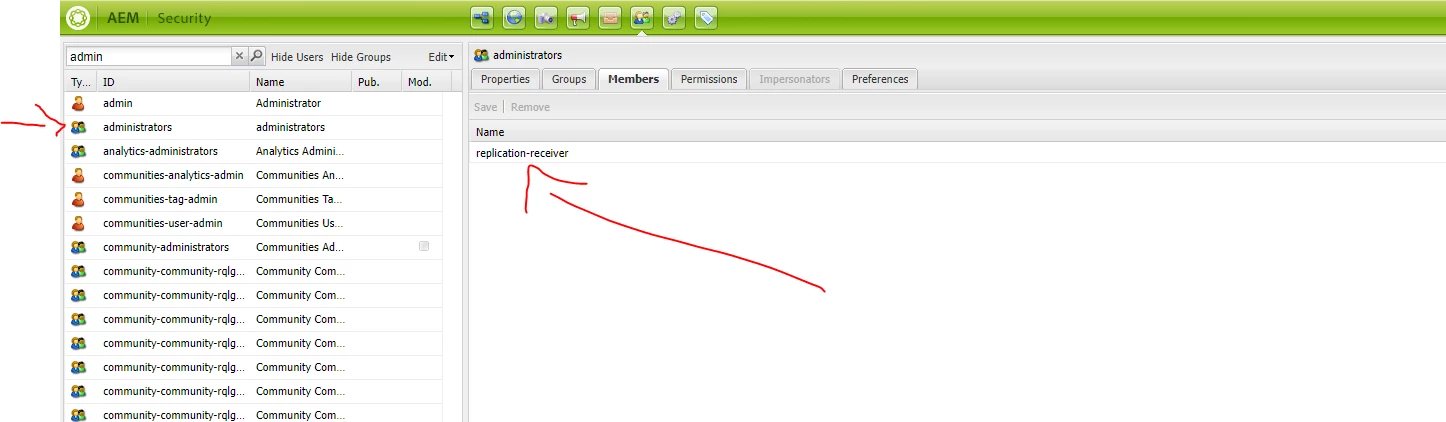
It's great that the response from this thread showcases solutions for how to programmatically check if a user belongs to the administrator's group, but however, you can manually check this in the UI as well.

1. visit: localhost:4502/useradmin

2. search for the group administrators

3. click on members; you should be able to see all the members here who are associated with the administrator's group.
4 replies

lukasz-m
Community Advisor
Community Advisor
October 16, 2022

Hi @akshaybhujbale,

Assuming you would like to do it programmatically you can use classes from org.apache.jackrabbit.api.security.user package. Mainly it will be UserManager, Authorizable, User and Group.

  • To check if user is an admin use isAdmin() method like this:
    import org.apache.jackrabbit.api.security.user.*;

    UserManager userManager = resourceResolver.adaptTo(UserManager.class); User user = (User) userManager.getAuthorizable("test-user"); user.isAdmin();
  • To verify if user is part of administrators group you can try one of below alternative options:
    import org.apache.jackrabbit.api.security.user.*;
    
    UserManager userManager = resourceResolver.adaptTo(UserManager.class);
    User user = (User) userManager.getAuthorizable("test-user");
    
    Group group = (Group) userManager.getAuthorizable("administrators");
    group.isMember(user);
    second option for the same
    import org.apache.jackrabbit.api.security.user.*;
    
    UserManager userManager = resourceResolver.adaptTo(UserManager.class);
    User user = (User) userManager.getAuthorizable("test");
    
    Iterator<Group> groups = user.memberOf();
    while (groups.hasNext()) {
        Group group = groups.next();
        if (group.getID().equals("administrators")) {
            break;
        }
    } 

In general memberOf will return all groups hierarchy so even if user is not directly assigned to administrators group but is member of other group that is added to administrators group you will get appropriate result.

HeenaMadan
Community Advisor and Adobe Champion
October 17, 2022

To check user is admin

UserManager userManager = resourceResolver.adaptTo(UserManager.class);
User user = (User) userManager.getAuthorizable("myuser");
user.isAdmin(); // returns true if myuser is admin

To check user is part of administrative group

Group group = (Group) userManager.getAuthorizable("administrators");
group.isMember(user);// true if the Authorizable to test is a direct or indirect member
Level 6
October 17, 2022

Hi @heenamadan 


Do you what is logic behind 

user.isAdmin();

like what is check it check if the user is admin user or not. 

BrianKasingli
Community Advisor and Adobe Champion
BrianKasingliCommunity Advisor and Adobe ChampionAccepted solution
Community Advisor and Adobe Champion
October 17, 2022

It's great that the response from this thread showcases solutions for how to programmatically check if a user belongs to the administrator's group, but however, you can manually check this in the UI as well.

1. visit: localhost:4502/useradmin

2. search for the group administrators

3. click on members; you should be able to see all the members here who are associated with the administrator's group.