How to hide a particular page in navigation | Hide in Navigation | Community
Skip to main content
Level 2
July 25, 2023
Solved

How to hide a particular page in navigation | Hide in Navigation

  • July 25, 2023
  • 3 replies
  • 2039 views

After selecting the "Hide in Navigation" this page "Our Stories" is still appearing in the navigation.
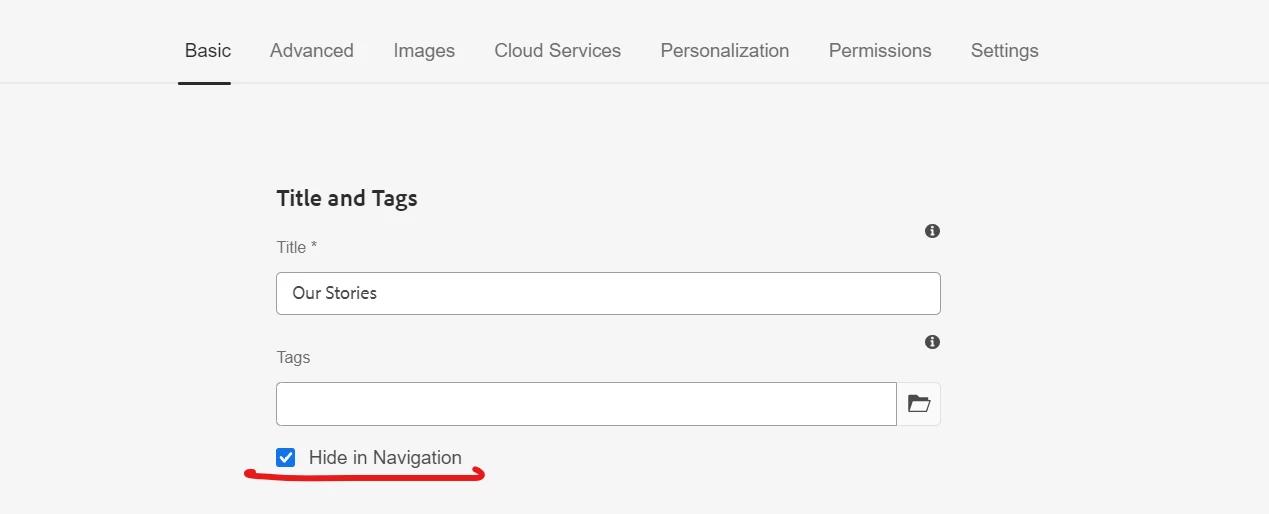
 

What changes I need to do in my code??

Here is my backend HTL code:


<div class="cmp-secondary-navigation" data-component="secondaryNavigation">
<nav class="cmp-secondary-navigation__body">
<ul class="sec-navigation-list">
<li class="sec-navigation-list__item" data-sly-repeat="${currentPage.listChildren}">
<a class="sec-navigation-list__item__link" href="${item.path}.html">${item.title}</a>
</li>
</ul>
</nav>
</div>


Or do I need to implement any changes from Java side (sling model)


Please suggest the appropriate changes along with the code.

This post is no longer active and is closed to new replies. Need help? Start a new post to ask your question.
Best answer by DPrakashRaj

you can add a logic in sightly to test if hideInNav value is selected or not for the condition to create an item list.

Be default currentPage.listChildren will list all the child pages.

may be some thing like this with data-sly-test

<div data-sly-test="${item.hideInNav == 'false'  }">
<a class="sec-navigation-list__item__link" href="${item.path}.html">${item.title}</a>
</div>

3 replies

DPrakashRaj
Community Advisor
DPrakashRajCommunity AdvisorAccepted solution
Community Advisor
July 25, 2023

you can add a logic in sightly to test if hideInNav value is selected or not for the condition to create an item list.

Be default currentPage.listChildren will list all the child pages.

may be some thing like this with data-sly-test

<div data-sly-test="${item.hideInNav == 'false'  }">
<a class="sec-navigation-list__item__link" href="${item.path}.html">${item.title}</a>
</div>

Ekhlaque
Adobe Employee
Adobe Employee
July 25, 2023

@sanchay1 Could you please check and update your backend HTL code to include a condition that checks the "Hide in Navigation" property of each page before adding it to the navigation list? If the property is set to true, skip adding that page to the navigation.
Sharing the modified code ,which might help you to achieve your ask.


<div class="cmp-secondary-navigation" data-component="secondaryNavigation"> <nav class="cmp-secondary-navigation__body"> <ul class="sec-navigation-list"> <sly:repeat="${currentPage.listChildren}"> <sly:if test="${!item.hideInNav}"> <li class="sec-navigation-list__item"> <a class="sec-navigation-list__item__link" href="${item.path}.html">${item.title}</a> </li> </sly:if> </sly:repeat> </ul> </nav> </div>


kaikubad
Community Advisor
Community Advisor
July 25, 2023

In addition with @dprakashraj , You can also inherit your component from 

com.adobe.cq.wcm.core.components.models.Navigation
The functionality you are trying to achieve is already implemented here.
You can also checkout the code. But the basic think is like @dprakashraj said, you have to add logic in sightly to test hideInNav