How to get Rendition image height and width programmatically? (Other than OOTB Renditions) | Community
Skip to main content
Level 3
June 1, 2022

How to get Rendition image height and width programmatically? (Other than OOTB Renditions)

  • June 1, 2022
  • 3 replies
  • 3528 views

I have a scenario where I have to read each of the manually added renditions height and width. 
Rendition rendition = resource.adaptTo(Rendition.class);// rendition  obj would only give size of the rendition (rendition.getSize()) not height and width.
For generated renditions, we would at least read it from the node name (String Operations) (cq5dam.thumbnail.140.100.png).

But how to get the height and width of the renditions which are other than ootb renditions and doesnt have height and width values in the filename.

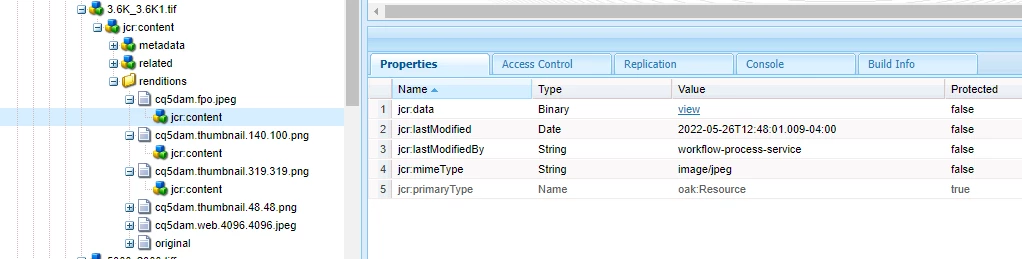
for ex: cq5dam.fpo.jpeg
@debal_das 
@p_v_nair 

This post is no longer active and is closed to new replies. Need help? Start a new post to ask your question.

3 replies

SantoshSai
Community Advisor
Community Advisor
June 2, 2022

Hi @mrudulmo 

You can try the Asset class to get the details of a particular DAM Asset.

e.g.
Image Width

public int getWidth() { 
Asset asset = resourceResolver.getResource("imagepath").adaptTo(Asset.class);
Rendition rendition = asset.getRendition("cq5dam.thumbnail.48.48.png");
try {
BufferedImage bimg = ImageIO.read(rendition.getStream());
return bimg.getWidth();
} catch (Exception e) {
}
return 0;
}

Image Height

public int getWidth() { 
Asset asset = resourceResolver.getResource("imagepath").adaptTo(Asset.class);
Rendition rendition = asset.getRendition("cq5dam.thumbnail.48.48.png");
try {
BufferedImage bimg = ImageIO.read(rendition.getStream());
return bimg.getHeight();
} catch (Exception e) {
}
return 0;
}

Hope that helps!

Regards,
Santosh

Santosh Sai
MrudulMoAuthor
Level 3
June 2, 2022

@santoshsai : Thanks for your time. 

I tried this but no luck. This is what I added to my class. and getting Exception as below.


Just to cross check i am using below imports

javax.imageio.ImageIO
java.awt.image.BufferedImage


BufferedImage bimg;
bimg = ImageIO.read(rendition.getStream());
width = bimg.getWidth();
height = bimg.getHeight();


From the initial screenshot, u can see the properties of a particular resource I am trying to access.

MrudulMoAuthor
Level 3
June 2, 2022

@santoshsai : Can you please check this once. ?

Kiran_Vedantam
Community Advisor
Community Advisor
June 2, 2022

HI @mrudulmo 


The rendition is also an asset and you can get the length and width using the metadata.

Int length = resourceResolver.getResource("<<path to resource>>").adapto(Asset.class).getMetadataValue(tiff:ImageLength)


Hope this helps!


Thanks,
Kiran Vedantam.

SantoshSai
Community Advisor
Community Advisor
June 2, 2022

Hi @kiran_vedantam 

metadata will only be generated for the original uploaded asset, there will be no metadata for generated rendition images


If we wish to get height and width for generated rendition image we can try the above solution which I posted.

Regards,
Santosh

Santosh Sai
MrudulMoAuthor
Level 3
June 2, 2022

Agreed with @santoshsai 

sunil_kumar_
Level 5
June 2, 2022

Hi @mrudulmo , Can't you get is just from rendition file name. These renditions are created by width and height only. If you check documentation of any thumbnail creating workflow step, These are created by defining width and height i.e. file name itself contains width and height(other then original or if something customized)


you can original's width and height can be as mention by others. 
Try this if works.