How to extend ResponsiveGrid in React SPA | Community
Skip to main content
August 26, 2020
Solved

How to extend ResponsiveGrid in React SPA

  • August 26, 2020
  • 6 replies
  • 3555 views

Adobe SPA SDK provides implementation of ResponsiveGrid which is already mapped to 

wcm/foundation/components/responsivegrid

In case I want to extend it, how am I supposed to do it? It is not very documented anywhere.
I'm referring to newly updated ResponsiveGrid which is coming with 1.0.0 of

@adobe/aem-react-editable-components

One example I found was suggesting something like this:

export class MyGrid extends ResponsiveGrid {
render() {
return (
<div {...this.containerProps}>
<div className="MyGrid-message">Welcome to my Custom Grid!</div>
{ super.childComponents }
{ super.placeholderComponent }
</div>
)
}
}

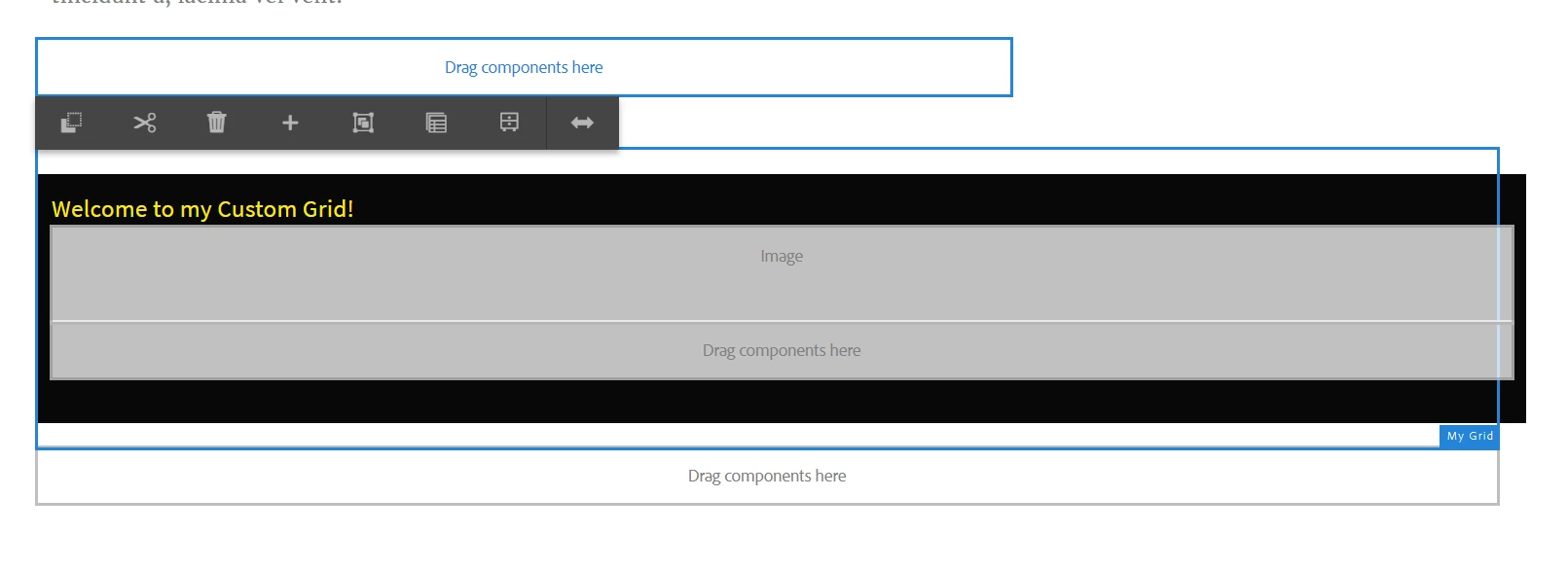
 But that didn't work. It renders the "welcome..." text, but no placeholder for adding new components.

This post is no longer active and is closed to new replies. Need help? Start a new post to ask your question.
Best answer by Nikhil-Kumar

@grimm1 
Try this one out https://github.com/godanny86/aem-guides-wknd-events/tree/feature/mygrid it worked for me.


Thanks,
Nikhil


6 replies

Nikhil-Kumar
Community Advisor
Community Advisor
August 26, 2020

@grimm1 

I was also looking for something like this, extending responsivegrid and customizing it.

The reason why we can't do so is that SPA templates doesn't render non SPA or any existing OOTB component.

Now sure how we can achieve this but I guess should create a Responsive grid React component and by using mapTo statement, mapping it to AEM overlayed component under /apps/project/content/components and do some customization in React component itself. 
As far as I know we can't do any customization from AEM apart from just overlaying. Try using Aem spa libraries in React.

If possible please loop me in too, if you anything to make it work.

Thanks,
Nikhil 

Nikhil-Kumar
Community Advisor
Community Advisor
August 26, 2020

@grimm1 
Similar issue was raised in https://experienceleaguecommunities.adobe.com/t5/adobe-experience-manager/include-responsivegrid-component-in-angular-spa-aem-6-5/qaq-p/329893

It shows the implementation in Angular for responsiveGrid, Can you try using the same in React as well? 

MapIt to the OOTB responsivegrid component in react i.e. wcm/foundation/components/responsivegrid

Let me know if it works!!!


Thanks,
Nikhil

Grimm1Author
August 26, 2020

It is not very similar. I am able to use existing responsivegrid just fine, because it already has mapping to work in SPA, which is provided by the SDK.

In my case, I want to extend it.


For that I obviously need to:

1) create a component under my project's apps folder, which is going to have

sling:resourceSuperType="wcm/foundation/components/responsivegrid"

2) create a React renderer, let's name it Container.js

3) add it into import-components.js

4) in Container.js, I need to extend existing ResponsiveGrid class which comes from SDK


Nikhil-Kumar
Community Advisor
Community Advisor
August 26, 2020

@grimm1 
Below code snippet is missing in your contained class that you mentioned:

get containerProps() {
let containerProps = super.containerProps;
containerProps.className = (containerProps.className || '') + ' MyGrid ' + this.props.gridClassNames;
return containerProps;
}

Refer this link for grid component :  https://github.com/godanny86/aem-guides-wknd-events/tree/feature/mygrid

Thanks,
Nikhil

Nikhil-Kumar
Community Advisor
Nikhil-KumarCommunity AdvisorAccepted solution
Community Advisor
August 26, 2020

@grimm1 
Try this one out https://github.com/godanny86/aem-guides-wknd-events/tree/feature/mygrid it worked for me.


Thanks,
Nikhil


arunpatidar
Community Advisor
Community Advisor
August 26, 2020

You need to extend


class ResponsiveGrid extends AllowedComponentsContainer { /** * The attributes that will be injected in the root element of the container * * {Object} - the attributes of the container */ get containerProps() { let containerProps = super.containerProps; containerProps.className = (containerProps.className || '') + ' ' + this.props.gridClassNames; return containerProps; } /** * The properties that will go on the placeholder component root element * * {Object} - the properties as a map */ get placeholderProps() { let props = super.placeholderProps; props.placeholderClassNames = (props.placeholderClassNames || '') + ' ' + PLACEHOLDER_CLASS_NAMES; return props; } /** * Returns the properties to add on a specific child component * * {Object} item The item data * {String} itemKey The key of the item * {String} itemPath The path of the item * {Object} The map of properties to be added */ getItemComponentProps(item, itemKey, itemPath) { let attrs = super.getItemComponentProps(item, itemKey, itemPath); attrs.className = attrs.className || ''; attrs.className += this.props.columnClassNames && this.props.columnClassNames[itemKey] ? ' ' + this.props.columnClassNames[itemKey] : ''; return attrs; } } ResponsiveGrid.defaultProps = { title: 'Layout Container', // Temporary property until CQ-4265892 is addressed, beware not rely it _allowedComponentPlaceholderListEmptyLabel: 'No allowed components for Layout Container' }; MapTo('wcm/foundation/components/responsivegrid')(withComponentMappingContext(ResponsiveGrid));


like responsivegrid extending allowecomponentsContainer


Arun Patidar
Grimm1Author
August 27, 2020

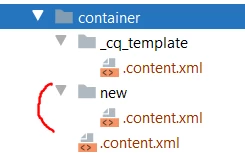
Found out why it was not rendering the placeholder for adding new elements.

It was not React issue, but the missing sub-component for generating newpar, which will not come from the extended responsivegrid.

<?xml version="1.0" encoding="UTF-8"?>
<jcr:root xmlns:sling="http://sling.apache.org/jcr/sling/1.0" xmlns:cq="http://www.day.com/jcr/cq/1.0" xmlns:jcr="http://www.jcp.org/jcr/1.0"
jcr:primaryType="cq:Component"
jcr:title="New Paragraph - Responsive Grid"
sling:resourceSuperType="wcm/foundation/components/parsys/newpar"
componentGroup=".hidden"/>

All the other code mentioned above works just fine, even with new v1.0.0 dependency

"@adobe/aem-react-editable-components"