How to enable graphql? | Community
Skip to main content
Level 8
March 24, 2021
Solved

How to enable graphql?

  • March 24, 2021
  • 2 replies
  • 1990 views

We created a content fragment model, "bonus", and a content fragment from this model ("mybonus")


We have a graphql client and are trying to get it to return the fields of mybonus.


This document: says 


To enable GraphQL queries in AEM, create an endpoint at /content/cq:graphql/global/endpoint:

  • Nodes cq:graphql and global must be of type sling:Folder


How do we do this?


It then talks about "additional configuration" below:


Additional configurations are required:

  • Dispatcher:
    • To allow required URLs
    • Mandatory
  • Vanity URL:
    • To allocate a simplified URL for the endpoint
    • Optional
  • OSGi Configuration:
    • GraphQL Servlet Configuration:
      • Handles requests to the endpoint
      • The configuration name is org.apache.sling.graphql.core.GraphQLServlet. It needs to be provided as an OSGi factory configuration
      • sling.servlet.extensions must be set to [json]
      • sling.servlet.methods must be set to [GET,POST]
      • sling.servlet.resourceTypes must be set to [graphql/sites/components/endpoint]
      • Mandatory
    • Schema Servlet Configuration:
      • Creates the GraphQL schema
      • The configuration name is com.adobe.aem.graphql.sites.adapters.SlingSchemaServlet. It needs to be provided as an OSGi factory configuration
      • sling.servlet.extensions must be set to [GQLschema]
      • sling.servlet.methods must be set to [GET]
      • sling.servlet.resourceTypes must be set to [graphql/sites/components/endpoint]
      • Mandatory
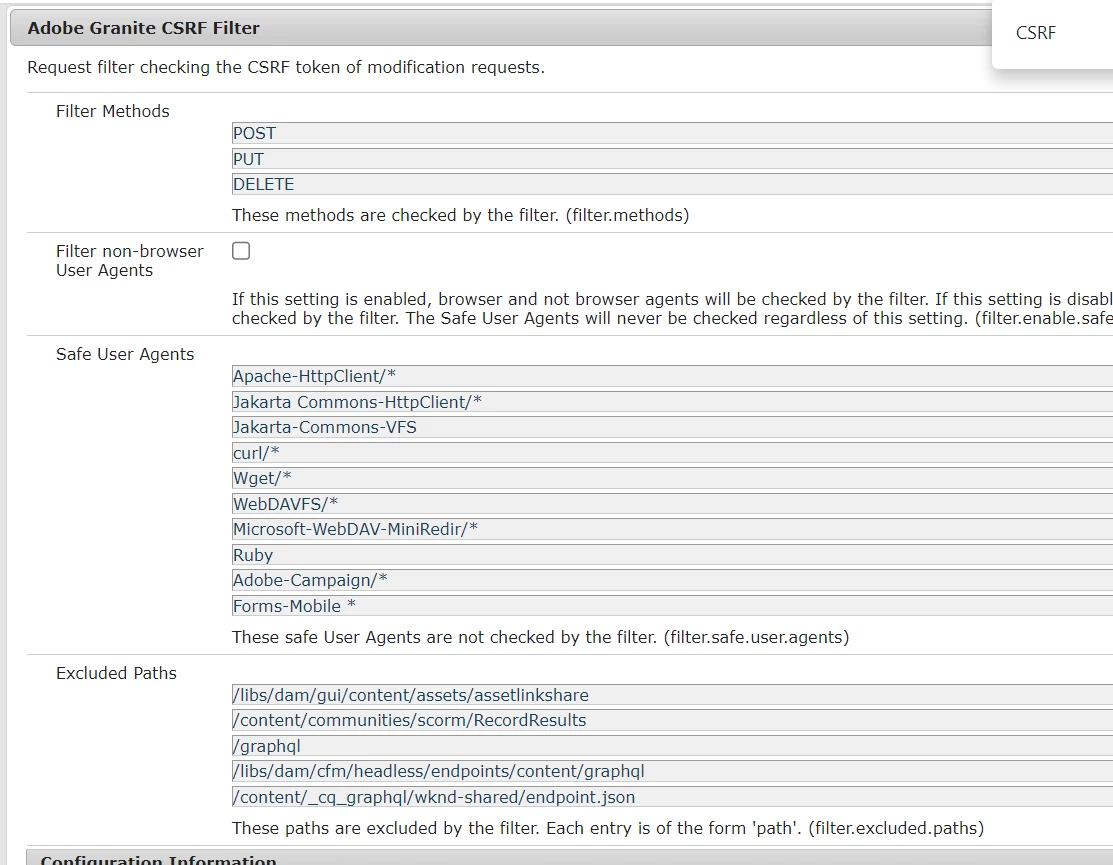
    • CSRF Configuration:
      • Security protection for the endpoint
      • The configuration name is com.adobe.granite.csrf.impl.CSRFFilter
      • Add /content/cq:graphql/global/endpoint to the existing list of excluded paths (filter.excluded.paths)
      • Mandatory

Does anyone have any documentation or guides on how and where to do the above?  We are using the cloud SDK locally, and the Cloud version of AEM in production.

This post is no longer active and is closed to new replies. Need help? Start a new post to ask your question.
Best answer by aanchal-sikka

Few features are now available in AEMaaCS OOTB

- Tools> GraphQL (to create and publish endpoints)

- Tools > GraphQL Query Editor (GraphiQL explorer to create and edit persisted queries)

- GraphQL Servlet Configuration:

- CSRF config

- Default settings for GraphQL cache are also available. However you can fine-tune them, Details on https://experienceleague.adobe.com/docs/experience-manager-learn/getting-started-with-aem-headless/graphql/advanced-tutorial/graphql-persisted-queries.html?lang=en#cache-control-all-adventures


2 replies

Vijayalakshmi_S
Level 10
March 26, 2021

Hi @tb3dock,

In the same documentation as you mentioned in your post, under section "Supporting Packages" -> Package link exist and it states it has all the required configuration. 
Can you try installing the same. (Ignore if you have already downloaded from here)


TB3dockAuthor
Level 8
March 26, 2021
Thanks for the reply. I tried that supporting package, didnt help unfortunately.
aanchal-sikka
Community Advisor
aanchal-sikkaCommunity AdvisorAccepted solution
Community Advisor
December 15, 2023

Few features are now available in AEMaaCS OOTB

- Tools> GraphQL (to create and publish endpoints)

- Tools > GraphQL Query Editor (GraphiQL explorer to create and edit persisted queries)

- GraphQL Servlet Configuration:

- CSRF config

- Default settings for GraphQL cache are also available. However you can fine-tune them, Details on https://experienceleague.adobe.com/docs/experience-manager-learn/getting-started-with-aem-headless/graphql/advanced-tutorial/graphql-persisted-queries.html?lang=en#cache-control-all-adventures


Aanchal Sikka