How to disable move functionality for pages in Touch UI 6.2 | Community
Skip to main content
karansheel
Level 3
November 29, 2017
Solved

How to disable move functionality for pages in Touch UI 6.2

  • November 29, 2017
  • 6 replies
  • 4244 views

Hi,

we have a requirement in which we have to disable the move functionality for pages under certain path in siteadmin . Below is screenshot
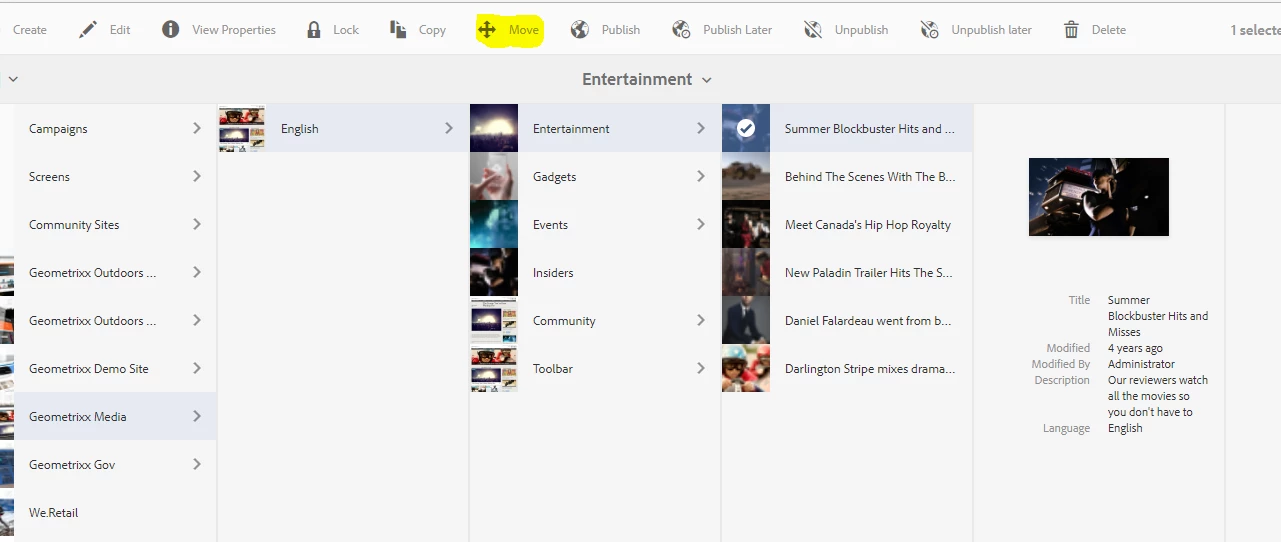
Is there any configuration to disable it ? can anyone help

This post is no longer active and is closed to new replies. Need help? Start a new post to ask your question.
Best answer by ravindrareddydr

Yes its good idea

1. create a group

2. restrict this path only to group

it will not impact to any other users/groups and no code changes. so this change will not effect

6 replies

smacdonald2008
Level 10
November 29, 2017
karansheel
Level 3
November 29, 2017

But there is no option like move in ACL & if i revoke the edit option user will not be able to edit the page

smacdonald2008
Level 10
November 29, 2017

Sometimes a orgs processes have to drive when an author can move or not move a page. There seems to be no OOTB way to define when a MOVE can and cannot be used.

ravindrareddydr
Level 2
November 29, 2017

HI Karansheel,

Let me help here

As part of touch UI in AEM 6.2 to hide specific actions from action bar , need to strict specific action for a group for below hierarchy node

/libs/wcm/core/content/sites/jcr:content/actions/selection/movepage

1. Please  restrict above path using ACL from crxde / explorer

Thanks

Ravindra

Singaiah_Chintalapudi
Level 7
November 29, 2017

Its good idea to create a separate group and place the people whom you want to disable the move button. Assign the required permissions to this group except delete. Then these people won't be able to see the Move button.

If you modify the OOTB code then it will affect on all users.

ravindrareddydr
ravindrareddydrAccepted solution
Level 2
November 29, 2017

Yes its good idea

1. create a group

2. restrict this path only to group

it will not impact to any other users/groups and no code changes. so this change will not effect

Level 2
August 1, 2023

Hi @singaiah_chintalapudi@smacdonald2008 , @ravindrareddydr,

In my case, I want to disable the move button for published/active pages,

and enable it for unpublished pages, irrespective of users or user groups.

This should be applicable in general for all.

This is to avoid the published page being moved from its path.

All suggestions are welcome.

I have created a separate question in the community.

https://experienceleaguecommunities.adobe.com/t5/adobe-experience-manager/hide-show-aem-dam-asset-menu-options/m-p/265673