
How to disable defaultRelativeTime on Assets views. | Community
Skip to main content
blumukesh
Level 2
November 2, 2021
Solved

How to disable defaultRelativeTime on Assets views.

  • November 2, 2021
  • 2 replies
  • 952 views

Basically , Our requirement is to disable defaultRelativeTime on Assets views .

If we modify any assets - timestamp(Modified,) views like - "a few seconds ago" 
Actually we are looking to display format like - "Sep 12, 2016, 5:16:46 PM" .
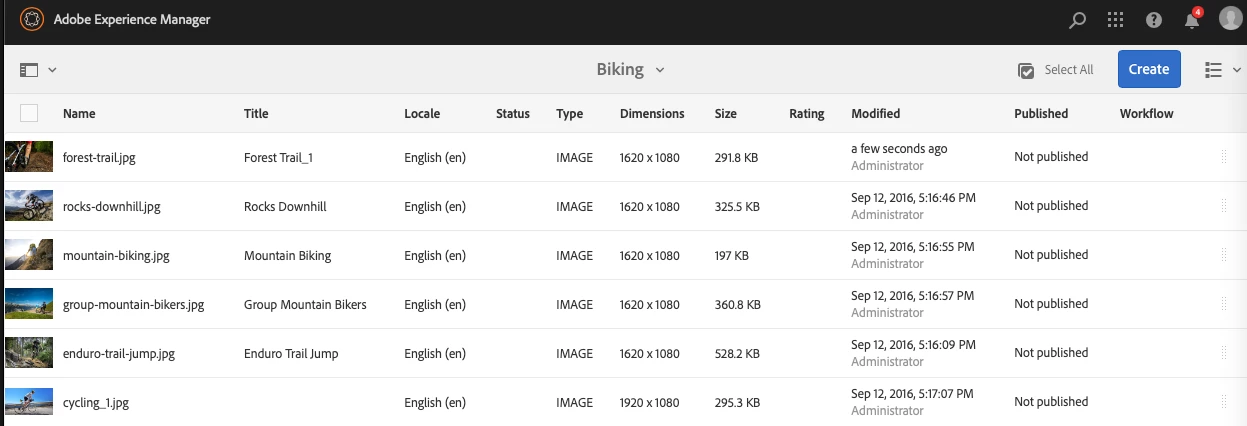
I could see defaultRelativeTime in moment js but not sure to modify for disable defaultRelativeTime .

Any thoughts/pointer on this please .
This post is no longer active and is closed to new replies. Need help? Start a new post to ask your question.
Best answer by blumukesh

Thanks Arun!
I found better way to solve this problem.
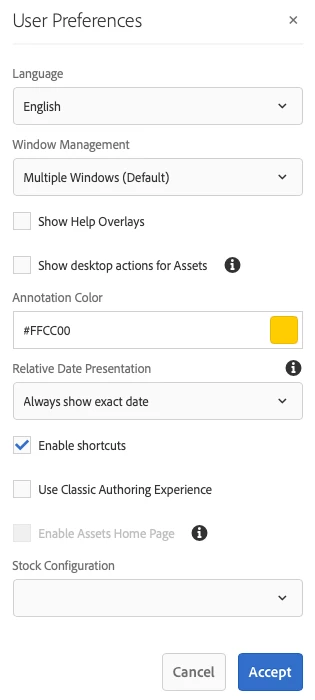
Solution already available in OOTB AEM:-
Click on User icon --> My Preferences --> User Preferences --> Update Relative Date Presentation to Always show exact date --> Accept

Tested - it works based on requirement.

2 replies

arunpatidar
Community Advisor
Community Advisor
November 2, 2021

Hi,

I am not sure if you changed the existing code what would be the impact but for the safe side this can be achieved from front end side.

You can update the text with the actual value on contentload  and content change event.


Arun Patidar
blumukesh
blumukeshAuthorAccepted solution
Level 2
November 3, 2021

Thanks Arun!
I found better way to solve this problem.
Solution already available in OOTB AEM:-
Click on User icon --> My Preferences --> User Preferences --> Update Relative Date Presentation to Always show exact date --> Accept

Tested - it works based on requirement.

arunpatidar
Community Advisor
Community Advisor
November 3, 2021

Perfect !!!

Thanks for sharing.

Arun Patidar