how to deploy custom component author to publisher in adaptive form | Community
Skip to main content
Level 2
May 22, 2020
Solved

how to deploy custom component author to publisher in adaptive form

  • May 22, 2020
  • 2 replies
  • 5598 views

I have created a custom component in CRXDE repository by coping and pasting existing component in AEM author. I am able to see that component in Tools -> General -> Components section in author instance. Is there any way to replicate the same on publisher as the component is missing in publish instance.


Thanks in advance

This post is no longer active and is closed to new replies. Need help? Start a new post to ask your question.
Best answer by Theo_Pendle

Hi @ramandeep,

CRXDE is a great tool for manipulating the JCR but it's only one small part of the development ecosystem you'll need to effectively deliver change on the AEM platform. If you want to create components, you should do so in an IDE and save your changes to a codebase project under version control, with a build pipeline to make sure that you are delivery reliable, quality change!

I strongly recommend that you follow the WKND Tutorial, which will teach you to set up your development tools, create a new project and create your first custom component.

If you are working for a company that has put AEM in place and wants you to do development, make it clear that they will need to provide the time and resources to:

  • Train the development team or hire AEM developers
  • Set up development tooling
  • Put in place at least three environnements: DEV, UAT, PROD
  • Determine a clear governance for the asset with distinct operational and delivery roles
  • Define a testing strategy
  • Create a CI/CD pipeline
  • Etc.

There is an analogy I often use with non-technical people who don't understand the scope of what it means to host and deliver change to a platform like AEM. AEM and the Adobe Experience and Marketing platforms are consistently rated at the top of their respective categories. AEM is to CMS what a Formula 1 car is to land vehicles. You can't buy a Formula 1 car and expect to win races if you don't also hire a pilot, engineers, mechanics, buy their equipment and put rent a garage. It's the same if you want to successfully run an enterprise piece of software 🙂

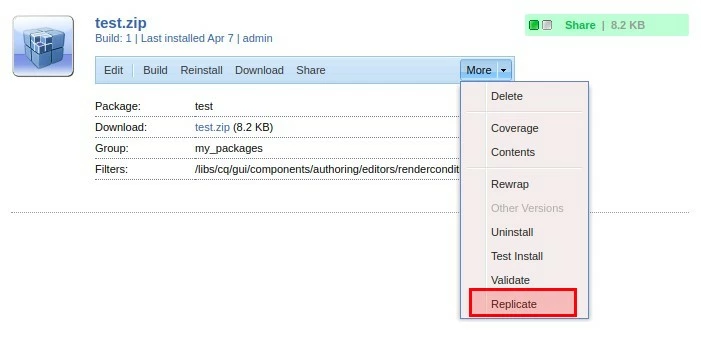
However, if you want to copy your work from one instance to another you can do so by building a package that includes your changes and replicating the package to Publisher. To be clear though, this is a one-shot hack and in no way replaces a everything I mentioned above!

  1. Go to http://localhost:4502/crx/packmgr/index.jsp
  2. Create a new package
  3. Add a filter to include your modifications
  4. Click on Build
  5. Then click on More > Replicate to install the package on Publisher
2 replies

Theo_Pendle
Theo_PendleAccepted solution
Level 8
May 23, 2020

Hi @ramandeep,

CRXDE is a great tool for manipulating the JCR but it's only one small part of the development ecosystem you'll need to effectively deliver change on the AEM platform. If you want to create components, you should do so in an IDE and save your changes to a codebase project under version control, with a build pipeline to make sure that you are delivery reliable, quality change!

I strongly recommend that you follow the WKND Tutorial, which will teach you to set up your development tools, create a new project and create your first custom component.

If you are working for a company that has put AEM in place and wants you to do development, make it clear that they will need to provide the time and resources to:

  • Train the development team or hire AEM developers
  • Set up development tooling
  • Put in place at least three environnements: DEV, UAT, PROD
  • Determine a clear governance for the asset with distinct operational and delivery roles
  • Define a testing strategy
  • Create a CI/CD pipeline
  • Etc.

There is an analogy I often use with non-technical people who don't understand the scope of what it means to host and deliver change to a platform like AEM. AEM and the Adobe Experience and Marketing platforms are consistently rated at the top of their respective categories. AEM is to CMS what a Formula 1 car is to land vehicles. You can't buy a Formula 1 car and expect to win races if you don't also hire a pilot, engineers, mechanics, buy their equipment and put rent a garage. It's the same if you want to successfully run an enterprise piece of software 🙂

However, if you want to copy your work from one instance to another you can do so by building a package that includes your changes and replicating the package to Publisher. To be clear though, this is a one-shot hack and in no way replaces a everything I mentioned above!

  1. Go to http://localhost:4502/crx/packmgr/index.jsp
  2. Create a new package
  3. Add a filter to include your modifications
  4. Click on Build
  5. Then click on More > Replicate to install the package on Publisher

ramandeepAuthor
Level 2
May 24, 2020
Thank you @theo_pendle. I am learning to develop AEM components in IDE. As you have sound knowledge on AEM can you please suggest me more tutorials on adaptive forms development. I am developing a test application by following all best practices for DEV/UAT/PROD environments by using CI/CD. Can you please suggest me the best approach of data binding for GET/POST data on forms.
Level 2
May 23, 2020

Hi Ramandeep,


This is not the correct approach. This must come through code in both author and publish instance after succesful deployment.

For the current scenario you can follow below steps:

1. Replicate all the node from crx/de.

2. As mentioned above, create a package of your component and replicate the same.

ramandeepAuthor
Level 2
May 24, 2020
Thank you @toimrank, I am working on the same by creating a package and replicating the same on publisher.