How to customise the search facets in workflow inbox | Community
Skip to main content
Level 2
February 19, 2021
Solved

How to customise the search facets in workflow inbox

  • February 19, 2021
  • 1 reply
  • 1215 views

Hi all,


It's pretty standard to customise the search rail for assets but has anyone ever customised the search rail for workflow inbox? Let's say I wanted to add a different facet to filter the inbox items. I don't see any documentation regarding this anywhere and naturally would be very interested to know if anyone has done this. I have attached a screenshot and marked up the section that I am alluding to.
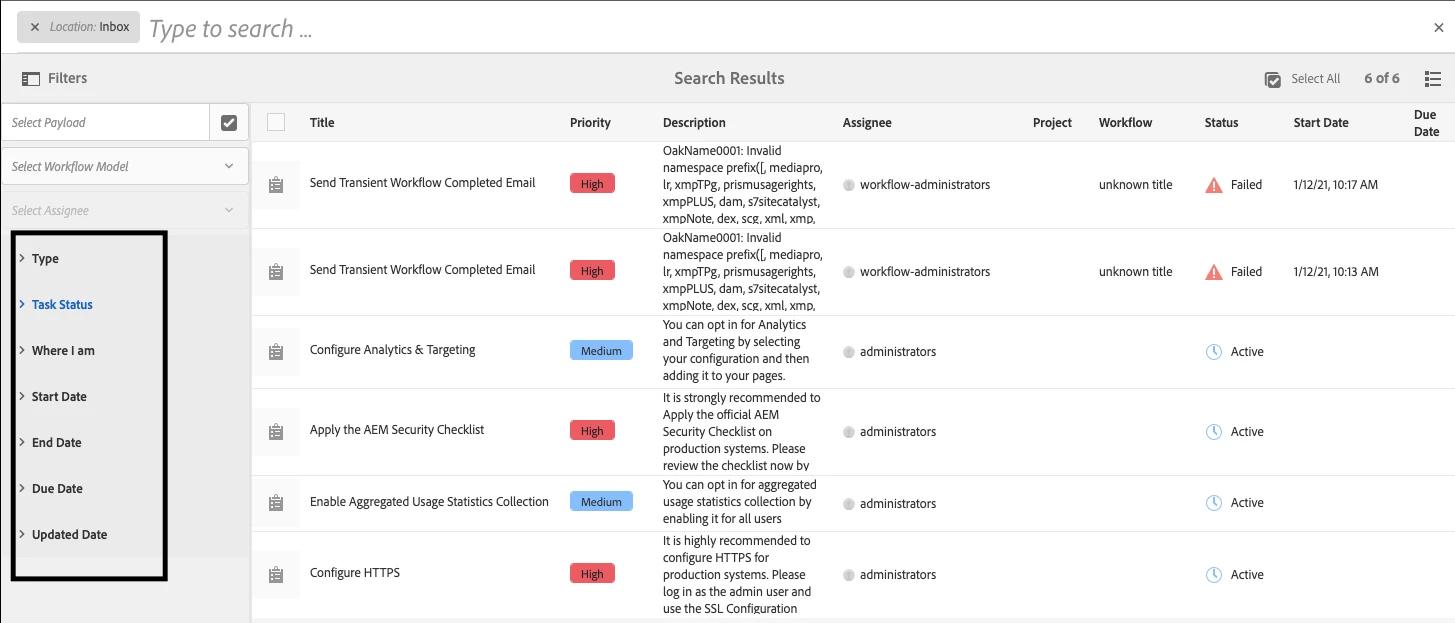


Many thanks.

This post is no longer active and is closed to new replies. Need help? Start a new post to ask your question.
Best answer by Vijayalakshmi_S

Hi @av77,

Per the OOB implementation, InboxItemFilter(com.adobe.granite.workflow.exec.filter.InboxItemFilter) implementation specifically looks for/handle these standard set of OOB highlighted facets/predicates in InboxOmniSearchHandler(com.adobe.cq.inbox.impl.omnisearch.InboxOmniSearchHandler)

Customization will involve custom OmniSearchHandler(com.adobe.granite.omnisearch.spi.core.OmniSearchHandler) and custom InboxItemFilter implementation. (rewriting whole of the implementation and its huge change)

1 reply

Vijayalakshmi_S
Vijayalakshmi_SAccepted solution
Level 10
February 24, 2021

Hi @av77,

Per the OOB implementation, InboxItemFilter(com.adobe.granite.workflow.exec.filter.InboxItemFilter) implementation specifically looks for/handle these standard set of OOB highlighted facets/predicates in InboxOmniSearchHandler(com.adobe.cq.inbox.impl.omnisearch.InboxOmniSearchHandler)

Customization will involve custom OmniSearchHandler(com.adobe.granite.omnisearch.spi.core.OmniSearchHandler) and custom InboxItemFilter implementation. (rewriting whole of the implementation and its huge change)

av77Author
Level 2
February 24, 2021

Thanks for replying. This is what we had planned for and also decided to shelf the idea because of the effort invovled. I was hoping there would some other legitimate hooks for doing this but sadly that does not appear to be the case. We will feed this as an enhancement request for Adobe to provide extensibility points for inbox customisations. The out of the inbox very rarely meets customer requirements.