How to create sitemap.html in AEM 6.5 | Community
Skip to main content
August 9, 2024
Solved

How to create sitemap.html in AEM 6.5

  • August 9, 2024
  • 1 reply
  • 1571 views

I have one requirement to create the sitemap.html page for the website. eg.


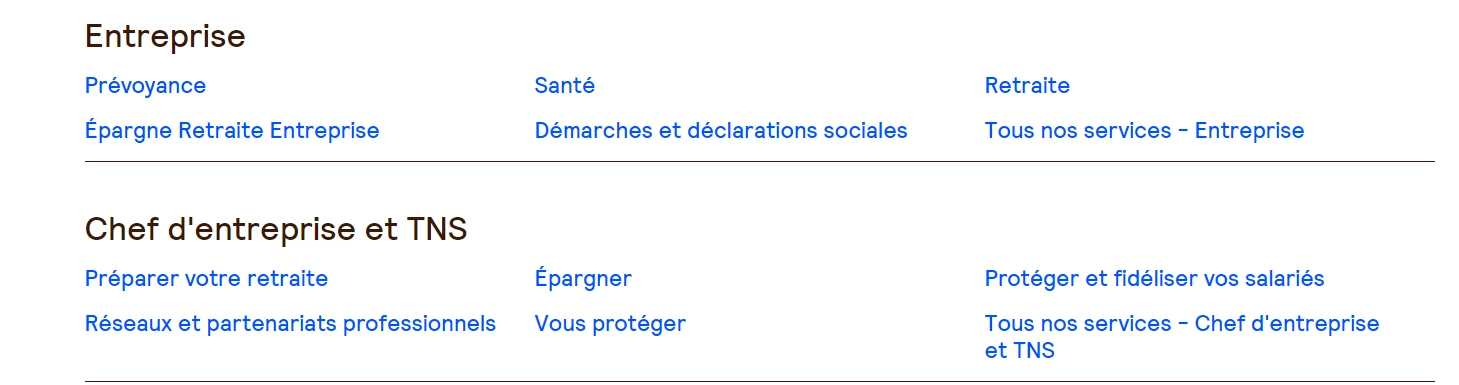
similar to this site. we need to create a page which will contains the page title and link. the sitemap will contain level 1 and level 2 pages of the sites.

This post is no longer active and is closed to new replies. Need help? Start a new post to ask your question.
Best answer by Rajumuddana

Hi @hemalatha @rajumuddana 
Can i follow this approach

1) Create a component which will have 2 fields in a dialog 1st  will be a textfield where we can add content path of a page and 2nd  is checkbox which will be used for whether we need to list child pages of that page which we have authored in textfield.

2) fetch a page title and link using sling model so we get highlighted field (page path which we authored - Accueil). In this case checkbox will be unchecked as we don’t need child entries.

 

3) for 2nd case we will author Entreprise page path and we will check the checkbox.

In sling model we can write logic to fetch child pages. And will return in form of list. And in slightly we can iterate over that list.

4) And if some child pages are need to be exclude then we will create one more multifield where we can author the pages which we don’t want to add in sitemap.

Please share your thoughts on this


Go with the second approach, this way you have more control.

You shall provide pages to exclude, root path from which you want to fetch children.


  1. If you don’t have requirement to fetch children of specific ‘parent pages’, keep ‘root page’ parent and fetch children.

OR

  1. If you have specific parent pages to fetch children, in the dialog have a multi field with ‘parent page’, nested multi field of ‘exclude pages’. (To avoid this nested multi field, check for the feasiblity to exclude with template type)


In both cases  will prepare a Map<parent page title, List<Child title, path>> of objects and at sightly integrate through and render as per your style guide.

You shall add a check box to enable or disable children if that is relevant.

I hope this is clear.


Thanks,

Raju.
1 reply

Level 4
August 9, 2024

Hi Vaibhabv,


if i understood correctly, you wanted to render parent and it's children pages along with their titles, links.

did you check this - https://experienceleaguecommunities.adobe.com/t5/adobe-experience-manager-assets/how-to-get-the-list-of-child-pages/m-p/365623#:~:text=Use%20PageManager.,print%20the%20title%20for%20each

update -

or else you shall try something like this

Node parentNode = session.getNode("/content/your/parent/node"); // Get the parent node NodeIterator children = parentNode.getNodes(); // Get immediate children // Iterate through immediate children while (children.hasNext()) { Node childNode = children.nextNode(); // Process child node // Iterate through children of childNode (second level) NodeIterator grandchildren = childNode.getNodes(); while (grandchildren.hasNext()) { Node grandchildNode = grandchildren.nextNode(); // Process grandchild node } }
August 9, 2024

HI @rajumuddana ,
We might require to exclude few pages like error, thank you screens, etc.


so how we can do it, any idea

or any idea is there any core component that we can use to render sitemap.html with links 

Level 4
August 9, 2024

Hi Vaibhav,


yes, there is similar OOTB component available, please check -https://experienceleague.adobe.com/en/docs/experience-manager-core-components/using/wcm-components/list


Thanks,

Raju.