How to create persist url graphql with variable array of object | Community
Skip to main content
Level 2
August 2, 2024
Question

How to create persist url graphql with variable array of object

  • August 2, 2024
  • 4 replies
  • 2576 views

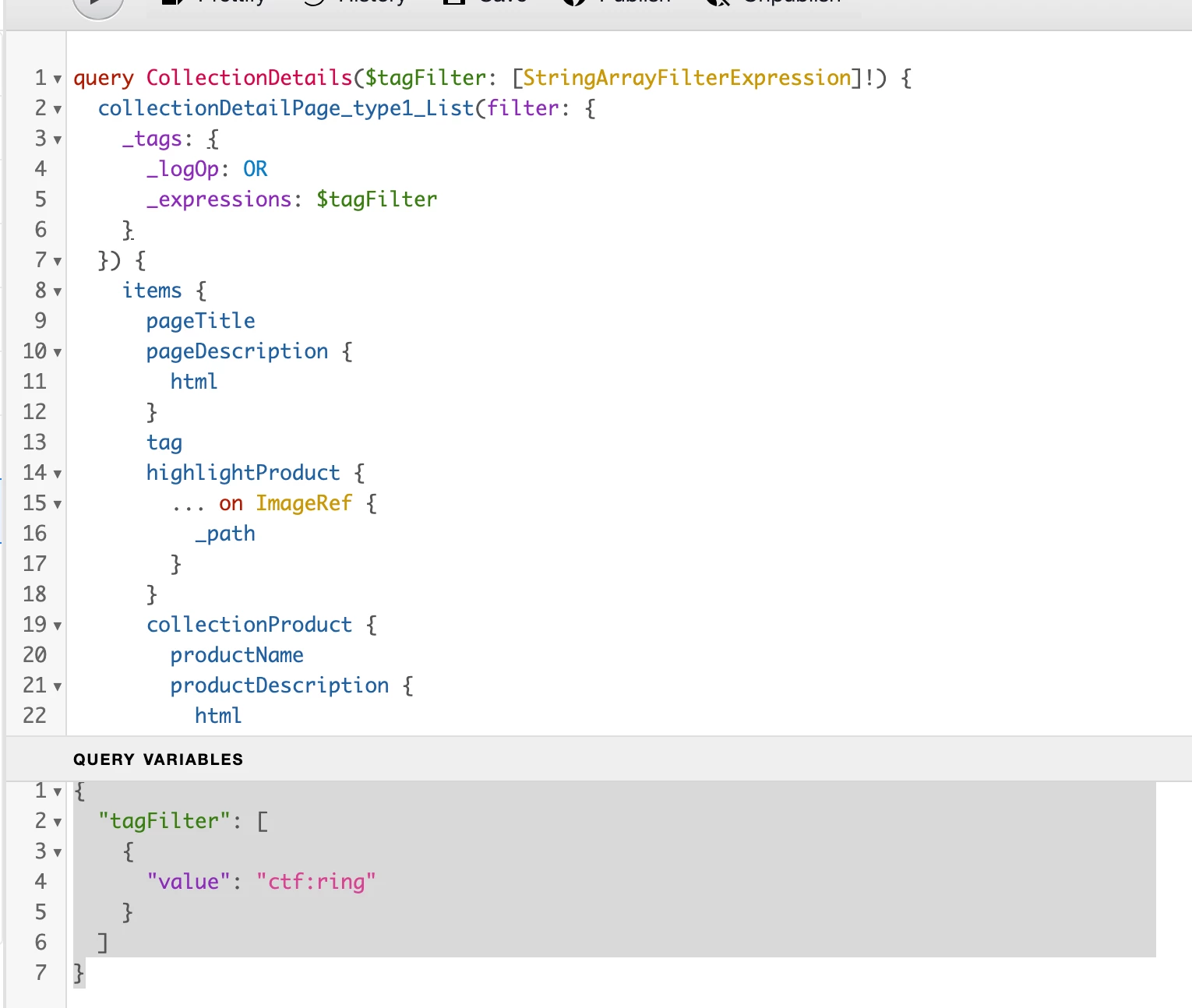
Hello i have query variable like this


 {
"tagFilter": [
{
"value": "ctf:ring"
}
]
}


and i want to copy url /graphql/execute.json/testingtemplate/collections;tagFilter=[{value: ctf:ring}]

and this encode
graphql/execute.json/testingtemplate/collections%3BtagFilter=[%7Bvalue:%20ctf:ring%7D]

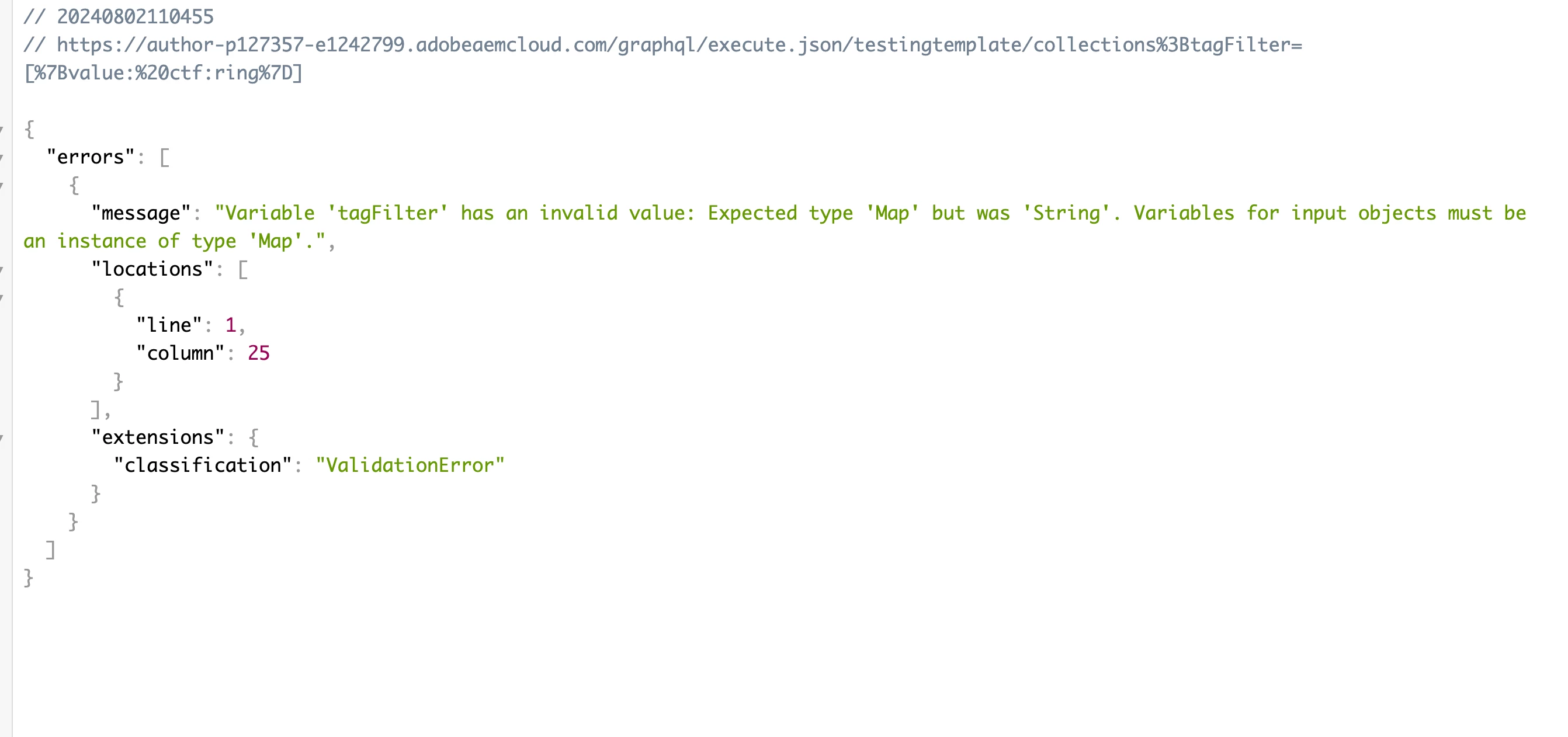
and i get error this. how to create url if variable array of object?


4 replies

Ravi_Pampana
Community Advisor
Community Advisor
August 5, 2024

Hi,


You need to encode entire query parameters ensuring special characters are encoded correctly, like below


const query = { tagFilter: [ { value: "ctf:ring" } ] }; const encodedQuery = encodeURIComponent(JSON.stringify(query)); const url = `/graphql/execute.json/testingtemplate/collections;tagFilter=${encodedQuery}`; console.log(url); // Output: /graphql/execute.json/testingtemplate/collections;tagFilter=%5B%7B%22value%22%3A%22ctf%3Aring%22%7D%5D
VinceLuAuthor
Level 2
August 5, 2024

yes but it's still error.

i have try url like this but cannot /graphql/execute.json/testingtemplate/collections;tagFilter=%5B%7B%22value%22%3A%22ctf%3Aring%22%7D%5D


h_kataria
Community Advisor
Community Advisor
August 6, 2024

Please check this https://experienceleague.adobe.com/en/docs/experience-manager-cloud-service/content/headless/graphql-api/persisted-queries#encoding-query-url 
Something like this might work.

/graphql/execute.json/testingtemplate/collections%3BtagFilter%3D[%7B"value":"ctf:ring"%7D]


VinceLuAuthor
Level 2
August 7, 2024

This is not work too. i'm confused

const query = {
tagname: [
{
"value": "collection:ring/bracelet"
},
{
"value": "collection:ring/earing"
}
]
};
 
const encodedQuery = encodeURIComponent(JSON.stringify(query));
 
h_kataria
Community Advisor
Community Advisor
August 10, 2024

Hi @vincelu 
I checked the implementation of StringArrayFilterExpression and tried some samples.

Could you please try this :

/graphql/execute.json/testingtemplate/collections%3BtagFilter=%7B"values":["collection:ring/bracelet","collection:ring/earing"]%7D


For passing a single value, it will have to be passed as value instead of values

/graphql/execute.json/testingtemplate/collections%3BtagFilter=%7B"value":"collection:ring/earing"%7D

I believe this should work and hope this helps. 

kautuk_sahni
Community Manager
Community Manager
August 7, 2024

@vincelu 

Did you find the suggestions helpful? Please let us know if you require more information. Otherwise, please mark the answer as correct for posterity. If you've discovered a solution yourself, we would appreciate it if you could share it with the community. Thank you!

Kautuk Sahni
VinceLuAuthor
Level 2
August 7, 2024

Still not found solution

Level 2
November 4, 2024

Anyone found a solution here? We would also need this feature to work with persisted queries.


Our example:


query getArrayTest( $param1Values: [String], ) { testList( filter: { param1: {_expressions: [{values: $param1Values, _operator: CONTAINS}]}, } ) { ...


Works in GraphiQL with parameters like this and returns the correct result:


{ "param1Values": ["foo","bar"] }


This would be then the query string: /graphql/execute.json/test/array-test;param1Values=["foo","bar"];

Tried the encoding like it's described in the documentation here https://experienceleague.adobe.com/en/docs/experience-manager-cloud-service/content/headless/graphql-api/persisted-queries#encoding-query-url and also how it's done in the javascript headless client https://github.com/adobe/aem-headless-client-js/blob/main/src/index.js#L104

After encoding it looks like this:

  • /graphql/execute.json/test/array-test%3Bparam1Values%3D%5B%22foo%22%2C%22bar%22%5D%3B

-> But that does not work! (tested on author, no dispatcher in between) Empty result every time but with the same parameters in GraphiQL it works.


September 19, 2025

For those that arrived here for the same issue. 
For us, persistent queries on endpoint:

  • /graphql/execute.json/<your-endpoint-name>/<persistent-query-name>

With array or object mapping variables such as StringArrayFilter or [String] types don't work because it seems that it disregards the variables in the POST body and on GET requests with encoding these on the URL, it is passed through as Strings when it expects a Map object. So instead of this, we run the whole sending of the graphQL query and variable POST against this endpoint:

  • /content/_cq_graphql/<your-endpoint-name>/endpoint.json

In case this helps anyone.