How to create Group Predicate in Asset Admin Search Rail | Community
Skip to main content
Level 6
September 26, 2023
Solved

How to create Group Predicate in Asset Admin Search Rail

  • September 26, 2023
  • 2 replies
  • 1390 views

I have to create a group predicate in Search Filter Similar to Status as shown in below screenshot
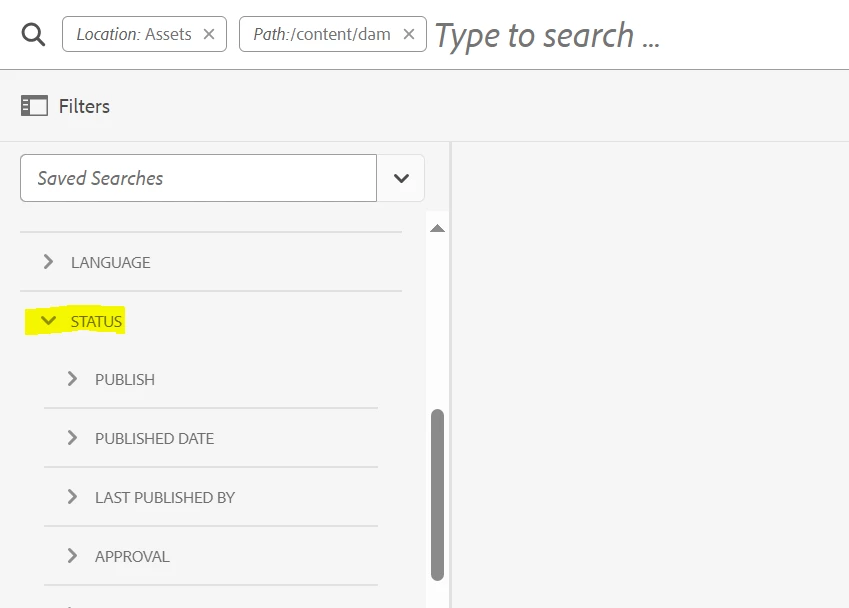
But while I edit Search Rail (AEM Sites | Custom Search Facets) I can't see group predicate options to drag to drop. And I don't want to add via Crx/de or send the predicate via the code.


Because If I add the group predicate via code/crx; then in future if we will add the filter manually from the AEM Sites | Custom Search Facets then it group predicated created via crx will be deleted. 

This post is no longer active and is closed to new replies. Need help? Start a new post to ask your question.
Best answer by EstebanBustamante

You must overlay this functionality to customize it, once you customize it with the changes you want, you need to version this(put in your codebase) so that every time your code is deployed this functionality is deployed along with it and nothing gets deleted. 

You can learn more here about overlay and extending:
https://levelup.gitconnected.com/aem-5-best-practices-for-overlays-4babcbbb8a80 

And here you can find something very very similar to what you are trying to achieve in this example:

https://experienceleague.adobe.com/docs/experience-manager-65/developing/extending-aem/customizing-page-authoring-touch.html?lang=en#add-new-selection-category-to-asset-browser 

https://github.com/Adobe-Marketing-Cloud/aem-authoring-extension-assetfinder-flickr/tree/master/src/main/content/jcr_root/apps 


Note: This is a customization that needs to be implemented by a developer 

2 replies

EstebanBustamante
Community Advisor and Adobe Champion
EstebanBustamanteCommunity Advisor and Adobe ChampionAccepted solution
Community Advisor and Adobe Champion
September 26, 2023

You must overlay this functionality to customize it, once you customize it with the changes you want, you need to version this(put in your codebase) so that every time your code is deployed this functionality is deployed along with it and nothing gets deleted. 

You can learn more here about overlay and extending:
https://levelup.gitconnected.com/aem-5-best-practices-for-overlays-4babcbbb8a80 

And here you can find something very very similar to what you are trying to achieve in this example:

https://experienceleague.adobe.com/docs/experience-manager-65/developing/extending-aem/customizing-page-authoring-touch.html?lang=en#add-new-selection-category-to-asset-browser 

https://github.com/Adobe-Marketing-Cloud/aem-authoring-extension-assetfinder-flickr/tree/master/src/main/content/jcr_root/apps 


Note: This is a customization that needs to be implemented by a developer 

Esteban Bustamante
Ronnie09Author
Level 6
September 27, 2023

If I push the change via the code then in future if I have to create a new predicate I have push that via the code, which is working 
but, 
When I tried creating group predicate from code base then I logged into AEM and creating a new search predicate manually via AEM console (Tools > General > Search Forms > Assets Admin Search Rail, then tap Edit) then the group predicate pushed via code gets deleted.

Adilos-Cantuerk
Community Advisor
Community Advisor
September 27, 2023

Hi @ronnie09 , 
i feel your struggle.
As soon as your modifications are a bit more than the UI wants you to go, you have to switch over to CRXDE and code pushing. When you are in that cold water for a bit, it is actually ok. 
You can add simple things via the ui, then export this part into your code before you have to push your changes by code regardless. Embrace this limitation and do it with the CRXDE.
Many more options are now available to you.

kautuk_sahni
Community Manager
Community Manager
September 28, 2023

@ronnie09 Did you find the suggestions from users helpful? Please let us know if more information is required. Otherwise, please mark the answer as correct for posterity. If you have found out solution yourself, please share it with the community.

Kautuk Sahni