How to create Custom Navigation Using Sling Models | Community
Skip to main content
Level 3
June 17, 2022
Solved

How to create Custom Navigation Using Sling Models

  • June 17, 2022
  • 2 replies
  • 1275 views

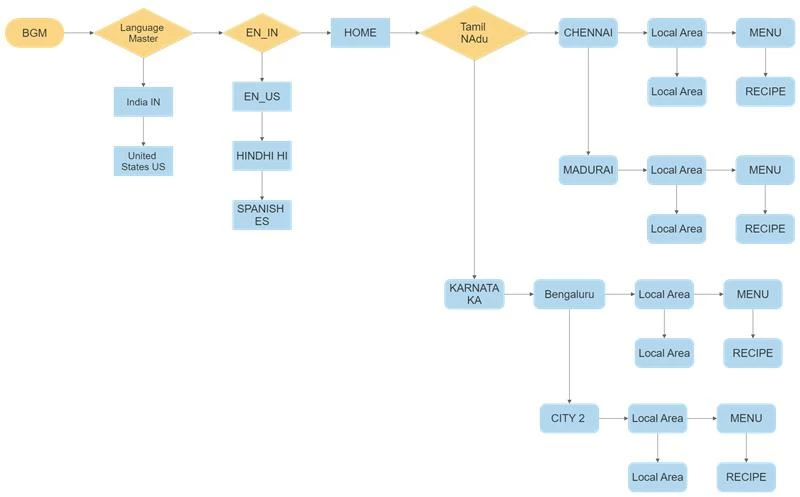
This is my Site Structure i want a Custom navigation component Using Java  i want a dropdown or something else which navigates pages and the navigation bar should Show the cities. pls help me. 


Project:Restaurant 


This post is no longer active and is closed to new replies. Need help? Start a new post to ask your question.
Best answer by ShaileshBassi

Hi,


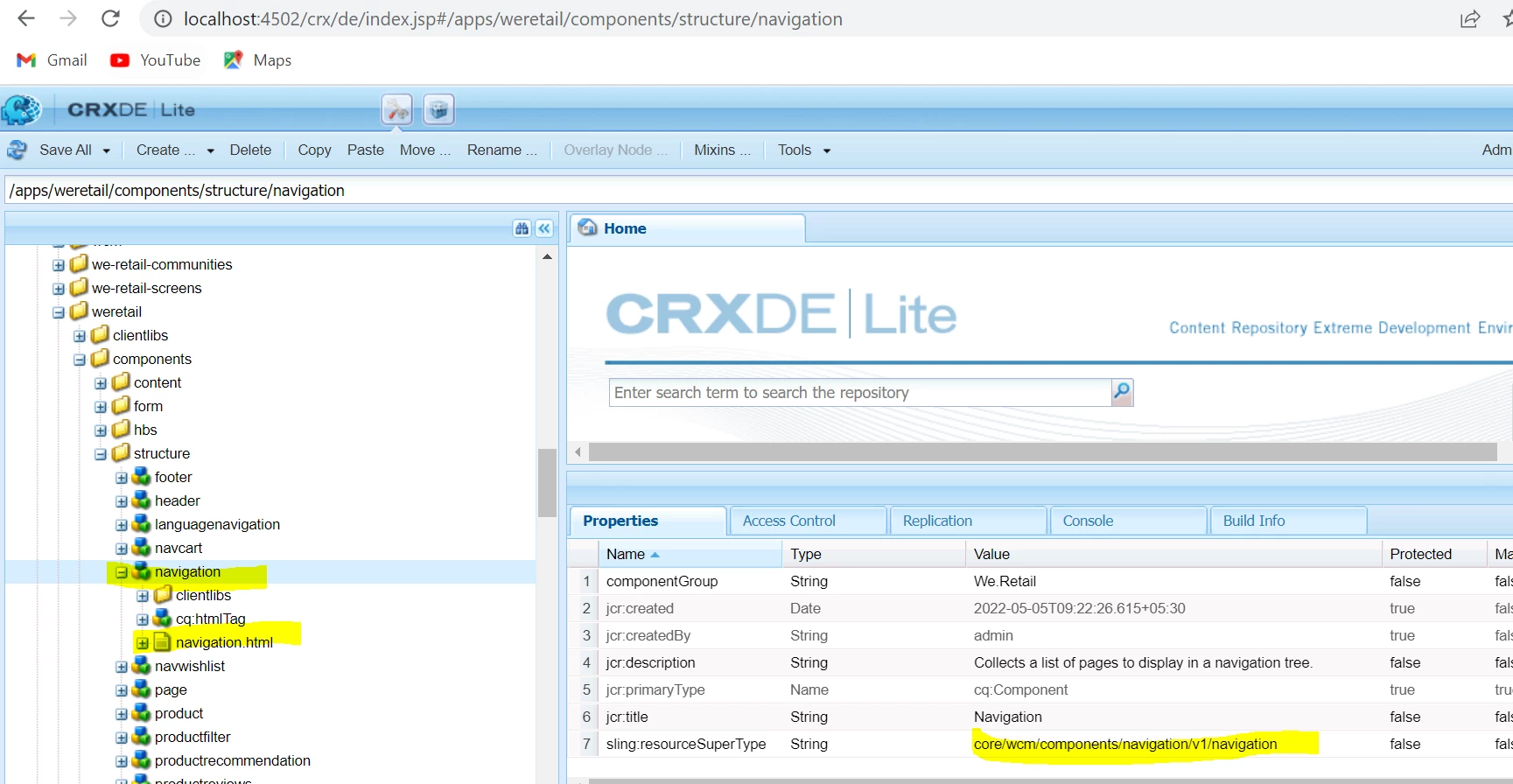
The above requirement is do-able. Over here you can create your custom component by overlaying the existing core component as shown in the example of we-retail.


After this based on your requirement you can modify the html file in your overlayed component which will call your "custom sling model" and use the same dialog as shown below.


Otherwise, you can even create a project specific navigation component as well, if required.


From your sling model you can return a Map<String,List<NavigationBean>> and render this navigation bean.

NavigationBean

  • private String linkTitle
  • private String linkUrl

Based on the selection in the dropdown i.e. you can populate the list and render it on the page. For rendering of the map in sightly:

HTL-code:


HTL-code:

<div data-sly-use.hashmap="com.adobe.examples.htl.core.hashmap.HashMapExample"

     data-sly-list="${hashmap.map.keySet.iterator}">

     ${item}

     <ul data-sly-list.aem="${hashmap.map[item].keySet.iterator}">

         <li>${aem} ${hashmap.map[item][aem]}</li>

     </ul>

</div>


Thanks


2 replies

ShaileshBassi
Community Advisor
ShaileshBassiCommunity AdvisorAccepted solution
Community Advisor
June 17, 2022

Hi,


The above requirement is do-able. Over here you can create your custom component by overlaying the existing core component as shown in the example of we-retail.


After this based on your requirement you can modify the html file in your overlayed component which will call your "custom sling model" and use the same dialog as shown below.


Otherwise, you can even create a project specific navigation component as well, if required.


From your sling model you can return a Map<String,List<NavigationBean>> and render this navigation bean.

NavigationBean

  • private String linkTitle
  • private String linkUrl

Based on the selection in the dropdown i.e. you can populate the list and render it on the page. For rendering of the map in sightly:

HTL-code:


HTL-code:

<div data-sly-use.hashmap="com.adobe.examples.htl.core.hashmap.HashMapExample"

     data-sly-list="${hashmap.map.keySet.iterator}">

     ${item}

     <ul data-sly-list.aem="${hashmap.map[item].keySet.iterator}">

         <li>${aem} ${hashmap.map[item][aem]}</li>

     </ul>

</div>


Thanks


SantoshSai
Community Advisor
Community Advisor
June 17, 2022

Hi @harido ,

Recommended to refer AEM Core Navigation component - speed up development time and reduce maintenance cost , You can extend, apply Sling Model Delegation approach, to save your increased efforts, since it does have almost similar feature as per your requirement.

Reference: https://experienceleague.adobe.com/docs/experience-manager-core-components/using/components/navigation.html?lang=en

Hope that helps you!

Regards,

Santosh

Santosh Sai