How to create a page component and give it the ability to drag and drop ? | Community
Skip to main content
Level 3
December 23, 2023
Solved

How to create a page component and give it the ability to drag and drop ?

  • December 23, 2023
  • 4 replies
  • 1597 views

Hi, I have already gone through some blogs related to this problem statement.

But i am not getting the placeholder to drag and drop the component in template. I am creating the base page component by extending the core component.

Kindly suggest me the solution.
This post is no longer active and is closed to new replies. Need help? Start a new post to ask your question.
Best answer by aanchal-sikka

@monish_gavali 


The Images are really burry for me. I am unable to understand the structure you have.


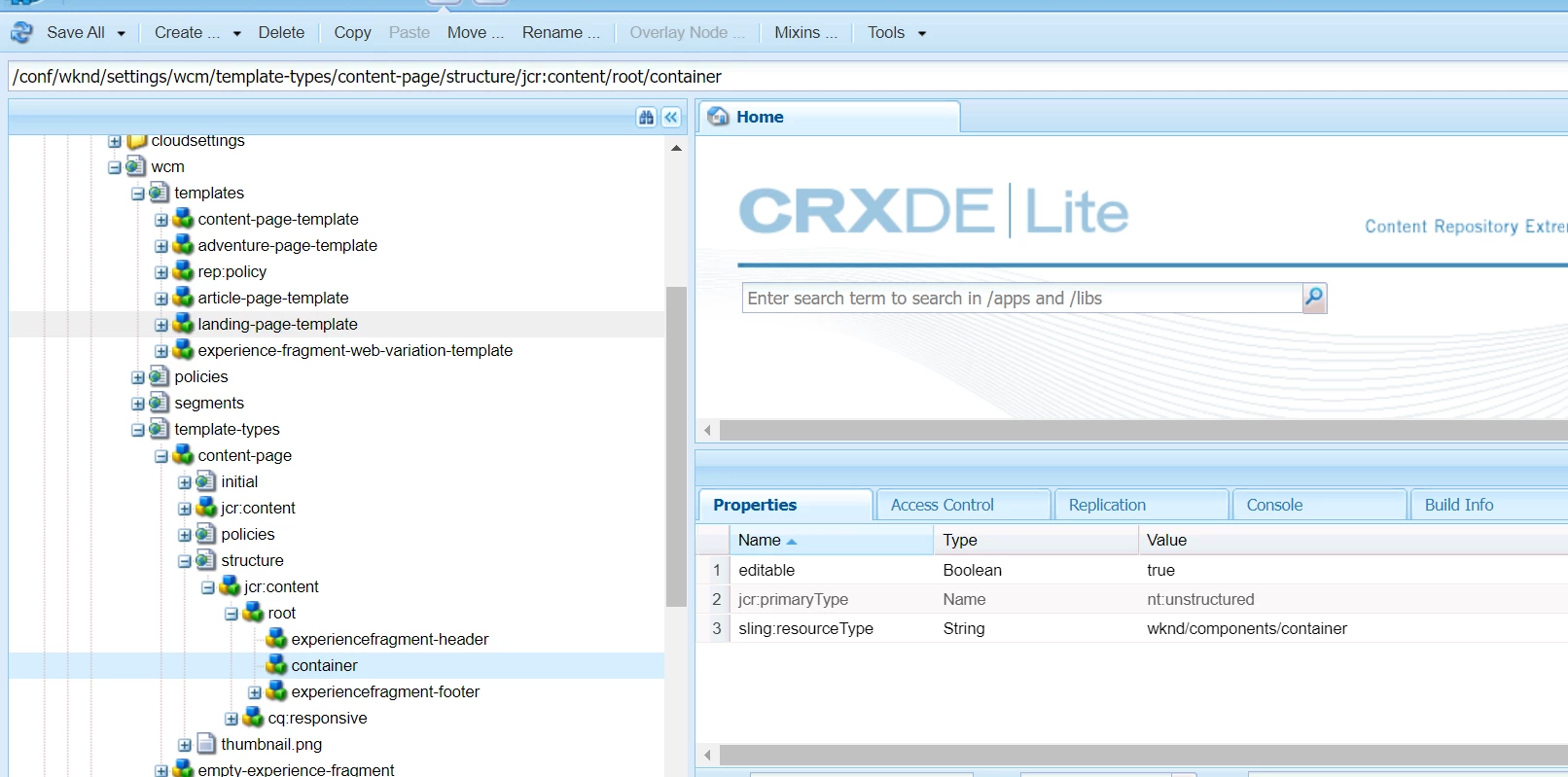
Requesting you to please refer to WKND templates and template-type. For a root container, you need to have "/structure/jcr:content/root" as indicated in the image below:


4 replies

Hemendra
Level 2
December 24, 2023

Hi, Please check your template and choose structure mode to unlock the LayoutContainer (this is the key to have drag and drop functionality)

Also, I recommend to add an additional new LayoutContainer (also set the policy, to add allowed desired components) on the page in Structure mode and unlock this.

for more details check below part of this documentation link


Level 3
December 25, 2023

Let me explain what I did from starting.


1) First I created a page component having  resourceSuperType path of Core Page component path.


2) Then I created a custom template type which is having resource type path of my own Page Component.


3) Then I created a editable template by using my custom template type.


This is the template which i have created using my custom template type


This is the template which i have created using the existing template type


Path of existing template type:

/libs/settings/wcm/template-types/html5page


In this template the drag and drop component placeholder is available but in my template it is not available.


Please help me with this issue.


Hemendra
Level 2
December 25, 2023

Hi Monish, Thanks for explaining the issue and I have tried the same steps and i am able to see the drag-drop functionality. May it could be something wrong with the environment setup. I'm attaching my demo package that i created, try to upload it using package manager side on your side and see if you are able to see it using this.
package link 

Raja_Reddy
Community Advisor
Community Advisor
December 25, 2023

Hi @monish_gavali 

you are using a static template, allowing the template in /etc/design can you see the "drag" and "drop" sections.

Thanks

Level 3
December 25, 2023

Let me explain what I did from starting.


1) First I created a page component having  resourceSuperType path of Core Page component path.


2) Then I created a custom template type which is having resource type path of my own Page Component.


3) Then I created a editable template by using my custom template type.


This is the template which i have created using my custom template type


This is the template which i have created using the existing template type


Path of existing template type:

/libs/settings/wcm/template-types/html5page


In this template the drag and drop component placeholder is available but in my template it is not available.


Please help me with this issue.


aanchal-sikka
Community Advisor
Community Advisor
December 26, 2023

@monish_gavali 


To be able to Drag-n-Drop components, you would first need to allow them to be added to the container.


- Go to the template

- CLick on the Root container

- Go to its policy

- ENable the components you would like to add. Save the policy

- Refresh template

- You should be able to add components now

Aanchal Sikka
Level 3
December 26, 2023

Thanks @aanchal-sikka for the reply but the thing is using my base page component I am not getting that Drag Components Here Placeholder in my templates. 

aanchal-sikka
Community Advisor
aanchal-sikkaCommunity AdvisorAccepted solution
Community Advisor
December 26, 2023

@monish_gavali 


The Images are really burry for me. I am unable to understand the structure you have.


Requesting you to please refer to WKND templates and template-type. For a root container, you need to have "/structure/jcr:content/root" as indicated in the image below:


Aanchal Sikka
kautuk_sahni
Community Manager
Community Manager
January 2, 2024

@monish_gavali Did you find the suggestions from users helpful? Please let us know if more information is required. Otherwise, please mark the answer as correct for posterity. If you have found out solution yourself, please share it with the community.

Kautuk Sahni