How to create a certain angle on pixel difference on a image text using image component | Community
Skip to main content
srinivas_chann1
Level 7
September 11, 2020
Solved

How to create a certain angle on pixel difference on a image text using image component

  • September 11, 2020
  • 2 replies
  • 1366 views

Hi,


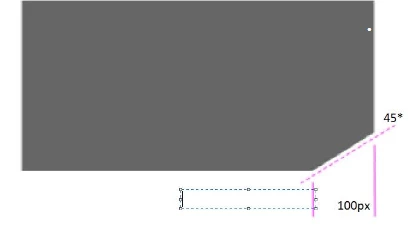
I have to create a angle of 45* degree cut at the edge of an text and also 100 pixel distance  using the text image component


Please let me know how to achieve it  through css or js. Once achieved what tools could be used to measure the accuracy of angle is it exactly 45* degrees or not and is it 100pixel or not??


Below is the text on text  image component required.


Thanks


This post is no longer active and is closed to new replies. Need help? Start a new post to ask your question.
Best answer by Theo_Pendle

Hi @srinivas_chann1,

This forum is aimed at answering AEM-specific questions. This is generic CSS question which would probably be better asked on Stack Overflow.

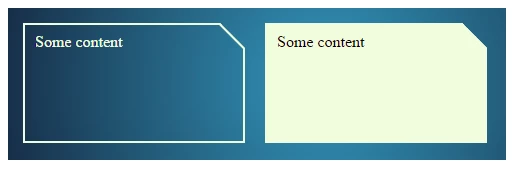
Here is a thread that answers your question and uses the CSS skew() function to give you the exact 45° corner you're looking for: https://stackoverflow.com/questions/7324722/cut-corners-using-css/33122202#33122202 


2 replies

srinivas_chann1
Level 7
September 11, 2020
Any inputs from any one
Theo_Pendle
Theo_PendleAccepted solution
Level 8
September 11, 2020

Hi @srinivas_chann1,

This forum is aimed at answering AEM-specific questions. This is generic CSS question which would probably be better asked on Stack Overflow.

Here is a thread that answers your question and uses the CSS skew() function to give you the exact 45° corner you're looking for: https://stackoverflow.com/questions/7324722/cut-corners-using-css/33122202#33122202