How to change cq publish instance log level to INFO | Community
Skip to main content
Level 3
May 23, 2016
Solved

How to change cq publish instance log level to INFO

  • May 23, 2016
  • 2 replies
  • 4810 views

Hi Guys,

I would like to change cq error log level to INFO, due to it always printed WARN log in error.log file. I would like to see more info.

I can only see there is one configruation (org.apache.pdfbox) on osgi console that configues error.log file. But If I change it to INFO level it looks not useful, error.log file still prints WARN log and without any INFO.

Regards.

This post is no longer active and is closed to new replies. Need help? Start a new post to ask your question.
Best answer by kautuk_sahni

Hi

Please have a look at this community article:

Link:-http://cq-ops.tumblr.com/post/78113074496/how-to-suppress-informational-log-messages-from

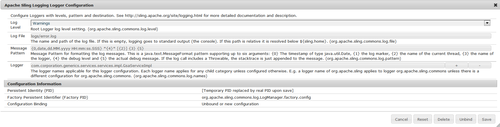
You can use the “Apache Sling Logging Logger Configuration” OSGi configuration at /system/console/configMgr to suppress a message such as follows:

28.02.2014 01:55:05.596 *INFO* [Thread-1078954] com.corporation.generics.services.services.impl.GsaServiceImpl >>>>>> Entering the buildUrl method

1) Raise the “Log Level” threshold one step higher (from INFO to WARN)

2) In the “Logger” field, enter the name of the package causing trouble (com.corporation.generics.services.services.impl.GsaServiceImpl)

See below:
image

It takes effect immediately on saving - no re-start necessary.


Apache Sling Logging Configuration

Configure:

  • Log Level and Log File, to define the location and log level of the central logging configuration (error.log). The level can be set to one of DEBUGINFOWARNERROR and FATAL.
  • Number of Log Files and Log File Threshold to define the size and version rotation of the log file.
  • Message Pattern defines the format of the log messages.

For further information see AEM Logging and Sling Logging.


I hope this would help you.


Thanks and Regards

Kautuk Sahni

2 replies

kautuk_sahni
Community Manager
kautuk_sahniCommunity ManagerAccepted solution
Community Manager
May 23, 2016

Hi

Please have a look at this community article:

Link:-http://cq-ops.tumblr.com/post/78113074496/how-to-suppress-informational-log-messages-from

You can use the “Apache Sling Logging Logger Configuration” OSGi configuration at /system/console/configMgr to suppress a message such as follows:

28.02.2014 01:55:05.596 *INFO* [Thread-1078954] com.corporation.generics.services.services.impl.GsaServiceImpl >>>>>> Entering the buildUrl method

1) Raise the “Log Level” threshold one step higher (from INFO to WARN)

2) In the “Logger” field, enter the name of the package causing trouble (com.corporation.generics.services.services.impl.GsaServiceImpl)

See below:

image

It takes effect immediately on saving - no re-start necessary.


Apache Sling Logging Configuration

Configure:

  • Log Level and Log File, to define the location and log level of the central logging configuration (error.log). The level can be set to one of DEBUGINFOWARNERROR and FATAL.
  • Number of Log Files and Log File Threshold to define the size and version rotation of the log file.
  • Message Pattern defines the format of the log messages.

For further information see AEM Logging and Sling Logging.


I hope this would help you.


Thanks and Regards

Kautuk Sahni

Kautuk Sahni
jiaBaiAuthor
Level 3
June 1, 2016

Hi Kautuksahni,

Thanks for your input.

I found it just need to set up logger level of "Apache Sling Logging Configuration" on osgi configuration console.

Regards.