How to add multiple values for the rootpath in TouchUI path browser? | Community
Skip to main content
sai_kumart66079
September 4, 2018
Solved

How to add multiple values for the rootpath in TouchUI path browser?

  • September 4, 2018
  • 4 replies
  • 4270 views

Hi Team,

There is a scenario in our project where we need to add multiple values to the root path element. Can you please suggest how this can be handled? Since the rootpath takes only String as the input and not the string array?

smacdonald2008Arun PatidarTechaspect Solutions

Regards,

Sai kumar

This post is no longer active and is closed to new replies. Need help? Start a new post to ask your question.
Best answer by Techaspect_Solu

Hi

Instead of enabling multiple root paths for a path browser, you can follow this alternate approach of choosing your desired root path from a selection list in your dialog.

On the basis of this selection, the root path of the pathbrowser can be set by writing a listener as follows:

function changePath() {

    var selectElement = document.querySelector('coral-select[name="./rootPath"]'),

        inputElement = document.querySelector('input[name="./path"]'),

        span = document.querySelector('span.coral-Form-field.coral-PathBrowser');

span.setAttribute('data-path-root', selectElement.value);

    inputElement.value = selectElement.value;

    selectElement.addEventListener('change', function() {

inputElement.value = selectElement.value;

span.setAttribute('data-path-root', selectElement.value);

    })

};

$(document).ready(function() {

$(document).on("dialog-ready", function() {

        changePath();

    });

});

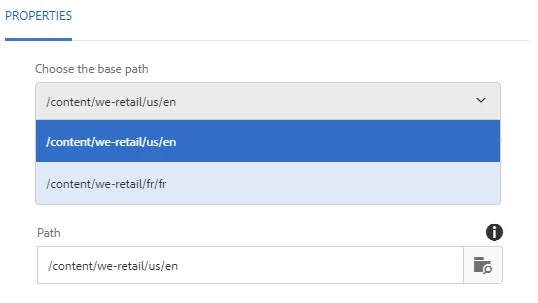
Keeping in mind that rootPath and path are the “name” properties for the selection list and pathbrowser respectively.

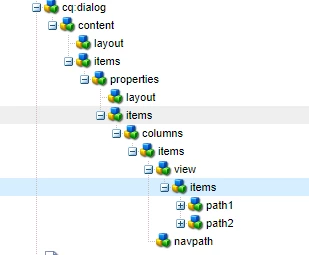
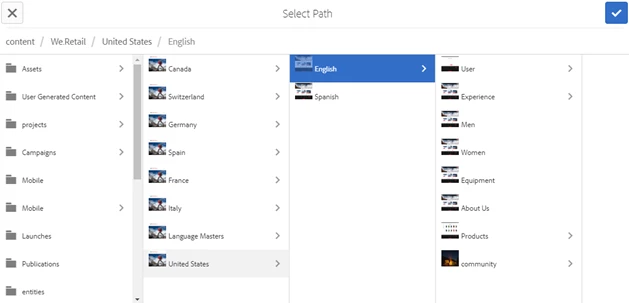
I have added screenshots for the dialog and the component for your better understanding.

Dialog structure:
Selection field properties:

Path browser properties:

Component :
Root path set as per the selection :
Hope this helps!

TechAspect Solutions

4 replies

smacdonald2008
September 4, 2018

As you suggested - OOTB -  the value is a String - does not accept a String[]. I do not think this is possible.

Endoriel
September 4, 2018

Would this help? ContextualPathBrowser

Otherwise I suggest looking into implementing a custom predicate or a JavaScript solution. There are some suggestions in here

Techaspect_Solu
Techaspect_SoluAccepted solution
September 6, 2018

Hi

Instead of enabling multiple root paths for a path browser, you can follow this alternate approach of choosing your desired root path from a selection list in your dialog.

On the basis of this selection, the root path of the pathbrowser can be set by writing a listener as follows:

function changePath() {

    var selectElement = document.querySelector('coral-select[name="./rootPath"]'),

        inputElement = document.querySelector('input[name="./path"]'),

        span = document.querySelector('span.coral-Form-field.coral-PathBrowser');

span.setAttribute('data-path-root', selectElement.value);

    inputElement.value = selectElement.value;

    selectElement.addEventListener('change', function() {

inputElement.value = selectElement.value;

span.setAttribute('data-path-root', selectElement.value);

    })

};

$(document).ready(function() {

$(document).on("dialog-ready", function() {

        changePath();

    });

});

Keeping in mind that rootPath and path are the “name” properties for the selection list and pathbrowser respectively.

I have added screenshots for the dialog and the component for your better understanding.

Dialog structure:

Selection field properties:

Path browser properties:

Component :

Root path set as per the selection :

Hope this helps!

TechAspect Solutions

smacdonald2008
September 6, 2018

Great response!